As your business develops or data volume grows, existing EVS disk capacities may no longer meet your storage needs. EVS capacity expansion is the solution to this issue. You can increase the storage space of existing EVS disks without interrupting services while ensuring continuous data storage and service stability.
Upper Limits on Disk Capacity
The maximum disk capacity is as follows:
- System disk: 1 TiB
- Data disk: 32 TiB
If you detach a system disk and then attach it to another server as a data disk, the maximum capacity of this disk is still 1 TiB.
How Do I Expand the Disk Capacity?
Figure 1 Capacity expansion process
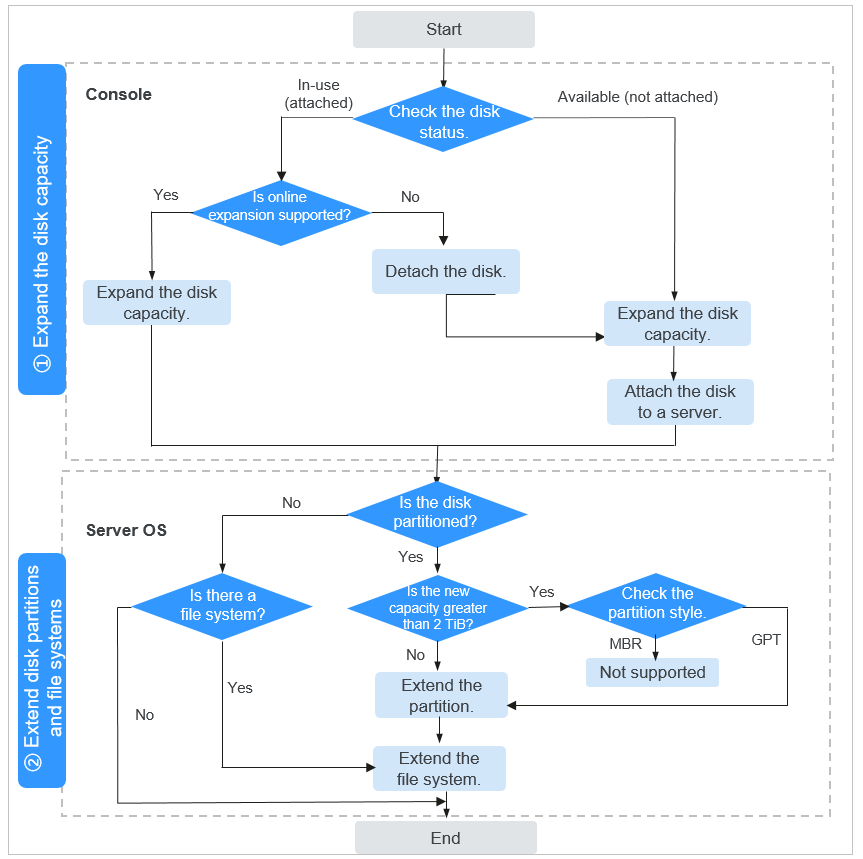
- Step 1: Expand the disk capacity on the console.
Choose a proper expansion method based on the disk status. To check the disk status, see Viewing EVS Disk Details. To learn about the expansion conditions under different statuses, see Prerequisites.
- Step 2: Extend disk partitions and file systems on the server.
Before extending the partitions and file systems, you need to select an appropriate extension method based on the disk partitions. For details, see Table 1. For how to check the disk partition style in Linux, see How Do I Check the Disk Partition Style in Linux?
Operation Category | Operation Instruction | |
|---|---|---|
The disk is not partitioned. | On Linux ECSs, you can directly extend the file systems. For details, see How Do I Extend the File System of an Unpartitioned Data Disk in Linux? | |
The disk is partitioned. |
|
|
MBR partitions with more than 2 TiB disk capacity after expansion | Not supported. The maximum disk capacity that MBR supports is 2 TiB, and the disk space in access of 2 TiB cannot be used.
| |
If a server is stopped during the expansion, the additional space added to a Windows system disk, Windows data disk, or Linux system disk may be automatically added to the last partition after the server is started. In this case, the additional space can be directly used. If the additional space is not automatically added, you need to extend the partition and file system according to the instructions in the preceding table.
FAQs
For more expansion FAQs, see Capacity Expansion.