Scenarios
You can modify, enable, or disable enterprise projects when your business changes.
For resource security, enterprise projects cannot be deleted. If a project will no longer be used, disable it.
- Disabled enterprise projects cannot be modified.
- Disabled enterprise projects still occupy the enterprise project quota. If your enterprise project quota cannot meet your requirement, contact O&M personnel to enable you to delete enterprise projects.
- Disabled enterprise projects will be deleted from Enterprise Project on the page of creating cloud services. Disabled enterprise projects will not support adding resources or creating user groups. Enable the enterprise projects if you want to use them.
- The default enterprise project cannot be modified or disabled.
Modifying an Enterprise Project
To modify the name or description of an enterprise project, perform the following steps:
- Sign in to the management console. In the upper right corner, hover over the account name and choose Enterprise Management from the drop-down list.
The Enterprise Project Management page is displayed.
- Locate the target enterprise project and click More > Modify in the Operation column.
The Modify Enterprise Project dialog box pops up.
Figure 1 Modifying an enterprise project

- Modify the project name or description.
Table 1 Project information Parameter
Description
Name
A project name can contain up to 255 characters. Letters, digits, underscores (_), and hyphens (-) are allowed. The value cannot contain the word default in any form.
Example: project_A
Description
The description can contain up to 512 characters.
Example: This enterprise project is used to manage the resources of Project A.
- Click OK.
Enabling an Enterprise Project
To use a disabled enterprise project again, enable it.
- Sign in to the management console. In the upper right corner, hover over the account name and choose Enterprise Management from the drop-down list.
The Enterprise Project Management page is displayed.
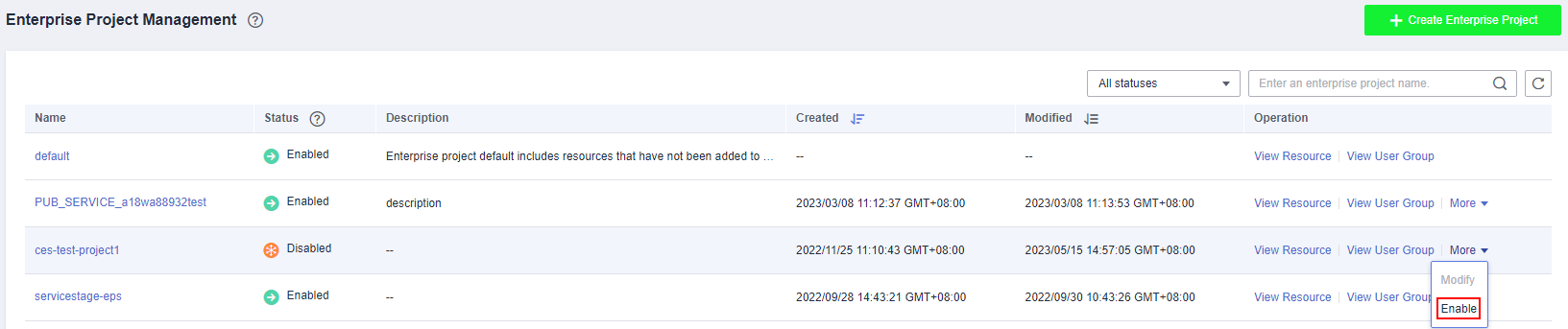
- Choose the disabled enterprise project, click More > Enable in the Operation column.
The Enable Enterprise Project dialog box pops up.
Figure 2 Enabling an enterprise project
- Click OK. The enterprise project is enabled successfully.
Disabling an Enterprise Project
You can disable an enterprise project if you no longer need to use it because your enterprise structure is adjusted or business is reduced.
- Sign in to the management console. In the upper right corner, hover over the account name and choose Enterprise Management from the drop-down list.
The Enterprise Project Management page is displayed.
- Choose the enabled enterprise project, click More > Disable in the Operation column.
The Disable Enterprise Project dialog box pops up
Figure 3 Disabling an enterprise project

- Click OK and the project is disabled.