Scenario
You can create an enterprise project for a department or based on your business requirements.
Prerequisites
Only the administrator or the user with the EPS Admin policy is allowed to create enterprise projects.
Restrictions and Limitations
Up to 100 enterprise projects can be created in an account.
Procedure
- Sign in to the management console. In the upper right corner, hover over the account name and choose Enterprise Management from the drop-down list.
The Enterprise Project Management page is displayed.
- On the Enterprise Project Management Service page, click Create Enterprise Project in the upper right corner.
The Create Enterprise Project page is displayed.
Figure 1 Creating an enterprise project
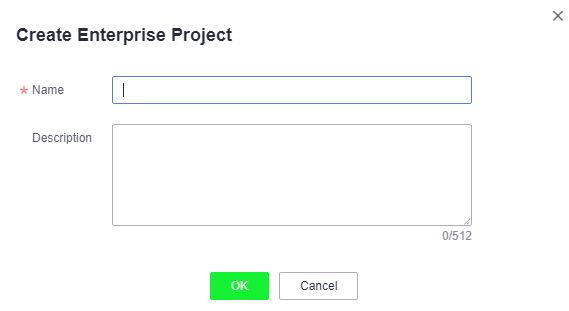
- Set Name and Description, and click OK.
Table 1 Configuration rules Parameter
Description
Name
A project name can contain up to 255 characters. Letters, digits, underscores (_), and hyphens (-) are allowed. The value cannot contain the word default in any form.
Example: project_A
Description
The description can contain up to 512 characters.
Example: The enterprise project is used to manage the resources of Project A.
NoteTo avoid data leakage, you are advised not to include personal or sensitive information in enterprise project descriptions or resource tags.