Scenarios
This section describes how to use VNC provided on the management console to log in to an ECS.
If you cannot use other remote login tools to log in to an ECS, you can use the VNC login mode. This login mode is mainly used in emergency O&M scenarios for you to view and perform maintenance operations.
After the login is successful, if you need to use the VNC-provided copy and paste functions, see Follow-up Procedure.
Before using remote login (VNC) provided on the management console to log in to a Linux ECS authenticated using a key pair, log in to the ECS using an SSH key and set a login password.
Prerequisites
If you set Login Mode to Key pair when purchasing the ECS, you have used an SSH key to log in to the Linux ECS and set a login password.
Procedure
- Log in to the management console.
- Click
 in the upper left corner and select a region and project.
 - Under Computing, click Elastic Cloud Server.
- In the Operation column of the target ECS, click Remote Login.
- (Optional) When the system displays "Press CTRL+ALT+DELETE to log on", click Ctrl+Alt+Del in the upper part of the remote login page to log in to the ECS.Note
Do not press CTRL+ALT+DELETE on the physical keyboard because this operation does not take effect.
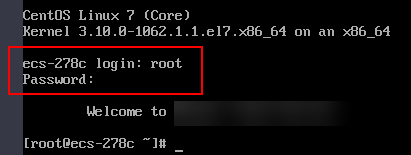
- Enter the ECS password as prompted.
Figure 1 Username (root as an example) and password
Follow-up Procedure
Local commands can be copied to an ECS. To do so, perform the following operations:
- Log in to the ECS using VNC.
- Click Paste & Send in the top area of the page.
- Press Ctrl+C to copy data from the local computer.
- Press Ctrl+V to paste the local data to the Paste & Send window.
- Click Send.
Send the copied data to the CLI.
There is a low probability that data is lost when you use Paste & Send on the VNC page of a GUI-based Linux ECS. This is because the number of ECS vCPUs fails to meet GUI requirements. In such a case, it is a good practice to send a maximum of 5 characters at a time or switch from GUI to CLI (also called text interface), and then use the Paste & Send function.