Logging In to a Windows ECS
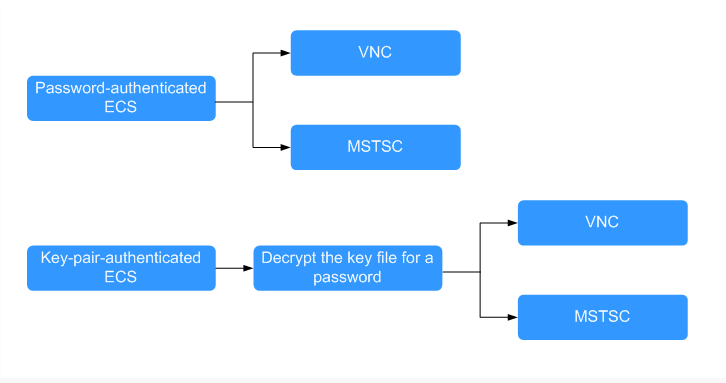
You can log in to a Windows ECS using either VNC or MSTSC provided on the management console.
Figure 1 Windows ECS login modes
- (Optional) Retrieve your password from the key file.
To log in to a key-pair-authenticated ECS, use the password obtaining function provided by the management console to decrypt the key file and obtain a password.
For details, see Obtaining the Password for Logging In to a Windows ECS.
- Select a login mode for the ECS.
- Management console (VNC)
For details, see Logging In to a Windows ECS Using VNC.
- Remote desktop connection (MSTSC)
For details, see Logging In to a Windows ECS from a Windows Server.
- Management console (VNC)
Logging In to a Linux ECS
The method for logging in to an ECS varies depending on the login authentication methods configured during ECS creation.
Figure 2 Linux ECS login modes
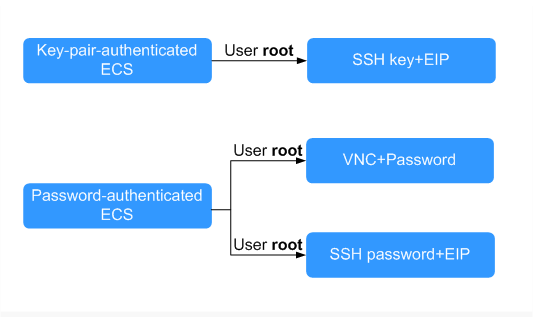
- To log in to a key-pair-authenticated ECS for the first time, use a tool, such as PuTTY or Xshell, and the desired SSH key as user root. Ensure that the ECS has an EIP bound.
For instructions about how to log in to a Linux ECS using an SSH key, see Logging In to a Linux ECS Using an SSH Key Pair.
NoteIf you want to log in to an ECS using VNC provided on the management console, log in to the ECS using an SSH key, configure the login password, and use the password for login.
- To log in to a password-authenticated ECS for the first time, use either of the following methods:
- For logins using VNC on the management console, the login username is root.
For details about how to log in to the ECS using VNC, see Logging In to a Linux ECS Using VNC.
- For logins using an SSH password, the login username is root and the ECS must have an EIP bound.
For details, see Logging In to a Linux ECS Using an SSH Password.
- For logins using VNC on the management console, the login username is root.
Follow-up Procedure
- If you have added a data disk during ECS creation, you must initialize the data disk after logging in to the ECS.
For details, see Scenarios and Disk Partitions.
- For certain ECSs, you need to install a driver after logging in to them. For details about available ECS types and functions, see ECS Types.