This section describes how to compare migration items to check if there are any differences between source and destination databases. By comparing migration objects, you can determine the proper time for service migration to minimize the service downtime.
Comparison Scenarios
You can compare migration objects with different dimensions:
- Object-level comparison: It helps you compare databases, indexes, tables, views, stored procedures and functions, and sorting rules of tables. You are advised to perform the comparison after a full migration is complete.
- Data-level comparison is classified into row comparison and value comparison.
- Row comparison: It helps you compare the number of rows in the tables to be migrated. This comparison method is recommended because it is fast.
- Value comparison: It helps you check whether data in the migrated table is consistent. The comparison process is relatively slow.
- Sampling comparison: If there is a lot of data, it takes a long time to compare the number of rows and values. Sampling comparison is recommended. You can set an appropriate sampling ratio to complete a comparison faster.
- Periodic comparison: DRS periodically compares the number of rows or objects in the source database table with those in the destination database table and displays the comparison results. To compare rows or objects periodically, enable comparison policy.
When you check data consistency, compare the number of rows first. If the number of rows are inconsistent, you can then compare the data in the table to determine the inconsistent data.
Comparison Restrictions
- You can manually create a comparison task only when the task is in the incremental phase.
- During a comparison, the comparison items are case sensitive. If one of the source or destination database is case insensitive and the other one is case sensitive, the comparison result may be inconsistent.
- When a full migration task is complete, DRS automatically creates object-level and row comparison tasks. If operations are performed on data in the source database during data comparison, the comparison results may be inconsistent.
- If DDL operations were performed on the source database, you need to compare the objects again to ensure the accuracy of the comparison results.
- If data in the destination database is modified separately, the comparison results may be inconsistent.
- If the encoding of the source database character type is abnormal, the database driver will convert the character type to an abnormal code point during DRS migration or comparison. As a result, the values may be consistent but the bytes may be inconsistent.
- Currently, value comparison supports only some tables without primary keys. For tables that do not support value comparison, you can compare the number of rows. Therefore, you can compare data by row or value based on scenarios.
- UTC time is used in the SQL statements generated by DRS for querying inconsistent data. If the table contains time fields, you need to set the session time zone to UTC+0 before querying inconsistent data.
- Only static value comparison is supported for tables without primary keys. Dynamic value comparison is not supported.
- The DRS task cannot be suspended during value comparison. Otherwise, the comparison task may fail.
- To prevent resources from being occupied for a long time, DRS limits the comparison duration. If the comparison duration exceeds the threshold, the comparison task stops automatically.
- When a full migration task is complete, DRS automatically creates object-level and row comparison tasks. The comparison duration limits to 30 minutes. After the threshold, the comparison tasks automatically stop and the full migration task stops.
- For a row comparison task manually created in the incremental phase, if the source database is a relational database, the row comparison duration limits to 60 minutes. If the source database is a non-relational database, for example, MongoDB, the row comparison duration limits to 30 minutes.
- To avoid occupying resources, the comparison results of DRS tasks can be retained for a maximum of 60 days. After 60 days, the comparison results are automatically cleared.
- For a migration task from MySQL, virtual columns in the source database do not support value comparison. During the comparison, virtual columns are filtered out.
- If the destination database uses MySQL 5.7, JSON floating-point values lose trailing decimal zeros due to the JSON type's normalization behavior in this version. As a result, the source and destination values are inconsistent due to precision loss.
- Performing DDL operations on a table during value comparison may result in a task failure. In this case, you need to perform the comparison again. You are advised to minimize DDL operations on a table during the comparison.
Impact on Databases
- Object comparison: System tables of the source and destination databases are queried, occupying about 10 sessions. The database is not affected. However, if there are a large number of objects (for example, hundreds of thousands of tables), the database may be overloaded.
- Row comparison: The number of rows in the source and destination databases is queried, which occupies about 10 sessions. The SELECT COUNT statement does not affect the database. However, if a table contains a large amount of data (hundreds of millions of records), the database will be overloaded and the query results will be returned slowly.
- Value comparison: All data in the source and destination databases is queried, and each field is compared. The query pressure on the database leads to high I/O. The query speed is limited by the I/O and network bandwidth of the source and destination databases. Value comparison occupies one or two CPUs, and about 10 sessions.
Estimated Comparison Duration
- Object comparison: Generally, the comparison results are returned within several minutes based on the query performance of the source database. If the amount of data is large, the comparison may take dozens of minutes.
- Row comparison: The SELECT COUNT method is used. The query speed depends on the database performance.
- Value comparison: If the database workload is not heavy and the network is normal, the comparison speed is about 5 MB/s.
Prerequisites
- You have logged in to the DRS console.
- A migration task has been started.
Creating a comparison task
You can follow the comparison process or select a comparison method based on your service scenario. The following operations describe how to compare migration items by following the recommended migration process.
- On the Online Migration Management page, click the target migration task name in the Task Name/ID column.
- On the Migration Comparison tab, compare objects of the source and destination databases.
- Create an Object-Level Comparison task to check the integrity of database objects.
Click Object-Level Comparison. On the Object-Level Comparison tab, view the comparison result of each comparison item.
Locate a comparison item you want to view and click View Details in the Operation column.
- Create a Data-Level Comparison (row comparison or value comparison) task to compare the number of rows and values of the migrated data.
- In the Before You Start pane, click Validate All Rows/Values.
- In the displayed Create Comparison Task dialog box, specify Comparison Type, Comparison Time, and Object. Then, click OK.
- Comparison Type: compares rows and values.Note
- After a task enters the incremental phase, you can create a row or value comparison task.
- After the full synchronization is complete, data in the source database cannot be changed. Otherwise, the comparison result will be inconsistent.
- Comparison Time: You can select Start upon task creation or Start at a specified time. There is a slight difference in time between the source and destination databases during synchronization. Data inconsistency may occur. You are advised to compare migration items during off-peak hours for more accurate results.
- Flow Control: You can enable flow control for some comparison tasks. After flow control is enabled, you can set Effective to Always or Scheduled and set Flow Limit to a specific value. If you select Scheduled, you can set the time range based on your service requirements.
- Compare Incremental Data Only: You can enable incremental data comparison for some comparison tasks. This function is available only when you select Dynamic for Comparison Method. In addition, you can select a start time of incremental data.
- Filter Data: After this function is enabled, objects can be compared based on the configured filtering criteria.Note
Only MySQL-to-MySQL migration tasks support data filtering and comparison.
After enabling Filter Data, add filtering criteria for the table objects to be compared.
In the Filtering Criteria area, enter the filtering criteria, and click Verify.
Note- Standard SQL statements can be used to filter records. Each expression cannot contain packages, functions, variables, or constants specific to a database engine.
- Enter the part following WHERE in the SQL statement (excluding WHERE and semicolons), for example, sid > 3 and sname like "G %".
- Implicit conversion rules are not supported. Enter filtering criteria of a valid data type. For example, if column c of an Oracle database uses characters of the varchar2 type, the filtering criteria must be set to c > '10' instead of c > 10.
- Filter criteria cannot be configured for large objects, such as CLOB, BLOB, and BYTEA.
- You are not advised to set filter criteria for fields of approximate numeric types, such as FLOAT, DECIMAL, and DOUBLE.
- Do not use fields containing special characters as a filter condition.
- Objects whose database names, schema names, or table names are case insensitive cannot be filtered and compared.
- Currently, condition-based filtering is not supported when there are more than 50,000 tables in a database.
After the verification is successful, click Generate Processing Rule. The rule is displayed.
Click OK.
- Object: You can select objects to be compared based on the scenarios.
- Comparison Type: compares rows and values.
- After the comparison creation task is submitted, the Data-Level Comparison tab is displayed. Click
 to refresh the list and view the comparison result of the specified comparison type.
To view the comparison details, locate the target comparison type and click View Results in the Operation column. On the displayed page, locate a pair of source and destination databases, and click View Details in the Operation column to view detailed comparison results.
- For running comparison tasks with flow control enabled, you can check the source database extraction speed and incremental delay (available only for dynamic comparison) on the list page.

- Note: The statistics are refreshed every 10 seconds by default.
- For running comparison tasks with flow control enabled, you can click View Results to check the full comparison progress, full data extraction speed, number of inconsistent rows to be reviewed, and detailed progress of each source and destination database table. If the task is a dynamic comparison task, you can also check the incremental comparison delay, incremental comparison speed, incremental comparison position, number of inconsistent rows to be reviewed, and number of rows compared per second.
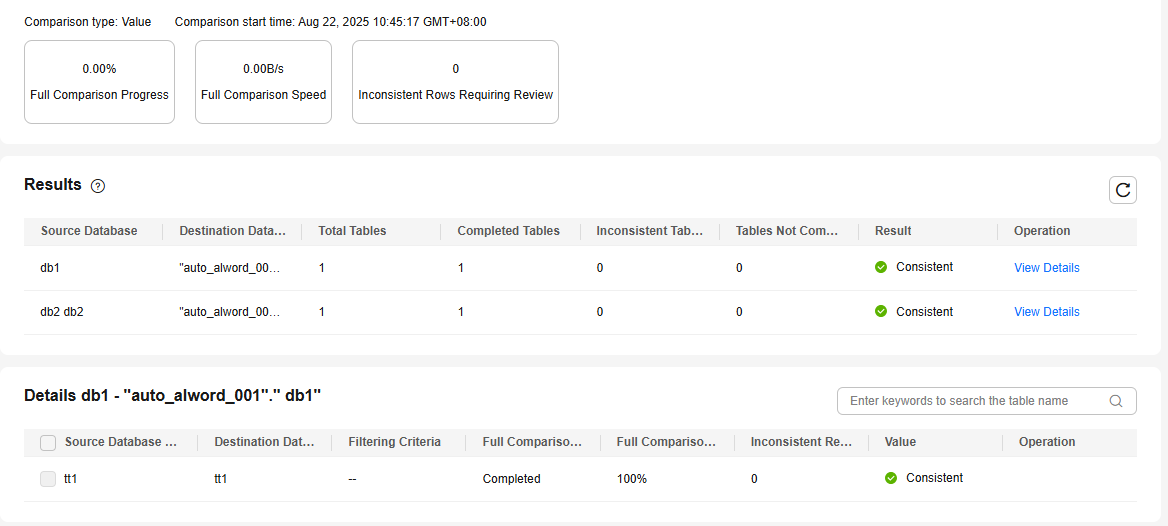
- Note: The statistics are refreshed every 10 seconds by default.
Note- You can cancel a running task at any time and view the comparison report of a canceled comparison task.
- You can sort the row comparison results displayed on the current page in ascending or descending order based on the number of rows in the source database table or the destination database table.
- If a negative number is displayed in the Row Differences column, the number of rows in the destination database table is greater than that in the source database table. If a positive number is displayed in the differences column, the number of rows in the source database table is greater than that in the destination database table.
- For running comparison tasks with flow control enabled, you can check the source database extraction speed and incremental delay (available only for dynamic comparison) on the list page.
- Create a Data-Level Comparison (sampling comparison) task. If there is a lot of data, it takes a long time to compare the number of rows and values. Sampling comparison is recommended. You can set an appropriate sampling ratio to complete a comparison faster.
On the Data-Level Comparison page, click Create Comparison Task, select Sample for Comparison Type, set Sampling Ratio, Comparison Time, and Object, and click OK.
Note- Only real-time migration tasks from MongoDB to DDS and from DDS to MongoDB support sampling comparison.
- The $sample command provided by MongoDB is used for data sampling: {$sample: { size: <positive integer N> } }.
In the preceding command, size is fixed to 1000. To perform MongoDB sampling comparison provided by DRS, the $sample command is executed for multiple times until the sampled data volume reaches the specified sampling ratio.
- In a single sampling comparison task, the $sample command is executed for multiple times. In this case, the same data in the source database may be obtained for multiple times.
- The total data volume of a collection is obtained using estimatedDocumentCount. It is an estimated value instead of an accurate value. The actual sampling data volume and sampling ratio may fluctuate, which is normal.
- Sampling comparison does not support documents whose _id is of the BinData data type. Documents whose _id is of the BinData data type will be filtered out and not be compared.
- If the number of inconsistent data records in a single MongoDB sampling comparison task exceeds 10,000, the comparison stops. A maximum of 10,000 inconsistent data records can be displayed.
- Perform a double check before the cutover.
Click Double Check During Cutover. In the displayed Create Comparison Task dialog box, specify Comparison Type, Comparison Time, and Object. Then, click OK.
For details about how to view comparison details, see 2.c.
- Stop the migration task.
After the service system is successfully migrated to the destination database, stop the migration task to prevent operations in the source database from being synchronized to the destination database to overwrite the data. This operation only deletes the replication instance, and the migration task is still in the task list. You can view or delete the task.
Generally, stopping a task can ensure the integrity of special objects because triggers and events are migrated when a task is being stopped. Only in some cases, such as network disconnections, a task may fail to be stopped. If a task fails to be stopped multiple times, you can select Forcibly stop task to reduce the waiting time. If you forcibly stop a task, triggers and events may not be completely migrated and you need to manually migrate them.
- Create an Object-Level Comparison task to check the integrity of database objects.
Periodic Comparison
Periodic comparison indicates that DRS periodically compares the number of rows or objects in the source database table with those in the destination database table and displays the comparison results.
- On the Online Migration Management page, click the target migration task name in the Task Name/ID column.
- Choose Migration Comparison.
- Click the Periodic Comparison tab and click Modify Comparison Policy.
- In the Modify Comparison Policy dialog box, enable periodic comparison, specify the comparison frequency, time interval, effective time and comparison type, and click Yes.Note
- After periodic comparison is enabled, DRS compares the number of rows or objects at the scheduled time. You can view the comparison results on the Data-Level Comparison or Object-Level Comparison tab.
- After periodic comparison is disabled, only historical comparison results can be viewed.
- Modifications to the comparison policy settings take effect from the next comparison and do not affect the on-going periodic comparison tasks.
- During periodic comparison, the source and destination databases will be read. Perform the comparison during off-peak hours.
- During periodic comparison, ultra-large tables (those with more than 100 million rows) are automatically filtered out. You can use data-level comparison to spot check such large tables. It is not recommended that these large tables be compared periodically.
- If you select Weekly for Comparison Frequency and select all the days (from Monday to Sunday) for Comparison Time, the comparison frequency will be automatically changed to Daily.
Quick Comparison
To accelerate and simplify the migration process, DRS provides the quick comparison function. You can directly perform a comparison on the migration task list. This function can be used to compare all migration objects only when incremental migration tasks are in progress.
- On the Online Migration Management page, locate the target migration task and click Compare in the Operation column.
- On the Create Comparison Task page, select Start upon task creation or Start at a specified time and click Yes to start the comparison task.
Viewing a Comparison Task
- On the Online Migration Management page, locate the target migration task and click View in the Operation column.
- On the Migration Comparison tab, view the data comparison result.
Data Repair
If there is inconsistent data in the static value comparison result, you can select the inconsistent tables on the comparison details page to repair the data. The data repair result includes repair SQL statements that can be executed in the destination database. After the repair, you can view the repair SQL details of the inconsistent rows on the repair progress details page. You can also export and download all the inconsistent SQL statements generated in this comparison, and manually execute the SQL statements in the destination database based on the site requirements. There are the following restrictions on data repair:
- Data repair is in restricted use. Currently, only MySQL-to-MySQL tasks are supported.
- If a SQL statement to be repaired is an INSERT or UPDATE statement, all columns of the inconsistent row are displayed in the repair SQL details page. The column values are the current values of the corresponding columns in the source database.
- Historical comparison tasks may fail to be repaired due to lack of repair information. You need to perform comparison again and then repair the inconsistent data.
- For each task, only the repair progress details about the latest data repair are displayed.
- The maximum size of a single inconsistent row is 4 MB. If the size exceeds 4 MB, the corresponding repair SQL statements fail to be generated.
- In the repair SQL statements generated by DRS, the time type field is based on the UTC time. If there are time fields in a table, set the session time zone to UTC+0 time zone before executing the repair SQL statements in the destination database. The following table lists the SQL statements for setting the session time zone for each database type.
- Exercise caution when running DELETE statements in repair SQL statements.
- Data repair is unavailable in the comparison result of tables without primary keys.
Database Type | Time Zone SQL |
|---|---|
MYSQL | SET session time_zone='+00:00'; |