Process
A complete real-time migration consists of creating a migration task, tracking task progress, analyzing migration logs, and comparing data consistency. By comparing multiple items and data, you can determine the proper time for service migration to minimize the service downtime.
A complete migration involves the following procedures.
Figure 1 Migration process
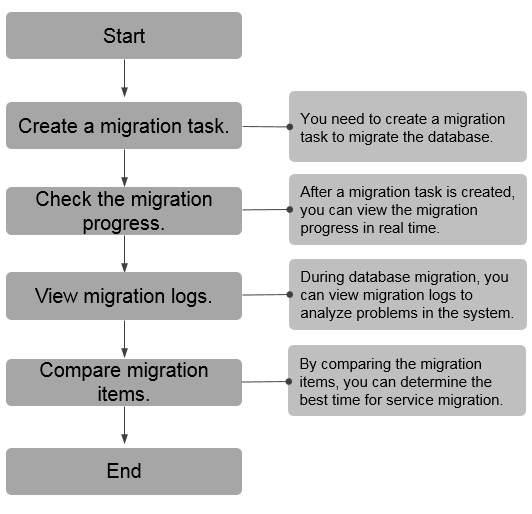
- Step 1: Create a migration task. Select the source and destination databases as required and create a migration task.
- Step 2: Check the migration progress. During migration, you can view the migration progress.
- Step 3: View migration logs. Migration logs contain alarms, errors, and prompt information. You can analyze system problems based on such information.
- Step 4: Compare migration items. You can compare objects and data to be migrated to ensure data consistency.
This section uses the migration from MySQL to RDS for MySQL as an example to describe how to configure a migration task over a VPC network on the DRS console.
VPC is suitable for migrations of cloud databases in the same region.
You can create a migration task that will walk you through each step of the process. After a migration task is created, you can manage it on the DRS console.
Prerequisites
- You have logged in to the DRS console.
- For details about the DB types and versions supported by real-time migration, see Real-Time Migration.
Procedure
- On the Online Migration Management page, click Create Migration Task.
- On the Create Replication Instance page, specify the task name, description, and the replication instance details, and click Create Now.
- Task information description
Table 1 Task information Parameter
Description
Task Name
The task name must start with a letter and consist of 4 to 50 characters. It can contain only letters, digits, hyphens (-), and underscores (_).
Description
The description can contain up to 256 characters and cannot contain special characters !=<>&'\"
- Replication instance information
Table 2 Replication instance settings Parameter
Description
Data Flow
Select To the cloud.
The destination DB is on the current cloud.
Source DB Engine
Select MySQL.
Destination DB Engine
Select MySQL.
Network Type
Select VPC Network.
Available options: VPC, VPN or Direct Connect, and Public network. By default, the value is Public network.
- VPC is suitable for migrations between cloud databases of the same account in the same region and VPC.
- Public network is suitable for migrations from on-premises databases or external cloud databases to destination databases.
- VPN or Direct Connect is suitable for migrations from on-premises databases to cloud databases or between databases across regions on the cloud using a VPN, Direct Connect, Cloud Connect, VPCEP, or a VPC peering connection.
Destination DB Instance
The RDS DB instance you created.
Replication Instance Subnet
The subnet where the replication instance resides. You can also click View Subnets to go to the network console to view the subnet where the instance resides.
By default, the DRS instance and the destination DB instance are in the same subnet. You need to select the subnet where the DRS instance resides, and there are available IP addresses for the subnet. To ensure that the replication instance is successfully created, only subnets with DHCP enabled are displayed.
Destination DB Instance Access
- Read-only
During the migration, the destination database is read-only. After the migration is complete, it restores to the read/write status. This option ensures the integrity and success rate of data migration.
If a migration task fails, the destination database restores to the read/write state. After the migration task is resumed, the destination database becomes read-only.
The access settings of the destination instance are also affected by the access settings of the DB instance itself. Therefore, you are advised not to set the access settings of the DB instance on the RDS console.
If the destination database is set to read-only for a migration task, you can disable read-only on the task details page. After read-only is disabled, the destination database cannot be set back to read-only. Even if the migration task fails and then is resumed and started, the destination database cannot be set to read-only.
- Read/Write
During the migration, the destination database can be queried or modified. Data being migrated may be modified when operations are performed or applications are connected. It should be noted that background processes can often generate or modify data, which may result in data conflicts, task faults, and upload failures. Do not select this option if you do not fully understand the risks. Set the destination database to Read/Write only when you need to modify other data in the database during the migration.
The task cannot be modified after being created.
Migration Type
- Full: This migration type is suitable for scenarios where service interruption is acceptable. All objects and data in non-system databases are migrated to the destination database at one time. The objects include tables, views, and stored procedures.NOTE:
If you are performing a full migration, do not perform operations on the source database. Otherwise, data generated in the source database during the migration will not be synchronized to the destination database.
- Full+Incremental: This migration type allows you to migrate data without interrupting services. After a full migration initializes the destination database, an incremental migration initiates and parses logs to ensure data consistency between the source and destination databases.NOTE:
If you select Full+Incremental, data generated during the full migration will be continuously synchronized to the destination database, and the source remains accessible.
Enable Binlog Cleanup
Indicates whether to enable the function of quickly clearing binlogs of the destination database. After this function is enabled, binlog clearing is enabled for the destination database during the full migration and disabled during the incremental migration.
Specify EIP
This parameter is available when you select Public network for Network Type. Select an EIP to be bound to the DRS instance. DRS will automatically bind the specified EIP to the DRS instance and unbind the EIP after the task is complete.
- AZ
Table 3 Task AZ Parameter
Description
AZ
Select the AZ where you want to create the DRS task. Selecting the one housing the source or destination database can provide better performance.
- Enterprise Project and Tags
Table 4 Enterprise Project and Tags Parameter
Description
Enterprise Project
An enterprise project you would like to use to centrally manage your cloud resources and members. Select an enterprise project from the drop-down list. The default project is default.
Tags
- Tags a task. This configuration is optional. Adding tags helps you better identify and manage your tasks. Each task can have up to 20 tags.
- After a task is created, you can view its tag details on the Tags tab. For details, see Tag Management.
NoteIf a task fails to be created, DRS retains the task for three days by default. After three days, the task automatically stops.
- Task information description
- On the Configure Source and Destination Databases page, wait until the replication instance is created. Then, specify source and destination database information and click Test Connection for both the source and destination databases to check whether they have been connected to the replication instance. After the connection tests are successful, select the check box before the agreement and click Next.
- Scenario 1: Self-built database - source database configuration
Table 5 Self-build database - source database information Parameter
Description
Database Type
Select Self-built on ECS.
VPC
A dedicated virtual network in which the source database is located. It isolates networks for different services. You can select an existing VPC or create a VPC.
Subnet
A subnet provides dedicated network resources that are isolated from other networks, improving network security. The subnet must be in the AZ where the source database resides. You need to enable DHCP for creating the source database subnet.
IP Address or Domain Name
The IP address or domain name of the source database.
Port
The port of the source database. Range: 1 – 65535
Database Username
The username for accessing the source database.
Database Password
The password for the database username.
SSL Connection
If SSL connection is required, enable SSL on the source database, ensure that related parameters have been correctly configured, and upload an SSL certificate.
NOTE:- The maximum size of a single certificate file that can be uploaded is 500 KB.
- If SSL is disabled, your data may be at risk.
NoteThe IP address, domain name, username, and password of the source database are encrypted and stored in DRS, and will be cleared after the task is deleted.
- Scenario 2: RDS DB instance - source database configuration
Table 6 RDS DB instance - source database information Parameter
Description
Database Type
Select RDS DB instance.
DB Instance Name
Select the RDS DB instance to be migrated as the source DB instance.
Database Username
The username for accessing the source database.
Database Password
The password for the database username.
SSL Connection
If SSL connection is required, enable SSL on the source database, ensure that related parameters have been correctly configured, and upload an SSL certificate.
NOTE:- The maximum size of a single certificate file that can be uploaded is 500 KB.
- If SSL is disabled, your data may be at risk.
- Destination database configuration
Table 7 Destination database settings Parameter
Description
DB Instance Name
The RDS DB instance selected during migration task creation. This parameter cannot be changed.
Database Username
The username for accessing the destination database.
Database Password
The password for the database username.
Migrate Definer to User
Indicates whether to migrate the Definers of all source database objects to the destination database user entered during the connection test.
- Yes
- No
The Definers of all source database objects will not be changed. You need to migrate all accounts and permissions of the source database in the next step. Note that if the Definer account is not found in the destination database, unavailable objects will be created.
SSL Connection
If SSL connection is required, enable SSL on the destination database, ensure that related parameters have been correctly configured, and upload an SSL certificate.
NOTE:- The maximum size of a single certificate file that can be uploaded is 500 KB.
- If SSL is disabled, your data may be at risk.
NoteThe database username and password are encrypted and stored in the system and will be cleared after the task is deleted.
- Scenario 1: Self-built database - source database configuration
- On the Set Task page, select the accounts and objects to be migrated, and click Next.
Table 8 Migration types and objects Parameter
Description
Flow Control
You can choose whether to control the flow. Flow Control takes effect in the full phase only.
- Yes
You can set a maximum migration speed, which varies depending on network conditions. During the migration, the migration speed of each task (or each subtask in multi-task mode) will not exceed the threshold you configure.
In addition, you can set the time range based on your service requirements. The traffic rate setting usually includes setting of a rate limiting time period and a traffic rate value. Flow can be controlled all day or during specific time ranges. The default value is Always. A maximum of 10 time ranges can be set, and they cannot overlap.
The flow rate must be set based on the service scenario and cannot exceed 9,999 MB/s.
- No
The migration speed is not limited and the outbound bandwidth of the source database is maximally used, which causes read consumption on the source database accordingly. For example, if the outbound bandwidth of the source database is 100 MB/s and 80% bandwidth is used, the I/O consumption on the source database is 80 MB/s.
NOTE:- Flow control mode takes effect only during a full migration.
- You can also change the flow control mode after creating a task. For details, see Modifying the Flow Control Mode.
Migrate Incremental Accounts and Permissions
Indicates whether to migrate incremental accounts and permissions during database migration.
- Yes
All incremental accounts and permissions will be migrated. The migration of incremental accounts and permissions may fail because the source and destination database versions and account encryption modes may be different.
- No
All incremental accounts and permissions will be filtered out during the migration.
Migrate Account
During a database migration, accounts need to be migrated separately.
There are accounts that can be migrated completely, accounts whose permissions need to be reduced, and accounts that cannot be migrated. You can choose whether to migrate the accounts based on service requirements. If you select Yes, you can select the accounts to be migrated as required.
- Yes
If you need to migrate accounts, see Migrating Accounts.
- No
During migration, accounts, permissions, and passwords are not migrated.
Create Indexes Along With Table Structure
Indicates whether to create indexes along with the table structure in the full migration phase.
- Yes: Indexes are migrated when the table structure is migrated in the full migration phase.
- No: Indexes are migrated separately after data migration.
Filter DROP DATABASE
To reduce the risks involved in data migration, DDL operations can be filtered out. You can choose not to synchronize certain DDL operations.
- If you select Yes, any database deletion operations performed on the source database are not migrated during data migration.
- If you select No, related operations are migrated to the destination database during data migration.
Migration Object
The left pane displays the source database objects, and the right pane displays the selected objects. You can choose to migrate all objects, tables, or databases based on your service requirements.
- All: All objects in the source database are migrated to the destination database. After the migration, the object names will remain the same as those in the source database and cannot be modified.
- Tables: The selected table-level objects will be migrated.
- Databases: The selected database-level objects will be migrated.
If the source database is changed, click
 in the upper right corner before selecting migration objects to ensure that the objects to be selected are from the changed source database.NOTE:
- If you choose not to migrate all of the databases, the migration may fail because the objects, such as stored procedures and views, in the databases to be migrated may have dependencies on other objects that are not migrated. To prevent migration failure, migrate all of the databases.
- If an object name contains spaces, the spaces before and after the object name are not displayed. If there are two or more consecutive spaces in the middle of the object name, only one space is displayed.
- The name of the selected migration object cannot contain spaces.
- To quickly select the desired database objects, you can use the search function.
- Yes
- On the Check Task page, check the migration task.
- If any check fails, review the cause and rectify the fault. After the fault is rectified, click Check Again.
- If the check is complete and the check success rate is 100%, click Next.Note
You can proceed to the next step only when all checks are successful. If there are any items that require confirmation, view and confirm the details first before proceeding to the next step.
- Compare source and destination parameters.
By comparing common and performance parameters for the source databases against those of the destination databases, you can help ensure that services will not change after a migration is completed. You can determine whether to use this function based on service requirements. It mainly ensures that services are not affected after a migration is completed.
- This process is optional, so you can click Next to skip the comparison.
- Compare common parameters:
If the common parameter values in the comparison results are inconsistent, click Save Change to change the destination database values to be the same as those of the source database.
Performance parameter values in both the source and destination databases can be the same or different.
- If you need to change the performance parameter values that are consistent in the comparison results to different values, locate the target parameter, enter values in the Change To column, and click Save Change in the upper left corner.
- If you want to make the performance parameter values of the source and destination database be the same:
- Click Use Source Database Value.
DRS automatically makes the destination database values the same as those of the source database.
NoteYou can also manually enter parameter values.
- Click Save Change to save your changes.
The system changes the parameter values based on your settings for the destination database values. After the modification, the list is updated automatically.
Some parameters in the destination database require a restart before the changes can take effect. The system will display these as being inconsistent. In addition, restart the destination database before the migration task is started or after the migration task is completed. To minimize the impact of this restart on your services, it is recommended that you schedule a specific time to restart the destination database after the migration is complete.
For details about how to set parameters during a comparison, see Parameters for Comparison.
- Click Next.
- Click Use Source Database Value.
- On the displayed page, specify Start Time, Send Notifications, SMN Topic, Delay Threshold (s), Run Post-Migration Comparison, Start Now (Initialization Only), and Stop Abnormal Tasks After, confirm that the configured information is correct, and click Submit to submit the task.
Table 9 Task startup settings Parameter
Description
Start Time
Set Start Time to Start upon task creation or Start at a specified time based on site requirements. The Start at a specified time option is recommended.
NOTE:The migration task may affect the performance of the source and destination databases. You are advised to start the task in off-peak hours and reserve two to three days for data verification.
Send Notifications
This parameter is optional. If the status, latency metric, or data of the migration task is abnormal, DRS will send you a notification.
SMN Topic
This parameter is available only after you enable Send Notifications and create a topic on the SMN console and add a subscriber.
- After the task is submitted, view and manage it on the Online Migration Management page.
- You can view the task status. For more information about task status, see Task Statuses.
- You can click
 in the upper right corner to view the latest task status.
 - After the full migration is complete, you can use data comparison to check whether the data is consistent before and after the migration.
- By default, DRS retains a task in the Configuration state for three days. After three days, DRS automatically deletes background resources, but the task status remains unchanged. When you reconfigure the task, DRS applies for resources again.
- For a public network task, DRS needs to delete background resources after you stop the task. The EIP bound to the task cannot be restored to the Unbound state until background resources are deleted.