This section describes how to quickly enable database audit.
Background
Database audit supports auditing user-installed databases on ECS/BMS as well as RDS databases on the management console.
- Ensure the VPC, security group, and subnet of the database audit instance are the same as those of the node (application side or database side) where you plan to install the database audit agent. Otherwise, the instance will be unable to connect to the agent or perform audit.
- If SSL is enabled for a database, the database cannot be audited. To use database audit, disable SSL first.
Create a database audit instance, connect the instance with the target database, and enable database audit.
Auditing Databases Without Agents
Databases of some types and versions can be audited without using agents, as shown in Table 1.
Type | Supported Edition |
|---|---|
RDS for SQLServer | All editions are supported by default. |
RDS for MySQL |
|
PostgreSQL NOTICE: If the size of an SQL statement exceeds 4 KB, the SQL statement will be truncated during auditing. As a result, the SQL statement is incomplete. |
|
- DBSS without agents is easy to configure and use, but the following functions are not supported:
- Successful and failed login sessions cannot be counted.
- The port number of the client for accessing the database cannot be obtained.
- GaussDB(DWS) has the permission control policy for the log audit function. Only accounts and users with the Security Administrator permission can enable or disable the DWS database audit function.
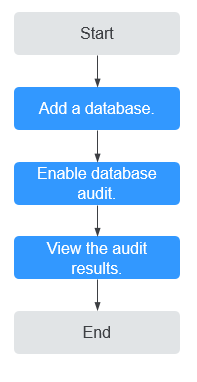
Figure 1 Agent-free auditing process
Step | Configuration | Description |
|---|---|---|
1 | Purchase database audit. Add a database to the database audit instance and enable audit for the database. Apply for database audit. Add a database to the database audit instance and enable audit for the database. | |
2 | Enable database audit and connect the added database to the database audit instance. | |
3 | By default, database audit complies with a full audit rule, which is used to audit all databases that are connected to the database audit instance. You can view the audit result on the database audit page. NOTICE: You can set database audit rules as required. For details, see Adding Audit Scope. |
Auditing Databases Using Agents
For a database whose type and version are not listed in Table 1, you need to install an agent to enable the database audit.
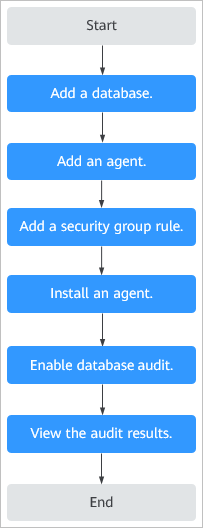
Figure 2 Procedure for quickly configuring database audit
Step | Configuration | Description |
|---|---|---|
1 | Apply for database audit. Add a database to the database audit instance and enable audit for the database. | |
2 | Select an agent add mode. Database audit supports auditing databases built on ECS, BMS, and RDS on the cloud. Select an agent add mode based on your database deployed on the management console. | |
3 | Configure TCP (port 8000) and UDP (ports 7000 to 7100) in the security group inbound rule of the database audit instance to allow the agent to communicate with the audit instance. | |
4 | Download and then install the agent on the database or application based on the add mode you chose. | |
5 | Enable database audit and connect the added database to the database audit instance. | |
6 | By default, database audit complies with a full audit rule, which is used to audit all databases that are connected to the database audit instance. You can view the audit result on the database audit page. |
Verifying the Result
When you connect the added database to the database audit instance, database audit records all operations performed on the database. You can view the audit result on the database audit page.