DataArts Insight can connect to API data sources to meet your data timeliness and scalability requirements. This section describes how to connect DataArts Insight to an API data source.
Notes and Constraints
API data sources are only applicable for dropdown lists in query controls and do not support building dashboards or large screens.
Prerequisites
You have obtained the API access permission.
Procedure
- Click
 in the upper left corner of the management console to select a region and select an enterprise project from Enterprise Project in the upper right corner of the Workspace page.
 - Click the name of the desired project in the My Projects area in the right pane.
- In the navigation pane on the left, choose Data Management > Data Sources. On the displayed page, click Create Data Source. In the displayed slide-out panel, set Source Database Type to API data.
- Set other parameters based on Table 1.
Figure 1 API data configuration items
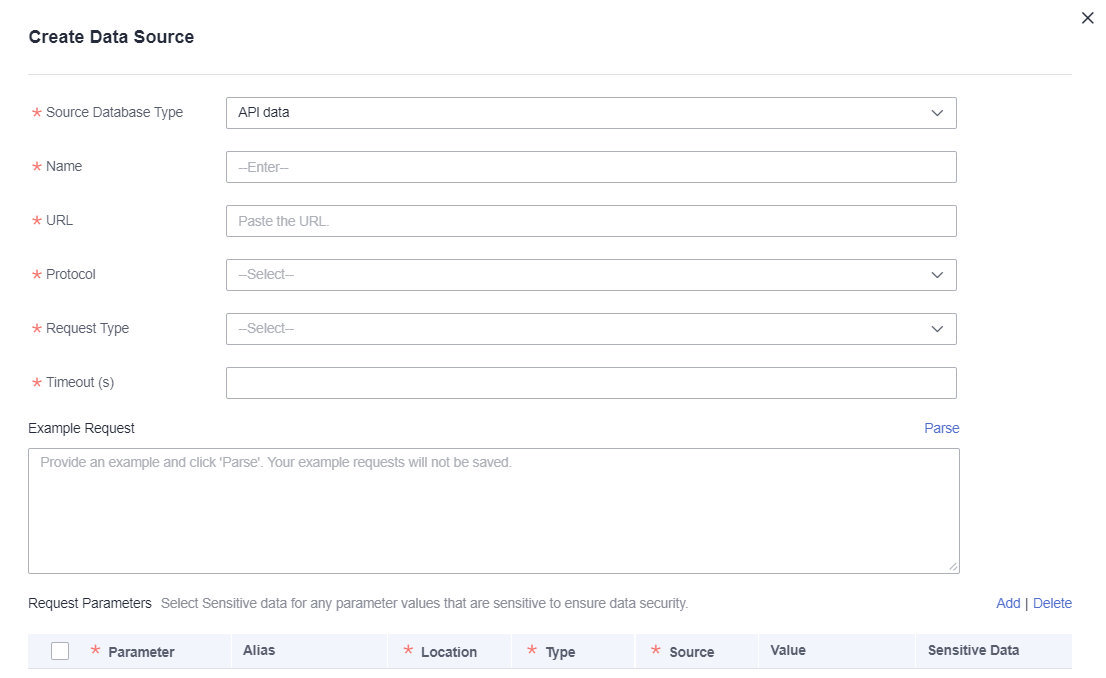
Table 1 Parameters Parameter
Mandatory
Description
Source Database Type
Yes
Type of the accessed data source. In this example, API data is selected.
Name
Yes
Name of the API data source displayed in the data source list.
URL
Yes
URL used to connect to API data.
Protocol
Yes
Protocol used to connect to API data.
Request Type
Yes
Type of the request used for connecting to the API data source. The options are GET and POST.
Timeout (s)
Yes
API connection timeout. The value ranges from 1 second to 999999 seconds.
Request Example
Yes
API request example.
NOTE:The API request example is parsed using either ? {query-string} or within the request body.
Request Parameters
Yes
Request parameters in the API request example. For details, see Table 2.
Table 2 Request parameters Parameter
Mandatory
Description
Parameter
Yes
Name of an API parameter.
Alias
No
Alias of an API parameter.
Location
Yes
Location of a parameter. The value can be Header, Body, or Parameter.
Type
Yes
Parameter type.
Source
Yes
Source of a parameter. The value can be a fixed value.
Value
No
Parameter value.
Sensitive Data
No
Indicates whether the parameter content involves sensitive data.
- Click Test Connection to test the data source connectivity.
- After the test is successful, click Next and select response parameters.
- Click OK.