Scenario
To ensure data security, consider using data masking for your service. After you set fields to be masked in a dataset, the system obfuscates sensitive data within those fields so that the fields are anonymized on the dashboard to ensure data security.
Prerequisites
You have created a dataset by referring to Creating a Dataset Through Visual Configuration.
Procedure
- Click
 in the upper left corner to select a region.
 - In the lower left corner of the navigation pane, select an enterprise project from Enterprise Project.
- In the project list on the console, click a project to go to the project page.
- Choose Data Management > Dataset.
- Click More > Column Permissions in the Operation column of the target dataset.
- Enable the column permission switch.
- Configure permission rules.
- Click Create Rule.
- Select the target fields. You can select both dimension fields and metric fields.
- Set Permission Rules to Data masking.
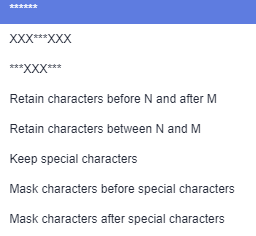
- Select a masking rule, as shown in Figure 1.
Table 1 Data masking rules Rule
Description
******
The masked fields are represented by six asterisks (*) and are fully concealed.
XXX***XXX
The first and last three characters are reserved, while the middle characters are concealed.
***XXX***
The three characters in the middle are reserved, and the other characters concealed.
Retain characters before N and after M
All characters except the specified ones are concealed.
Retain characters between N and M
All characters except the specified ones are concealed.
Keep special characters
All characters except the specified ones are concealed.
Mask characters before special characters
All characters except the specified ones are concealed.
Mask characters after special characters
All characters except the specified ones are concealed.
Figure 1 Masking rules
- Set Effective Scope.
- Apply to all users: All users can view only the masked field values.
- Apply to specific users:
- The specified users can view only the masked field values.
- Other users and user groups can view complete field values.
- Exclude specific users:
- The specified users and user groups can view complete field values.
- Other users and user groups can view only the masked field values.
NoteDataArtsInsight allows users to view the plaintext of anonymized columns by clicking
 on the dashboard or right-clicking on the large screen and choosing View data from the shortcut menu, regardless of whether they have permissions on the dataset or not.
- Click OK.