DataArts Insight allows you to upload local XLSX, XLS, and CSV files to a connected data source database. This section describes how to upload files in DataArts Insight.
Notes and Constraints
- Only XLSX, XLS, and CSV files can be uploaded.
- The size of the file to be uploaded cannot exceed 50 MB.
- The fields in the file to be uploaded cannot be empty. The file must contain at least one column and a maximum of 1000 columns.
- Static files must be uploaded to a connected data source. Before uploading static files, connect to a data source by referring to "Creating a Data Source". This is because you must have the edit permission on the data source.
Uploading Procedure
- Click
 in the upper left corner to select a region.
 - In the lower left corner of the navigation pane, select an enterprise project from Enterprise Project.
- Click the name of the desired project in the My Projects area in the right pane.
- Choose Data Management > Data Sources.
- Select a data source.
- Click Uploaded Files in the upper right corner of the page. The Uploaded Files page is displayed.
Figure 1 Uploading a file

- Click Add File to upload the file and configure file parameters.
Figure 2 File parameters
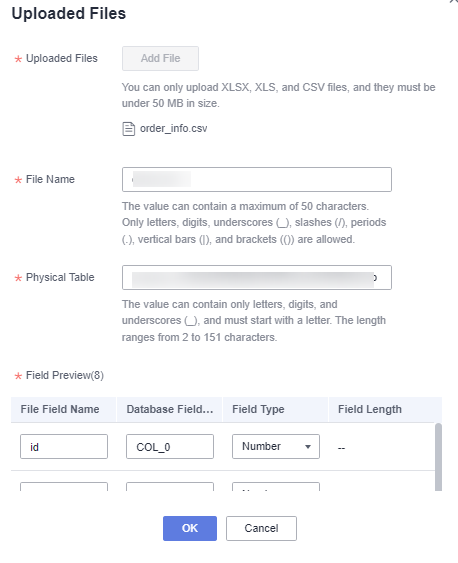
Table 1 Parameters for uploading a file Parameter
Description
Uploaded Files
You can upload XLSX, XLS, and CSV files, and they must be under 50 MB in size.
File Name
After a file is uploaded, the system automatically identifies the file name. You can also change the file name.
NOTE:The file name cannot be empty and can contain a maximum of 50 characters. Only letters, digits, underscores (_), slashes (/), vertical bars (|), and brackets (()) are allowed.
Physical Table
Name of the table that is automatically created in the database after the file is uploaded to the database.
You can change the physical table name. The physical table name can contain a maximum of 150 characters, including letters, digits, and underscores (_).
Auto Fill
If the database field name is incorrect, click Auto Fill so that the system automatically fills in the default name in the correct format.
Field Preview
After a file is uploaded to the database, the file is stored in a database table.
The database field name and type correspond to the column name and data type in the created database table. The file field name serves as the column header in the uploaded file and is used as the column description in the database table.
You can change the file field name, database field name, and field type when uploading a file.
File Field Name
Name of a field automatically identified by DataArts Insight. This parameter cannot be empty. A field name can contain a maximum of 50 characters, including letters, digits, underscores (_), slashes (/), vertical bars (|), and brackets.
Database Field Name
Database field name, which cannot be empty. The name can contain only letters, digits, and underscores (_), and cannot exceed 50 characters.
Field Type
Field type, including text, number, and date. The field type is automatically identified after a file is uploaded.
Field Length
The value cannot be empty and must be a valid integer containing a maximum of 1000 characters.
- Click OK to upload the file.
- After the upload is successful, view the uploaded file in the Uploaded Files list.Note
- API data sources do not support file upload.
Follow-up Operations
After creating a file data source, you can also create datasets and analyze data.
- To add data tables in the data source to DataArts Insight, see Creating a Dataset Through Visual Configuration.
- To add a visualized chart and analyze data, see Creating a Dashboard.
- To create a large screen, see Creating a Large Screen.