Scenarios
This section describes how to add database login information so that you can log in to a database for visualized data management operations.
Note
- If you have not logged in to a DB instance through the created login over a year, the system automatically clears all information, including the saved password, of this login.
- You can log in to the same database either on the DAS console or using other clients. Both methods do not affect each other.
- DAS allows you to manage DB instances of different types of engines. An RDS MySQL DB instance is used in the following example.
Adding Login Information for RDS DB Instances
- In the navigation pane on the left of the DAS console, choose Standard Edition to go to the login list page.
- Click Add Login.
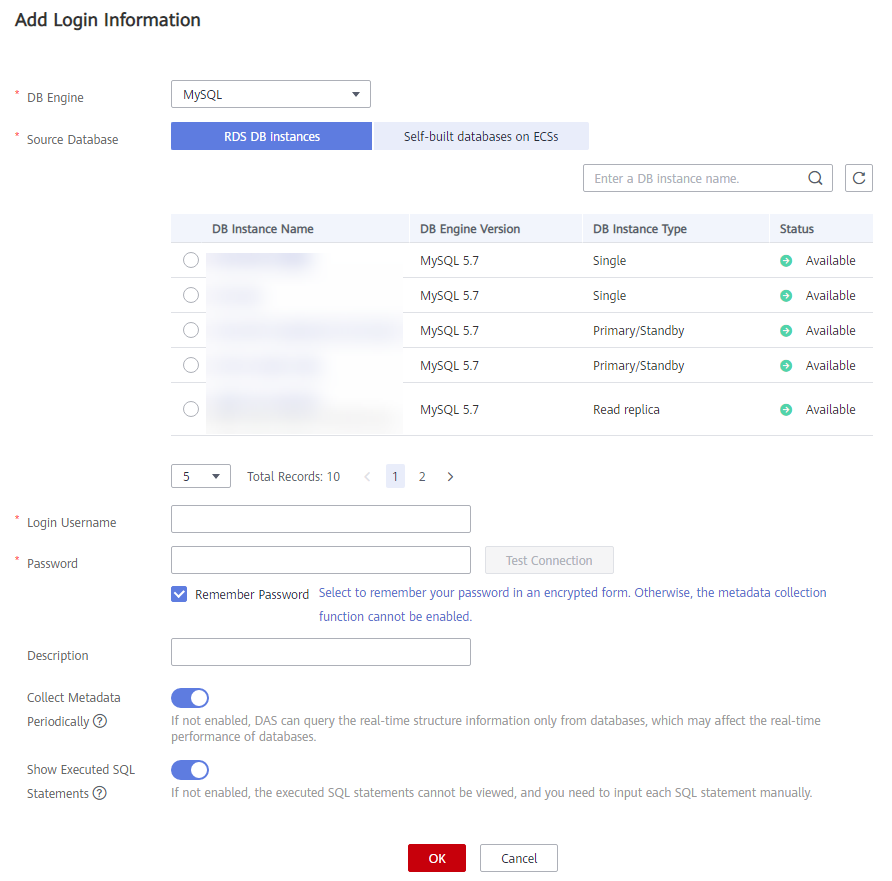
- On the displayed page, select the DB engine, source database, and target DB instance, enter the login username, password, and description (optional), and enable Collect Metadata Periodically and Show Executed SQL Statements.
Figure 1 Add Login Information
 Note
Note- The username and password required for adding the login are the database username and password.
- To delete the password, you can modify or delete the login.
- You are advised to enable Collect Metadata Periodically. If it is disabled, DAS obtains only the structured data from databases in real time, and the performance of databases is affected.
The collection time cannot be customized. Once Collect Metadata Periodically is enabled, DAS automatically collects metadata at 20:00 every day (UTC time). If you are not using a UTC time, convert the time according to your local time zone. You can also click Collect Now to collect metadata at any time you want.
- You are advised to enable Show Executed SQL Statements. With it enabled, you can view the executed SQL statements under SQL Operations > SQL History and execute them again without entering the SQL statements.
- Test the connection as needed. If a message indicating that the connection failed is displayed, modify the connection according to the failure causes contained in the message.
- Click OK.
Adding Login Information for Self-built Databases on ECSs
- In the login list of the Standard Edition, click Add Login.
- On the displayed page, select the DB engine, source database, and target DB instance, enter the port, login username, password, and description (optional), and enable Collect Metadata Periodically and Show Executed SQL Statements.
- Click Test Connection. If a message is displayed indicating connection successful, continue with the operation. If a message is displayed indicating connection failed and the failure cause is provided, make modifications according to the error message.Note
- Self-built databases on ECSs support MySQL 5.5, 5.6, 5.7, and 8.0 DB instances. HA clusters are not supported.
- Self-built databases on ECSs support PostgreSQL 9.4, 9.5, 9.6, 10, 11 and 12 DB instances.
- Self-built databases on ECSs support Microsoft SQL Server 2008, 2012, 2014, 2016, and 2017 DB instances. HA clusters are not supported.
- The username and password required for adding the login are the database username and password.
- The port is the port of your self-built DB instance. Ensure that the security group of the ECS allows access to this port. To avoid conflicts with reserved ports, you are advised to set a port number ranging from 1024 to 65535.
- To delete the password, you can modify or delete the login.
Click OK.
Parent topic: User Guide