By default, when indexes are deleted in an Elasticsearch cluster, the index data is deleted permanently. To prevent data loss caused by accidental deletion, CSS provides an index recycle bin. When enabled, deleted indexes are temporarily stored in the recycle bin, allowing for recovery before they are permanently removed. This feature improves data reliability and operational security.
How the Feature Works
Figure 1 How the index recycle bin works
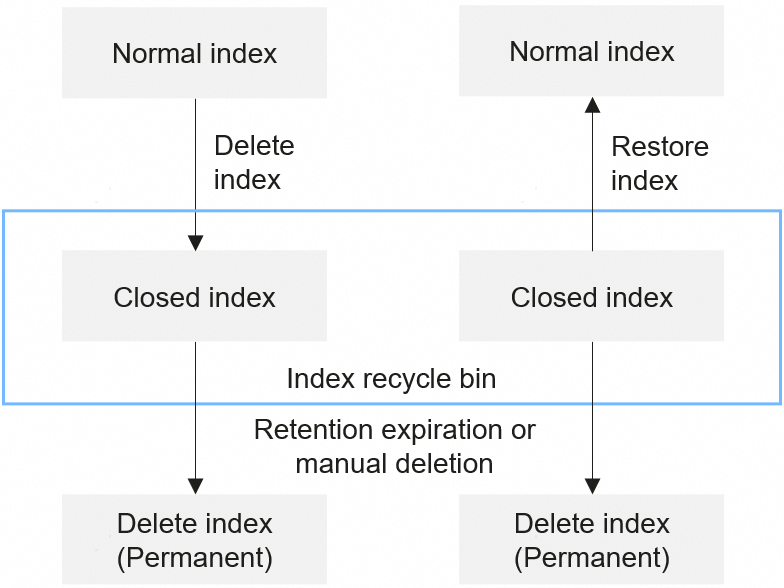
The index recycle bin prevents permanent data loss caused by accidental index deletion. As shown in Figure 1, when the index recycle bin is enabled:
- When you delete an index, the index status changes to Closed, and the closed index is moved to the recycle bin. This may cause the cluster status to briefly turn Red. This status indicates there are unallocated shards in the cluster, but it does not affect service availability.
- Deleted indexes are retained in the recycle bin for a predefined period. When this retention period expires, the deleted index and its data are removed from the recycle bin and are thus permanently deleted. You can also manually delete them from the index recycle bin at any time, which is also permanent.
- To restore a deleted index, select it in the recycle bin, and click Restore. The index becomes Open again, and its shards are reinitialized. This process can also cause the cluster status to become Red temporarily.
Constraints
- Only Elasticsearch 7.10.2 supports the index recycle bin.
- Indexes in the recycle bin remain part of the cluster metadata. This is why you cannot create indexes with the same name as those in the recycle bin.
Logging In to Kibana
Log in to Kibana and go to the command execution page. Elasticsearch clusters support multiple access methods. This topic uses Kibana as an example to describe the operation procedures.
- Log in to the CSS management console.
- In the navigation pane on the left, choose Clusters > Elasticsearch.
- In the cluster list, find the target cluster, and click Kibana in the Operation column to log in to the Kibana console.
- In the left navigation pane, choose Dev Tools.
The left part of the console is the command input box, and the triangle icon in its upper-right corner is the execution button. The right part shows the execution result.
Enabling the Index Recycle Bin
- Run the following command to enable the index recycle bin:PUT _cluster/settings{"persistent": {"index.trash.enabled": true}}
Table 1 Parameters for enabling the index recycle bin Parameter
Type
Default Value
Description
index.trash.enabled
Boolean
false
Whether to enable the index recycle bin. When the index recycle bin is enabled, deleting indexes will first move them to the recycle bin. The indexes will be permanently deleted only when they are cleared from the recycle bin.
The value can be:
- true: Enable the index recycle bin.
- false: Disable the index recycle bin.
indices.trash.keep.time
String
1d
Index retention period in the recycle bin. Expired indexes are permanently removed via a scheduled deletion task.
Value format: number + unit
- Number: a natural number
- Unit: nanos (nanosecond), micros (microsecond), ms (millisecond), s (second), m (minute), h (hour), or d (day)
Minimum value: 1d
indices.trash.clean.interval
String
5m
Recycle bin cleanup interval. The system runs a periodic cleanup job to permanently remove expired indexes in the recycle bin.
Value format: number + unit
- Number: a natural number
- Unit: nanos (nanosecond), micros (microsecond), ms (millisecond), s (second), m (minute), h (hour), or d (day)
Minimum value: 5m
- To manually delete specified indexes from the index recycle bin right away, instead of waiting for them to be removed periodically, run the following command:DELETE {index_name}
Table 2 Parameter description Parameter
Type
Default Value
Description
index_name
String
N/A
Specifies one or more indexes.
- Single index: Enter the index name, for example, my_index.
- Multiple indexes: Enter multiple index names and use a comma (,) to separate them, for example, my_index1,my_index2.
- Wildcard: Use the wildcard (*) to match multiple indexes. For example, myindex* indicates all indexes whose name starts with myindex.
Viewing Indexes in the Recycle Bin
Run the following command to view indexes in the index recycle bin to confirm index status:
GET _cat/trash?v=true&s=index
Parameter | Type | Default Value | Description |
|---|---|---|---|
v | Boolean | false | Whether the returned table will have a header. The value can be:
|
s | String | N/A | Index sorting field. The value can be:
|
format | String | None specified (table format) | The format of the returned result. Value range: json (text), yaml (text), cbor (binary), or smile (binary) If none of these four formats is specified, the result will be returned in a table. |
h | String | None specified (all) | Column names to be displayed in the returned table. If you wish to display only some of the columns, specify their names and separate them with a commas (,), for example, h=index,uuid,delete.time. |
The following is an example of the output.
index uuid pri rep trash.ts delete.timeindex1 CMD3FCLzTOyTg4RUekWNNA 1 1 1714465116615 23.6hindex1 6ATijuu6SfqamVI-WMyOKg 1 1 1714466233898 23.9h
When delete.time becomes 0, an index will be permanently deleted.
Restoring an Index from the Recycle Bin
- Run the following command to restore an index from the recycle bin:POST /trash/recover/{index_name}
- Run the following command to query the index list and check whether the index has been successfully restored:GET _cat/indices?v=true
Emptying the Recycle Bin
Emptying the recycle bin permanently deletes its data. Before doing that, make sure important data has been backed up.
- Run the following command to empty the recycle bin:POST trash/empty
- Run the following command to confirm that the recycle bin has been emptied:GET _cat/trash?v=true&s=index