Low aggregation query performance often slows down analysis when large datasets are involved. CSS Elasticsearch clusters leverage vectorization and optimized clustering to accelerate aggregation queries, enabling faster analytics and decision-making.
How the Feature Works
Enhanced aggregation works by pre-sorting and physically clustering data using carefully selected sorting and clustering keys upon ingestion, thereby minimizing data scanning and computational overheads during aggregation.
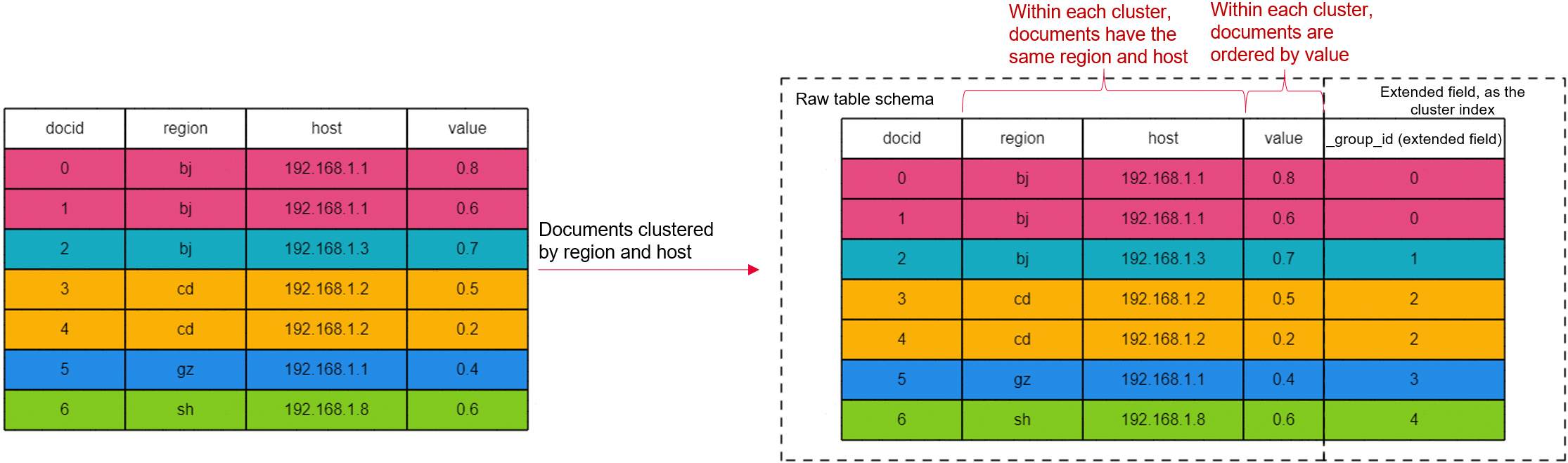
For example, for an index that contains the region, host, and value fields, documents can be sorted by these three fields upon ingestion, and then clustered and stored based on the region and host fields. In this case, documents with the same region or host are stored together, and are then sorted by the value field within each cluster.
When an aggregation query is performed, data is queried by clustering key (region and host), or by the value field within each cluster. This improves query efficiency.
Figure 1 An example of enhanced aggregation
Scenario | Description |
|---|---|
Aggregation of low-cardinality fields | Aggregates fields that have a small number of unique values. In this case, grouping is used. One example is counting the number of orders per city. A clustering operation can easily achieve this purpose. |
Aggregation of high-cardinality fields | Aggregates fields that have a large number of unique values. Histogram aggregation is typically used. One example is counting the hourly visits. A sorting key can be used to accelerate data aggregation by a specified scope or range. |
Hybrid aggregation of low- and high-cardinality fields | First groups and aggregates low-cardinality fields (for example, orders per city) using a clustering key, and then creates a histogram for high-cardinality fields (for example, timestamps) using a sorting key. Multi-level clustering improves the efficiency of hybrid queries. |
Constraints
Only Elasticsearch 7.10.2 supports enhanced aggregation.
Logging In to Kibana
Log in to Kibana and go to the command execution page. Elasticsearch clusters support multiple access methods. This topic uses Kibana as an example to describe the operation procedures.
- Log in to the CSS management console.
- In the navigation pane on the left, choose Clusters > Elasticsearch.
- In the cluster list, find the target cluster, and click Kibana in the Operation column to log in to the Kibana console.
- In the left navigation pane, choose Dev Tools.
The left part of the console is the command input box, and the triangle icon in its upper-right corner is the execution button. The right part shows the execution result.
Aggregation of Low-Cardinality Fields
Generally, low-cardinality fields use grouping as a way of aggregation. With appropriate sorting keys, grouping prepares the data for batch processing.
For example, to aggregate two low-cardinality fields city and product, perform the following steps: Parameter Type Default Value Description index.search.turbo.enabled Boolean false Whether to enable enhanced aggregation. Normally, enhanced aggregation must be enabled where aggregations are used. The value can be: index.sort.field Array of strings N/A Specify sorting keys. Sorting keys are fields used to sequence or rank documents. You can specify one or multiple fields as sorting keys. When multiple fields are specified, they will apply in the sequence in which they are specified. Documents are first ranked by the first field, then the initial result set is ranked by the second field, and so on. Value range: The value must be fields contained in the index. index.cluster.field Array of strings N/A Specify clustering keys. Clustering keys determine which documents are collected into the same clusters. During an aggregation operation, documents in the same cluster can be processed in batches, significantly enhancing aggregation performance. Constraint: The clustering keys must be a subset of the sorting keys. Value range: The value must be fields contained in the index. For example, query the average trade value for each product in different cities.
Aggregation of High-Cardinality Fields
High-cardinality fields commonly use sorting keys for histogram aggregation, which facilitates data processing per range or scope.
For example, to aggregate the typical high-cardinality field date, perform the following steps: Parameter Type Default Value Description index.search.turbo.enabled Boolean false Whether to enable enhanced aggregation. Normally, enhanced aggregation must be enabled where aggregations are used. The value can be: index.sort.field Array of strings N/A Specify sorting keys. Sorting keys are fields used to sequence or rank documents. You can specify one or multiple fields as sorting keys. When multiple fields are specified, they will apply in the sequence in which they are specified. Documents are first ranked by the first field, then the initial result set is ranked by the second field, and so on. Value range: The value must be fields contained in the index. This query groups the date field using a histogram and then calculates the average score.
Hybrid Aggregation of Low- and High-Cardinality Fields
Where low-cardinality and high-cardinality fields are mixed, first group and aggregate low-cardinality fields using a clustering key, then create a histogram for high-cardinality fields using a sorting key.
For example, to first group the low-cardinality field city, then group the low-cardinality field product, and then group the high-cardinality field date into a histogram, perform the following steps: Parameter Type Default Value Description index.search.turbo.enabled Boolean false Whether to enable enhanced aggregation. Normally, enhanced aggregation must be enabled where aggregations are used. The value can be: index.sort.field Array of strings N/A Specify sorting keys. Sorting keys are fields used to sequence or rank documents. You can specify one or multiple fields as sorting keys. When multiple fields are specified, they will apply in the sequence in which they are specified. Documents are first ranked by the first field, then the initial result set is ranked by the second field, and so on. Constraint: High-cardinality fields must be among the sorting keys, and must follow the last low-cardinality field. Value range: The value must be fields contained in the index. index.cluster.field Array of strings N/A Specify clustering keys. Clustering keys determine which documents are collected into the same clusters. During an aggregation operation, documents in the same cluster can be processed in batches, significantly enhancing aggregation performance. Constraint: The clustering keys must be a subset of the sorting keys. Value range: The value must be fields contained in the index. For example, query the average trade value of each product in different cities on each day specified by the date field.
Performance Testing
Test environment
Test Procedure
Test Result
This test focuses on the query result of dropoff_datetime aggregation, that is, the results of tasks autohisto_agg and date_histogram_agg. The following table compares the test results between when enhanced aggregation is disabled and when it is enabled.
Metric | Task | Unit | Enhanced Aggregation Disabled | Enhanced Aggregation Enabled | Enhanced Aggregation Disabled | Enhanced Aggregation Enabled | open/close | Conclusion | ||||
|---|---|---|---|---|---|---|---|---|---|---|---|---|
Test Round 1 | Test Round 2 | Test Round 3 | Test Round 1 | Test Round 2 | Test Round 3 | Mean Value | Mean Value | |||||
Min Throughput | autohisto_agg | ops/s | 4.42 | 4.44 | 4.43 | 11.66 | 11.94 | 11.96 | 4.43 | 11.85 | 2.68 | Throughput improves more than 2.5 times. |
Mean Throughput | autohisto_agg | ops/s | 4.50 | 4.46 | 4.44 | 11.81 | 11.99 | 12.00 | 4.47 | 11.93 | 2.67 | |
Median Throughput | autohisto_agg | ops/s | 4.51 | 4.46 | 4.44 | 11.83 | 11.98 | 12.00 | 4.47 | 11.94 | 2.67 | |
Max Throughput | autohisto_agg | ops/s | 4.54 | 4.48 | 4.45 | 11.90 | 12.07 | 12.02 | 4.49 | 12.00 | 2.67 | |
100th percentile latency | autohisto_agg | ms | 216.30 | - | - | - | 84.56 | 80.38 | 216.30 | 82.47 | 0.38 | Latency decreases by more than 60%. |
100th percentile service time | autohisto_agg | ms | 216.30 | - | - | - | 84.56 | 80.38 | 216.30 | 82.47 | 0.38 | |
error rate | autohisto_agg | % | 0 | 0 | 0 | 0 | 0 | 0 | 0 | 0 | 0 | - |
Min Throughput | date_histogram_agg | ops/s | 4.72 | 4.67 | 4.65 | 12.57 | 12.40 | 12.59 | 4.68 | 12.52 | 2.68 | Throughput improves more than 2.5 times. |
Mean Throughput | date_histogram_agg | ops/s | 4.73 | 4.67 | 4.67 | 12.61 | 12.46 | 12.61 | 4.69 | 12.56 | 2.68 | |
Median Throughput | date_histogram_agg | ops/s | 4.73 | 4.67 | 4.67 | 12.62 | 12.46 | 12.60 | 4.69 | 12.56 | 2.68 | |
Max Throughput | date_histogram_agg | ops/s | 4.74 | 4.67 | 4.67 | 12.64 | 12.49 | 12.63 | 4.69 | 12.59 | 2.68 | |
50th percentile latency | date_histogram_agg | ms | 202.61 | 218.09 | 213.43 | 77.64 | 76.02 | 82.63 | 211.38 | 78.77 | 0.37 | Latency decreases by more than 60%. |
100th percentile latency | date_histogram_agg | ms | 207.35 | 223.88 | 246.63 | 77.99 | - | - | 225.95 | 77.99 | 0.35 | |
50th percentile service time | date_histogram_agg | ms | 202.61 | 218.09 | 213.43 | 77.64 | 76.02 | 82.63 | 211.38 | 78.77 | 0.37 | |
100th percentile service time | date_histogram_agg | ms | 207.35 | 223.88 | 246.63 | 77.99 | - | - | 225.95 | 77.99 | 0.35 | |
error rate | date_histogram_agg | % | 0 | 0 | 0 | 0 | 0 | 0 | 0 | 0 | 0 | - |
Test Conclusion
Given the same cluster configuration, aggregation performance improves significantly when enhanced aggregation is enabled. Query throughput improves by more than 2.5 times, and latency decreases by more than 60%.