With CSS, when an Elasticsearch cluster's security needs change, you can change its security mode settings.
Configure the security mode based on the security needs of your cluster.
Cluster Type | Key Settings | Description | Applicable Scenario |
|---|---|---|---|
Non-security mode cluster | Security Mode: disabled | Access to such a cluster requires no user authentication, and data will be transmitted in plaintext using HTTP. | Use when creating a cluster for internal testing or workloads that have a low security standard.
Make sure the cluster is deployed in a secure environment. Do not expose the cluster's network interface to the public network. |
Security-mode cluster | Security-mode cluster + HTTP:
| Such a cluster requires user authentication. It supports access control and data encryption, and it uses HTTP to transmit data in plaintext. | Use to balance security and performance.
Make sure the cluster is deployed in a secure environment. Do not expose the cluster's network interface to the public network. |
Security-mode cluster + HTTPS:
| Such a cluster requires user authentication. It supports access control and data encryption, and it uses HTTPS to encrypt communication and enhance data security. | Use when security takes precedence over performance and public network access is required.
|
Table 2 lists the various types of security mode changes supported for CSS clusters.
Action | Scenario | Change Process |
|---|---|---|
Switching from the non-security mode to security mode | Non-security mode → Security mode + HTTP: Change a cluster from non-security mode to security mode + HTTP. |
|
Non-security mode → Security mode + HTTPS: Change a cluster from non-security mode to security mode + HTTPS. | ||
Switching from the security mode to non-security mode | Security mode → Non-security mode:
| |
Switching between HTTP and HTTPS in security mode | HTTP → HTTPS: Change a cluster from security mode + HTTP to security mode + HTTPS. | |
HTTPS → HTTP: Change a cluster from security mode + HTTPS to security mode + HTTP. |
Constraints
The security mode settings can be changed only for Elasticsearch clusters created after November 2022 and whose version is 6.5.4 or later.
Change Impact
Before changing the security mode for a cluster, it is essential to assess the potential impacts and review operational recommendations. This enables proper scheduling of the change, minimizing service interruptions.
Action | Service Interruption | Authentication Mode | Performance | Public Network Access | Security Account |
|---|---|---|---|---|---|
Non-security mode → Security mode + HTTP | Yes | Authentication required | N/A | Disallowed | N/A |
Non-security mode → Security mode + HTTPS | Yes | Authentication required | Downgraded | Allowed | N/A |
Security mode → Non-security mode | Yes | Authentication not required | Enhanced | Automatically disabled | Permanently deleted |
HTTP → HTTPS | Yes | No change | Downgraded | Allowed | N/A |
HTTPS → HTTP | Yes | No change | Enhanced | Automatically disabled | N/A |
Impact description:
- The security mode can be enabled or disabled for a cluster, and a security-mode cluster can use either HTTPS and HTTP.
- Service interruption: When a cluster's security mode is changed, the cluster automatically restarts, leading to temporary service unavailability.
- Authentication mode: Changing a cluster's security mode also changes its user authentication mechanism. The client authentication logic must be updated accordingly. If client adaptation cannot be completed in a timely manner, services may be interrupted.
- Performance impact: Given the same hardware configuration, switching from HTTP to HTTPS leads to a performance loss (such as throughput) of around 20% under high concurrency. Conversely, when a cluster switches from HTTPS to HTTP, cluster performance improves.
- Public network access: Only security-mode clusters that use HTTPS support public network access.
- Security account: When the security mode is disabled for a cluster, the system permanently deletes the cluster's security account.
- Tool impact: If the security mode is changed for a cluster that has an ongoing Kibana session, a session error message will be displayed on Kibana. To rectify the error, clear the cache and launch Kibana again.
Changing the security mode for a cluster changes its accessibility mode, possibly causing service interruptions. You should perform this operation before services are brought online or when service interruptions can be tolerated.
Change Duration
The following formula can be used to estimate how long it will take to change the security mode for a cluster:
Change duration (min) = 5 (min) x Total number of nodes to change + Data recovery duration (min)
where,
- 5 minutes indicates how long non-data recovery operations (e.g., initialization) typically take per node. It is an empirical value.
- The total number of nodes is the sum of the number of data nodes, master nodes, client nodes, and cold data nodes in the cluster.
Data recovery duration (min) = Total data size (MB)/[Total number of vCPUs of the data nodes x 32 (MB/s) x 60 (s)]
where,
- 32 MB/s indicates that each vCPU can process 32 MB of data per second. It is an empirical value.
- The formulas above use estimates under ideal conditions. The actual data recovery speed depends on cluster load.
Prerequisites
- All mission-critical data has been backed up. For details, see Creating Snapshots to Back Up the Data of an Elasticsearch Cluster.
- The cluster status is Available, and there are no ongoing tasks.
- Check whether load balancing is enabled for the cluster. If yes, disable load balancing first. Enable load balancing again after the security mode is changed. This prevents errors in accessing the cluster through the load balancer during the change.
Switching from the Non-Security Mode to Security Mode
You can change a non-security mode cluster to a security-mode cluster that uses HTTP or HTTPS. After a cluster's security mode is enabled, user authentication is required for accessing the cluster.
- Log in to the CSS management console.
- In the navigation pane on the left, choose Clusters > Elasticsearch.
- In the cluster list, find the target cluster, and choose More > Modify Configuration in the Operation column. The Modify Configuration page is displayed.
- Choose the Change Security Mode tab.
- Enable the security mode. Enter and confirm the administrator password of the cluster.
Figure 1 Enabling the security mode
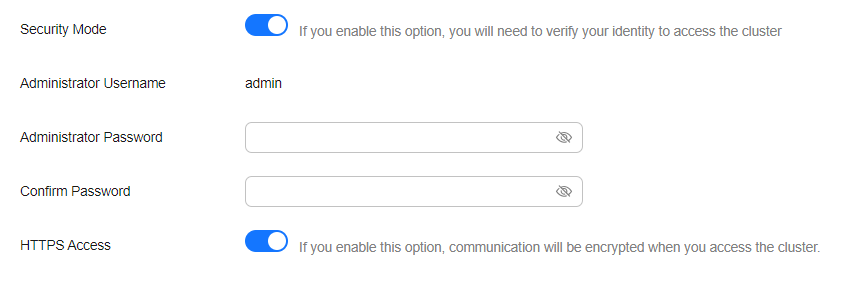
- Enable or disable HTTPS Access.
- If you enable HTTPS Access, HTTPS is used to encrypt cluster communication, and public network access can be enabled for the cluster.
- If you disable HTTPS Access, HTTP is used, and public network access is disallowed for the cluster.
- Click Submit, and confirm the information. The cluster list is displayed.
The Task Status of the cluster is Changing security mode. When the cluster status changes to Available, the security mode has been successfully changed.
Switching from Security Mode to Non-Security Mode
You can change a security-mode cluster that uses HTTP or HTTPS to a non-security cluster. After a cluster's security mode is disabled, user authentication is no longer required for accessing the cluster.

- Clusters with the security mode disabled do not require user authentication, and HTTP is used to transmit data in plaintext. Make sure such a cluster are deployed in a secure environment, and do not expose the cluster's network interface to the public network.
- When a cluster is switched from the security mode to non-security mode, indexes used by the security-mode cluster will be deleted. Back up data before changing the security mode.
- If a public IP address has been assigned to a security-mode cluster, unassign it before changing the security mode.
- If Kibana public network access is enabled for a security-mode cluster, disable it before changing the security mode.
- Log in to the CSS management console.
- In the navigation pane on the left, choose Clusters > Elasticsearch.
- In the cluster list, find the target cluster, and choose More > Modify Configuration in the Operation column. The Modify Configuration page is displayed.
- Choose the Change Security Mode tab.
- Disable the security mode.
Figure 2 Disabling the security mode

- Click Submit. In the displayed dialog box, confirm the information. The cluster list page is displayed.
The Task Status of the cluster is Changing security mode. When the cluster status changes to Available, the security mode has been successfully changed.
Switching between HTTP and HTTPS in Security Mode
You can change the protocol of a security cluster.
If a public IP address has been assigned to a security-mode cluster, unassign it before changing from HTTPS to HTTP.
- Log in to the CSS management console.
- In the navigation pane on the left, choose Clusters > Elasticsearch.
- In the cluster list, find the target cluster, and choose More > Modify Configuration in the Operation column. The Modify Configuration page is displayed.
- Choose the Change Security Mode tab.
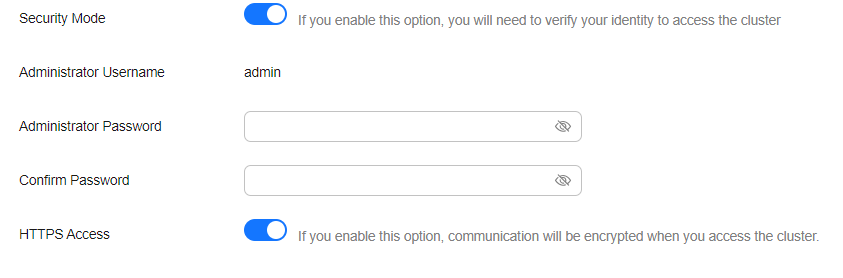
- Enable or disable HTTPS Access.
Figure 3 Configuring the protocol
- If you enable HTTPS Access,
HTTPS is used to encrypt cluster communication and you can enable public network access for the cluster.
- If you disable HTTPS Access, an alarm message is displayed. Click OK to disable the protocol.
Cluster communication is no longer encrypted and public network access cannot be enabled.
- If you enable HTTPS Access,
- Click Submit, and confirm the information. The cluster list is displayed.
The Task Status of the cluster is Changing security mode. When the cluster status changes to Available, the security mode has been successfully changed.