As a business expands, its time series data, such as logs and metrics, can grow exponentially. Storage costs can increase dramatically, and over-sized indexes can lead to poor query performance. To prevent these issues, operations teams traditionally needed to manually create new indexes, migrate old data, and delete obsolete data on a daily basis, which can be a tedious and error-prone process. Index lifecycle automation addresses these challenges by automatically managing index state transitions. This ensures read and write performance for hot data, reduces cold storage costs, and automatically deletes obsolete data. CSS Elasticsearch clusters provide the Index State Management (ISM) plugin for this purpose. By configuring ISM policies, you can automate key lifecycle operations, for example, to automatically roll over an index when it reaches 50 GB, transition it to cold storage when it is 30 days old, and delete it when it is 90 days old. This helps reduce costs and improve efficiency.
Additionally, CSS provides advanced ISM features such as skipping auto rollover for empty indexes and automatic retry of failed ISM tasks. These features further reduce the operational workload and enhance ISM task reliability.
- ISM: the Elasticsearch plugin that automates index lifecycle management. For more information, see the official document Index State Management.
- Policy: a set of rules for index lifecycle management. An example of a policy: If the number of documents in an index exceeds 10 million, the index rolls over.
- Rollover: When a write index grows beyond a specified size, age, or number of documents, a new index is automatically created to serve as the new write index. The old index changes to read-only or an archived state based on the ISM policy.
Constraints
- Only Elasticsearch clusters 7.6.2 or later support the ISM plugin.
- The Kibana GUI varies depending on the Kibana version. Kibana 7.10.2 is used as an example here.
Step 1: Creating an ISM Policy
Define one or more ISM policies on Kibana to tell the cluster how to manage indexes.
- Log in to the CSS management console.
- In the navigation pane on the left, choose Clusters > Elasticsearch.
- In the cluster list, find the target cluster, and click Kibana in the Operation column to log in to the Kibana console.
- On the Kibana console, expand the menu in the upper-left corner, and choose IM or Index Management to go to the index management page.
- Select Index Policies.
- Click Create policy to configure an index lifecycle policy.
- Policy ID: Enter a custom policy name.
- Define policy: Define the policy in JSON format. You can define a policy by modifying the default system example.
Figure 1 Creating a policy

- Click Create.
Step 2: Associating a Policy with Indexes
After an ISM policy is created, associate it with specific indexes to apply it. You are advised to associate a policy with an index template. This ensures that the policy is automatically applied to all indices created based on this template.
- Method 1: Associate a policy with an index template (recommended)
Use this method for indexes that store time series data.
- In the left navigation pane on Kibana, choose Dev Tools.
The left part of the console is the command input box, and the triangle icon in its upper-right corner is the execution button. The right part shows the execution result.
- Run the following command to create or update an index template:PUT _template/<template_name>{"index_patterns": ["index_name-*"], // Match all indexes whose name starts with index_name-."settings": {"opendistro.index_state_management.policy_id": "Policy_ID" // Replace it with the target policy ID.}}
For more information, see Create template.
- On the Managed Indices page, check for newly-created indexes whose name starts with index_name-*, and check whether their Policy is the associated policy ID.
- In the left navigation pane on Kibana, choose Dev Tools.
- Method 2: Manually associating an existing index with a policy
Use this method to associate a policy with existing indexes that are currently not associated with any policy.
- On the Kibana console, expand the menu in the upper-left corner, and choose IM or Index Management to go to the index management page.
- Click Indices.
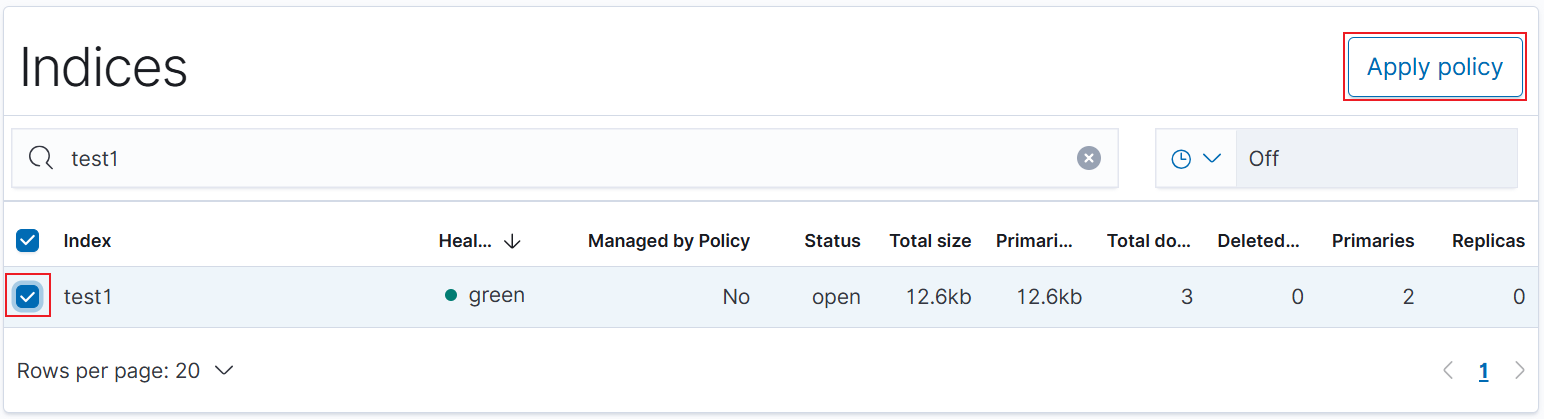
- In the Indices list, select one or more indexes.
- Click Apply policy in the upper right corner. In the displayed dialog box, select a policy ID.
Figure 2 Apply policy
- Click Apply.
- On the Managed Indices page, locate the indexes and make sure their Policy is the associated policy ID.
After you associate a policy with indexes, ISM automatically creates a job that runs every 5 minutes to execute the policy, check criteria, and change index states based on the policy.
Step 3: Managing ISM Policies
To manage deployed ISM policies, choose Index Management > Managed Indices on Kibana.
- View status: In the Managed Indices list, check the policy associated with each index and the policy status.
- Retry policy: If the policy associated with an index is not working properly, select this index and click Retry policy.
- Change policy: To update the policy for an index, click Change policy.
- Remove policy: To stop lifecycle management for an index, click Remove policy.
(Advanced Feature) Disabling Auto Rollover for Empty Indexes
A lifecycle policy can be configured to enable automatic index rollover, that is, automatically creating a new index when an existing index meets certain conditions (for example, when it reaches a predefined age in terms of days). The new index then receives subsequent writes. By default, even if an existing index contains no documents, new indexes are still created. Over time, this can result in a large number of empty indexes. To prevent this, CSS allows you to disable automatic rollover for empty indexes. This is achieved by configuring a lifecycle policy to allow automatic rollover only for indexes that contain documents. By doing so, you can prevent excessive empty indexes from being created, thus optimizing storage utilization and enhancing overall system efficiency.
This feature is supported only when an Elasticsearch cluster meets the following conditions:
You can disable automatic rollover for empty indexes at either the index level or the cluster level. Index-level settings take precedence over cluster-level settings. You must configure this manually. The commands are as follows:
- Disable empty index automatic rollover for a specified index:PUT {index_name}/_settings{"index.plugins.index_state_management.rollover.only_if_has_documents": true}
- Disable empty index automatic rollover at the cluster level:PUT _cluster/settings{"persistent": {"plugins.index_state_management.rollover.only_if_has_documents": true}}
(Advanced Feature) Configuring Auto Retry for ISM Tasks
ISM tasks (such as converting hot data to cold data and deleting expired indexes) can fail due to transient cluster issues like resource constraints, node restarts, or network interruptions. To address this, CSS automatically retries (reactivates) failed ISM tasks at configured intervals until they succeed. This ensures the continuity and reliability of ISM tasks.
This feature is supported only when an Elasticsearch cluster meets the following conditions:
Automatic retry of ISM tasks is enabled by default for Elasticsearch clusters that meet the conditions above.
For Elasticsearch clusters that do not meet these conditions, upgrade them to enable this feature. However, ISM tasks that have already failed before the upgrade will not be retried after the cluster is upgraded. You will need to manually retry them before the automatic retry can occur. The command for retrying failed ISM tasks is as follows:
POST _opendistro/_ism/retry/{index_name}
Run the following command to modify automatic retry settings for index lifecycle management tasks:
Parameter | Type | Default Value | Description |
|---|---|---|---|
plugins.index_state_management.coordinator.css.reactivate | Boolean | true | Whether to enable the Reactivate (auto retry) feature.
|
plugins.index_state_management.coordinator.css.reactivate_period | Time | 30m | Reactivate interval. Value range: ≥ 5m |
plugins.index_state_management.coordinator.css.reactivate_duration | Time | 1h | Initial Reactivate interval, that is, the wait time for another retry after the initial attempt fails. It is not affected by the exponential backoff mechanism. Value range: ≥ 1m |
plugins.index_state_management.coordinator.css.reactivate_max_duration | Time | 24h | Maximum Reactivate interval, that is, the maximum wait time between retry attempts regardless of the effect of the exponential backoff mechanism. This parameter ensures that the retry interval does not increase indefinitely. Value range: ≥ 1m |
plugins.index_state_management.coordinator.css.max_inflight_reactivate_tasks | Long | 10000 | Maximum number of tasks that can be retried at the same time. Value range: 1 to 100000 |
Idempotence considerations for ISM task retry
- Idempotent operations: All steps are retried, starting from the beginning, to ensure data consistency.
- Non-idempotent operations: The retry begins from where the failure occurred. If the original failure cause persists, retries may fail repeatedly, in which case, manual intervention is required.
Examples of non-idempotent operations in Elasticsearch's index lifecycle management tasks: ForceMerge, Notification, and Snapshot.
In the ISM task details API, CSS has added fields that record ISM task execution details. You can run the following command to check ISM task records, including the total number of failures, failure occurrence time, activation time, and failure causes:
GET /_opendistro/_ism/explain/{index_name}
Example response:
{"rollover-0000001" : {"index.opendistro.index_state_management.policy_id" : "logs-policy-rollover","index" : "rollover-0000001",..."reactivate_info" : {"count": 2, //Total number of failures."latest_failed_time": 1764301006792, //Latest failure time."latest_reactivate_time": 1764301486800, //Latest activation time."failed_infos": [ //Historical execution failure records. Only the latest 10 records are retained.{"start_time": 0, //Task execution time. The earliest execution time is 0."failed_time": 1764299686814, //Task failure time."info": { //Task failure cause."message" : "Missing rollover_alias index setting [index=rollover-0000001]"}},{"start_time" : 1764300286841,"failed_time" : 1764301006792,"info" : {"message" : "Missing rollover_alias index setting [index=rollover-0000001]"}}]},...}}