In log analytics and monitoring scenarios, storage costs for historical data accumulate over time. However, most cold data is accessed only occasionally for auditing or backtracking purposes. Storing such data on expensive local SSDs over extended periods does not make economic sense. To balance storage costs with long-term retention requirements, CSS provides a storage-compute decoupling feature for Elasticsearch clusters. By configuring an index state management (ISM) policy, coupled with index freezing, you can have eligible indexes automatically transitioned from local SSDs to lower-cost object storage. The data remains searchable, although query latency may increase.
Solution
This topic describes how to configure an ISM policy to decouple storage and compute.
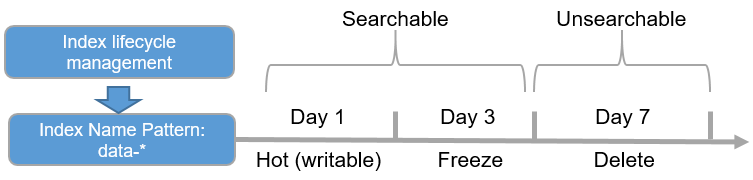
- Hot phase: Data is stored on high-performance local disks to support high-concurrency read and write operations.
- Warm phase: The index is frozen, and data is dumped to OBS. Local disks only retain necessary metadata, and query requests are directly sent to OBS. (Initial queries may experience higher latency, but subsequent queries can accelerate with the use of a cache.)
- Delete phase: When the data retention period expires, the index is automatically deleted to reclaim storage space.
In this example, an ISM policy is created for an Elasticsearch cluster. According to this policy, a newly created index is automatically frozen in three days, with data dumped to OBS; and deleted in seven days.
Figure 1 Storage-compute decoupling
Constraints
Only Elasticsearch 7.6.2 and 7.10.2 clusters support decoupled storage and compute.
Configuring an ISM Policy
- Log in to Kibana and go to the command execution page.
- Log in to the CSS management console.
- In the navigation pane on the left, choose Clusters > Elasticsearch.
- In the cluster list, find the target cluster, and click Kibana in the Operation column to log in to the Kibana console.
- In the left navigation pane, choose Dev Tools.
The left part of the console is the command input box, and the triangle icon in its upper-right corner is the execution button. The right part shows the execution result.
- Define an ISM policy to automate storage-compute decoupling for indexes.
For example, create a policy named hot_warm_policy. According to this policy, a newly created index is automatically frozen in three days, with data dumped to OBS; and deleted permanently in seven days.
PUT _opendistro/_ism/policies/hot_warm_policy{"policy": {"description": "hot warm archive delete workflow","error_notification": null,"default_state": "hot","states": [{"name": "hot","actions": [],"transitions": [{"state_name": "warm","conditions": {"min_index_age": "3d"}}]},{"name": "warm","actions": [{"freeze_low_cost": {} // Freeze the index.}],"transitions": [{"state_name": "delete","conditions": {"min_index_age": "7d"}}]},{"name": "delete","actions": [{"delete": {}}],"transitions": []}]}} - Associate the policy with an index template so that new indexes created using this template will automatically inherit this policy.
For example, create the index template template_hot_warm, which defines that newly created indexes whose name starts with data are automatically associated with the ISM policy hot_warm_policy.
PUT _template/template_hot_warm{"index_patterns": "data*","settings": {"number_of_replicas": 5, // Number of index replicas"number_of_shards": 1, // Number of index shards"opendistro.index_state_management.policy_id": "hot_warm_policy" // Index lifecycle policy name},"mappings": {"properties": {"name": {"type": "text"}}}} - Write data to an index.
For example, create an index named data-2022-06-06 and write data to it in batches.
POST data-2022-06-06/_bulk{"index":{}}{"name":"name1"}{"index":{}}{"name":"name2"}{"index":{}}{"name":"name3"}{"index":{}}{"name":"name4"}{"index":{}}{"name":"name5"}{"index":{}}{"name":"name6"}The index will automatically use the index template template_hot_warm and inherit the lifecycle policy hot_warm_policy through the template.
- Query data and check whether the ISM policy is automatically applied.
- Three days after index creation, query the list of frozen indexes and check whether indexes created three days ago have been frozen.GET _cat/freeze_indices?s=i&v
If the returned result contains data-2022-06-06, the index has been dumped to OBS.
health status index uuid pri rep docs.count docs.deleted store.size pri.store.sizegreen open data-2022-06-06 x8ab5NX6T3Ox_xoGUanogQ 1 1 6 0 7.6kb 3.8kb - Seven days after index creation, query the index list and check whether indexes created seven days ago have been deleted.GET /_cat/indices?expand_wildcards=open,closed
If the returned result does not contain data-2022-06-06, the index has been deleted.
- Three days after index creation, query the list of frozen indexes and check whether indexes created three days ago have been frozen.