Time series data processing workloads, such as log analytics and real-time monitoring, often involve rapid data growth over time. If data continues to be written to a single index, the index can become excessively large, leading to degraded query performance and increased storage consumption due to obsolete data. Traditionally, managing this growth required custom scripts to split indexes, which was complex and costly. Now, by configuring index state management (ISM) policies for indexes in Elasticsearch clusters, you can automate index rollover based on index size or age and have obsolete indexes deleted automatically. This helps balance query performance and storage costs.
- ISM: a plugin that automates index lifecycle management.
- Rollover: When the size or age of an index reaches a predefined threshold, a new index is automatically created, and writes are redirected to the new index.
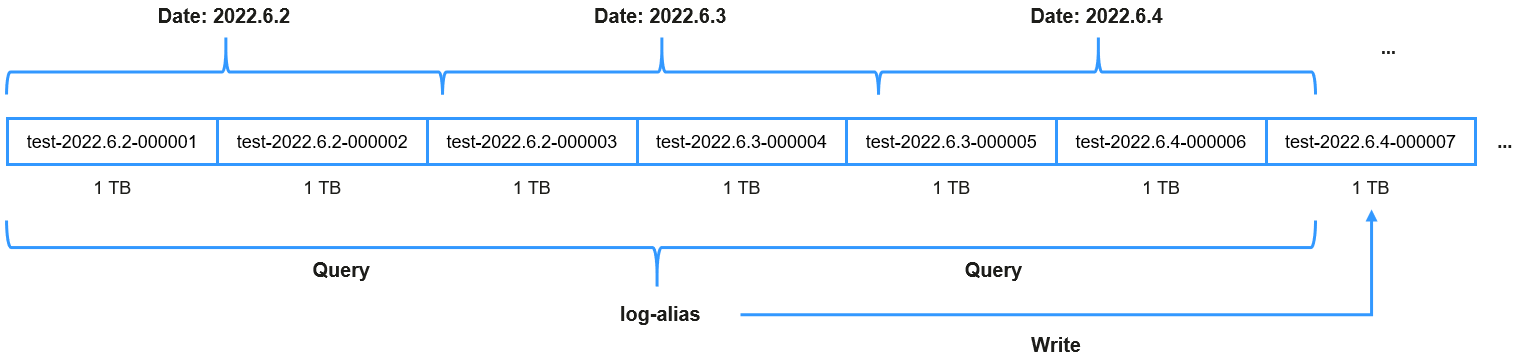
- Alias: the logical index name. During writes, the alias always points to the current active index; and during queries, it points to the current active index plus all historical indexes.
Solution
This topic describes how to configure an ISM policy to automate index rollover.
- Hot phase: Indexes handle high-concurrency writes. When the index size reaches 1 TB or its age reaches one day, a new index is automatically created, and writes are redirected to the new index.
- Warm phase: After seven days, index replicas are disabled to save resources.
- Delete phase: After 30 days, the index is automatically deleted to reclaim storage space.
Assume that an application generates around 2.4 TB of logs every day. An ISM policy can be created to optimize log storage and query performance. In this example, we define the index alias as log-alias. Figure 1 log-alias data organization shows the organization of data in this index. During queries, the alias points to all indexes whose name starts with test. During writes, the alias points only to the latest index.
Figure 1 log-alias data organization
The one day in the rollover time refers to 24 hours following the index creation time, not a calendar day.
Constraints
The Elasticsearch version must be 7.6.2 or later.
Configuring an ISM Policy
- Log in to Kibana and go to the command execution page.
- Log in to the CSS management console.
- In the navigation pane on the left, choose Clusters > Elasticsearch.
- In the cluster list, find the target cluster, and click Kibana in the Operation column to log in to the Kibana console.
- In the left navigation pane, choose Dev Tools.
The left part of the console is the command input box, and the triangle icon in its upper-right corner is the execution button. The right part shows the execution result.
- Define an ISM policy to automate index rollover, state transitions, and deletion.
For example, create a policy named "rollover workflow": When the index size reaches 1 TB or the index age reaches one day, it rolls over automatically. When the index age reaches seven days, replicas are disabled. When it reaches 30 days, the index is deleted.
PUT _opendistro/_ism/policies/rollover_workflow{"policy": {"description": "rollover test","default_state": "hot","states": [{"name": "hot","actions": [{"rollover": {"min_size": "1tb","min_index_age": "1d"}}],"transitions": [{"state_name": "warm","conditions": {"min_index_age": "7d"}}]},{"name": "warm","actions": [{"replica_count": {"number_of_replicas": 0}}],"transitions": [{"state_name": "delete","conditions": {"min_index_age": "30d"}}]},{"name": "delete","actions": [{"delete": {}}]}]}}After a lifecycle policy is created, run the following command to query the policy details:
GET _opendistro/_ism/policies/rollover_workflow Associate the policy with an index template so that new indexes created using this template will automatically inherit the ISM policy and alias.
For example, create an index template named template_test so that newly created indexes whose name starts with test are automatically associated with the ISM policy rollover_workflow, and will use log_alias for index rollover.
PUT _template/template_test{"index_patterns": "test*","settings": {"number_of_replicas": 1, // Number of index replicas"number_of_shards": 1, // Number of index shards"opendistro.index_state_management.policy_id": "rollover_workflow", // Index lifecycle policy name"index.opendistro.index_state_management.rollover_alias": "log_alias" // Which alias to roll over},"mappings": {"properties": {"name": {"type": "text"}}}}After an index template is created, you can run the following command to query the template details:
GET _template/template_testManually create the first index that will start the automatic rollover process.
For example, create the first index, set the date format, specify aliases, and set is_write_index to true. The index will automatically use the index template template_test and inherit the lifecycle policy rollover_workflow through the template.
PUT %3Ctest-%7Bnow%2Fd%7D-000001%3E{"aliases": {"log_alias": {"is_write_index": true // Tells the customer to direct all write requests aiming at log_alias to this index.}}}The index above is the URL code of <test-{now/d}-000001>. By default, the index name contains the creation date. For example, if an index was created on 2022-06-02, the index name is test-2022.06.02-000001.
- Write in data. The alias log_alias is used during data writes, and log_alias always points to the last index.POST log_alias/_bulk{"index":{}}{"name":"name1"}{"index":{}}{"name":"name2"}{"index":{}}{"name":"name3"}{"index":{}}{"name":"name4"}{"index":{}}{"name":"name5"}{"index":{}}{"name":"name6"}
- Query data and check whether the rollover takes effect.
- One day after the indexes are created, check the indexes starting with test.GET _cat/indices/test*?s=i
There are supposed to be at least two indexes, for example:
green open test-<Date>-000001 r8ab5NX6T3Ox_hoGUanogQ 1 1 6 0 416b 208bgreen open test-<Date>-000002 sfwkVgy8RSSEw7W-xYjM2Q 1 1 0 0 209b 209bIn the preceding information, test-<Date>-000001 is the index created in 4, and test-<Date>-000002 is the index generated through rollover.
- To query the index associated with the alias log_alias, run the following command:GET _cat/aliases/log_alias?v
The alias is supposed to point to multiple indexes, for example:
alias index filter routing.index routing.search is_write_indexlog_alias test-<Date>-000001 - - - falselog_alias test-<Date>-000002 - - - true
- One day after the indexes are created, check the indexes starting with test.
FAQ: How Do I Skip Rollover for an Index?
Scenarios
- A manual rollover is performed: A time-based ISM policy was configured to automate index rollover. Before the rollover criteria were met, however, a manual rollover was performed. When the auto rollover time configured by ISM was reached, an automatic rollover was attempted but failed because the index had already been rolled over manually. As a result, the ISM task stopped. To solve this problem, you need to skip the index rollover and then retry the ISM task to resume automatic index rollover.
- For an index that has already been rolled over automatically, a remove or add policy operation is performed: After the rollover policy is modified (through the remove policy or add policy operation), the ISM task restarts from the beginning. When rollover starts, the task fails. To solve this, you also need to skip index rollover and then retry the ISM task to resume automatic index rollover.
After rollover is skipped for an index, ISM will no longer attempt rollover or generate rolled-over indexes. This means skipping index rollover may lead to data loss. Please exercise caution.
Constraints
To skip index rollover, the Elasticsearch cluster version must be 7.6.2 or 7.10.2, and the cluster image version must not be earlier than 7.x.2_25.1.0_x.x.x.
Procedure
- If an ISM task stops due to an index rollover failure, run the following command to skip index rollover:PUT {index_name}/_settings{"index.plugins.index_state_management.rollover_skip": true}
If true is returned, the configuration is successful.
- After index rollover is skipped, run the following command to retry the ISM task:POST _opendistro/_ism/retry/{index_name}
If the following information is returned, the retry is successful:
{"updated_indices": 1,"failures": false,"failed_indices": []}