This topic introduces the end-to-end procedure for using CSS Elasticsearch to build enterprise-grade search and analytics applications, covering key steps from environment setup to application rollout.
Figure 1 Procedure for using CSS Elasticsearch
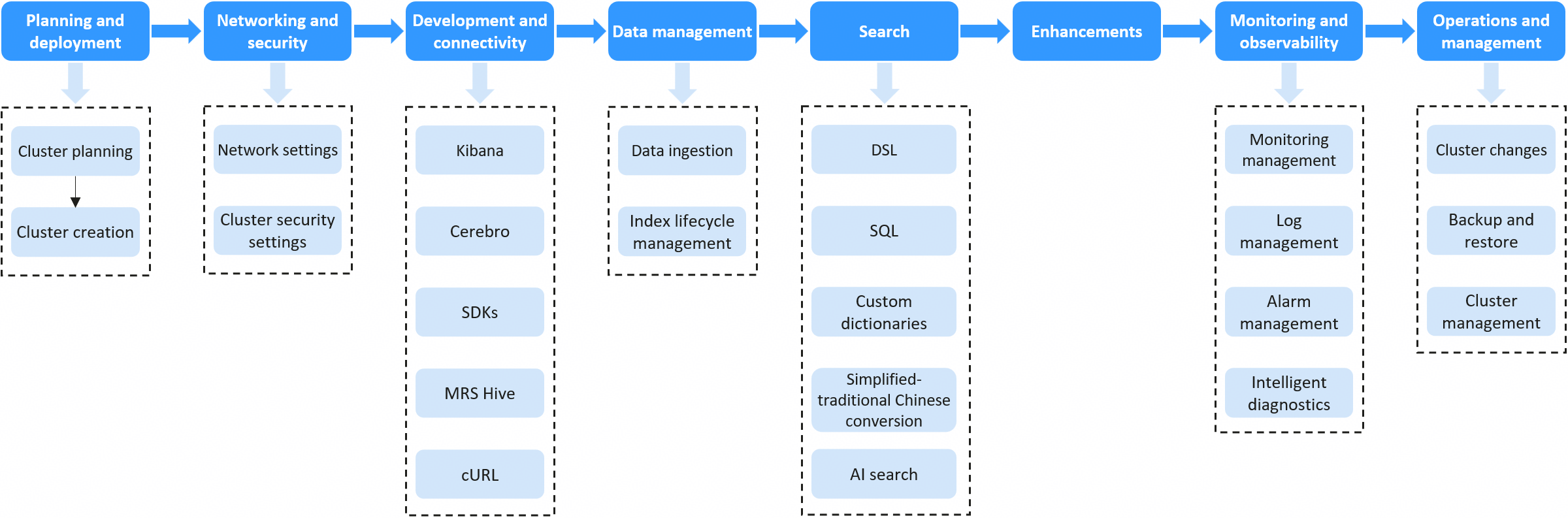
Stage | Key Step | Description | Details |
|---|---|---|---|
Planning and deployment | Cluster planning | Based on projected data volumes and intended use cases, plan node specifications, multiple-AZ deployment, and security mode in advance to minimize the need for changes after cluster creation. | |
Creating a cluster | Create an Elasticsearch cluster based on your planning and service requirements. | ||
Networking and security | Network settings | CSS Elasticsearch clusters support several different networking modes. Choose the configuration that best suits your connectivity needs. | - |
Cluster security settings | Configure user permissions and authentication policies to ensure cluster access security. | ||
Development and connectivity | Connecting to your cluster | CSS provides multiple connection options tailored to different roles, programming languages, and network environments. At the application layer, CSS supports open-source RESTful APIs and SDKs for popular languages. It also includes built-in visualization and management tools such as Kibana and Cerebro. | |
Data management | Data ingestion | CSS Elasticsearch clusters provide multiple data ingestion options, including Logstash, open-source Elasticsearch APIs, and the Cloud Data Migration (CDM) service. Choose one that best suits your service requirements. | |
Index lifecycle management | CSS Elasticsearch clusters provides the Index State Management (ISM) plugin that you can use to configure and manage index lifecycle policies and automate index rollover. This helps reduce costs and improve efficiency. | ||
Search | Search and analytics | CSS Elasticsearch clusters support both DSL and SQL as query languages, along with an efficient tokenization plugin. It helps you build an intelligent search and big data analytics platform for efficient data mining and accurate insights. | |
Enhancements | CSS enhancements over open-source Elasticsearch | CSS offers major enhancements over open-source Elasticsearch, delivering better performance, stability, and more cost-effective storage. | |
Monitoring and observability | Monitoring management | Cloud Eye enables efficient visualization and monitoring of cluster resources and key SLA metrics (such as P99 latency and HTTP status codes), as well as index-level monitoring. The O&M team can monitor cluster health and performance bottlenecks in real time, ensuring high service availability. | |
Log management | The O&M team can analyze run logs, slow query logs, and operation audit records to quickly demarcate issues, analyze performance, and ensure security and compliance. Logs can be ingested into Elasticsearch in real time or backed up to OBS for long-term storage, meeting diverse, enterprise-grade operational and auditing requirements. | ||
Alarm management | CSS Elasticsearch clusters support custom alarm rules, flexible notification channels, and seamless integration with the native Prometheus monitoring ecosystem. Integration with SMN enables real-time notification of cluster exceptions, allowing you to move from reactive troubleshooting to proactive mitigation and ensuring service continuity. | ||
Operations and management | Managing cluster changes | You can easily manage cluster changes throughout the entire lifecycle, such as cluster scaling, version upgrade, multi-AZ configuration, and HA configuration, all while ensuring service continuity. | |
Backup and restore | CSS Elasticsearch provides comprehensive backup and restore capabilities for clusters. Using snapshots, you can save point-in-time copies of cluster data in OBS buckets and quickly restore them in the event of data loss or other operational needs. This improves data reliability. | ||
Cluster management | Cluster resources can be isolated by enterprise project and tagged for refined management. You can easily restart and delete clusters and optimize them through YML parameters, ensuring efficient cluster management. |