Overview
CodeArts Deploy provides visualized and automatic deployment services. It has various deployment actions to help you make a standard deployment process, reduce deployment costs, and improve release efficiency.
CodeArts Deploy has the following features:
- Supports host (physical machine and VM) deployment and container deployment.
- Provides system templates such as Tomcat, SpringBoot, and Django for you to create tasks quickly. You can drag and drop atomic actions to orchestrate tasks flexibly.
- Supports deployment with multiple hosts in one environment at the same time.
- Implements container deployment using Cloud Container Engine (CCE).
- Saves custom templates to create applications at one click.
- Supports parameterized configuration, provides parameter types such as string, environment, and enumeration, and supports dynamic parameter replacement during application deployment.
- Seamlessly integrates with CodeArts Pipeline to support continuous service release.
- Generates deployment logs for atomic actions and provides keywords to accurately match FAQs. If the deployment fails, you can quickly locate the cause and find a solution.
What Can I Do with CodeArts Deploy?
The table below describes the functions provided by CodeArts Deploy.
Function | Description |
|---|---|
Basic resource management | Add one or more hosts and verify the connectivity. Create a host cluster to perform operations on multiple hosts in a unified manner. Search for a host by name or IP address. Modify or delete a host or host cluster. |
Application management | Create one or more applications using a predefined template or custom orchestration procedure, search for and filter applications by name, and modify and delete applications. |
Parameter configuration | Application steps support parameter reference. During deployment, you can specify parameter values. You can deploy applications by replacing corresponding parameters with specified values. |
Dynamic parameter | Applications support dynamic parameter execution. During deployment, you can dynamically enter parameters without modifying applications, enhancing reusability and flexibility. |
Application package selection | Select application packages from CodeArts Artifact where they are automatically saved as artifacts during building. |
Application package upload | Application packages can be uploaded from the local host to CodeArts Artifact. |
Deployment dynamics | Dynamic messages, including deployment success, deployment failure, and application update and deletion messages, are generated during application deployment. |
Concurrent deployment | Select multiple hosts and environments in an application to implement concurrent deployment of multiple hosts. |
Deployment details | Check the deployment details, including the deployment progress and application deployment information. |
Deployment log | Check deployment logs on the deployment details page. If multiple hosts are deployed concurrently, you can check logs by host. |
CodeArts Pipeline integration | Applications can be integrated in CodeArts Pipeline and orchestrated to be executed in parallel or serially. Pipeline parameters are supported. |
How Does CodeArts Deploy Work?
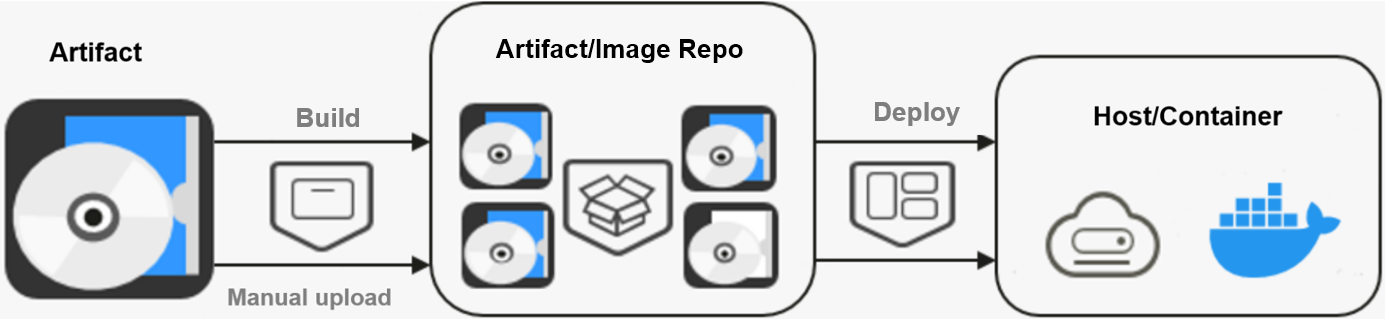
You can either manually upload artifacts or create a build task to save artifacts to CodeArts Artifact or an image repository. CodeArts Deploy uploads and installs the artifacts on a host or container.