Before deleting a private CA, ensure that it is not in use and will not be used.
If deletion is scheduled for a private CA in the Disabled or Expired state, the deletion will take effect after a waiting period of 7 to 30 days. If deletion is scheduled for a private CA in the Pending activation state, the deletion will take effect immediately. Before the specified deletion date, you can cancel the deletion if you want to use the private CA again. If the specified deletion period expires, the private CA will be permanently deleted. Exercise caution when performing this operation.
Prerequisites
The private CA to be deleted is in the Disabled or Pending activation state.
Procedure
- Log in to the management console.
- Click
 in the upper left corner of the page and choose .
 - In the navigation pane on the left, choose .
- Locate the row of the private CA to be deleted and click Delete in the Operation column.
- The operations vary according to the private CA status.
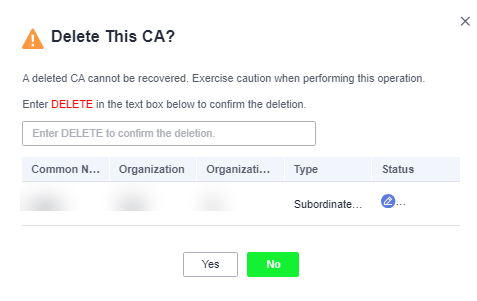
- Private CA in the Pending activation state
In the displayed dialog box, enter DELETE in the text box.
Figure 1 Deleting a private CA in the Pending activation state
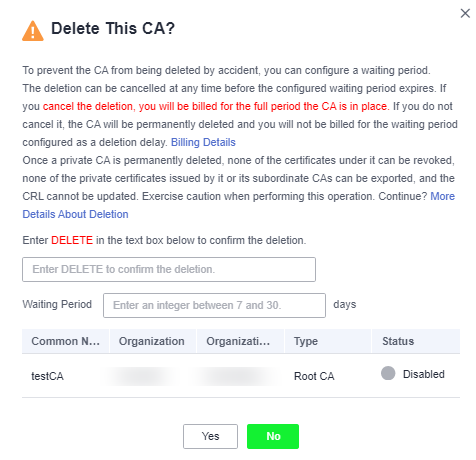
- Private CA in the Disabled or Expired state
In the dialog box that is displayed, enter DELETE in the text box and configure the waiting period.
Figure 2 Configuring the waiting period
- Private CA in the Pending activation state
- Click OK.
- Private CA in the Pending activation state: If message "CA xxx deleted successfully." is displayed in the upper right corner of the page, the private CA is deleted successfully.
- Private CA in the Disabled or Expired state: If the private CA status changes to Pending deletion, the private CA will be deleted after the waiting period expires.