CCE permissions management allows you to assign permissions to IAM users and user groups under your tenant accounts. CCE combines the advantages of IAM and RBAC to provide a variety of authorization methods, including IAM fine-grained/token authorization and cluster-/namespace-scoped authorization.
CCE permissions are described as follows: Cluster-level permissions involve non-Kubernetes native APIs and support fine-grained IAM policies and enterprise project management capabilities. Namespace-level permissions involve CCE Kubernetes APIs and are enhanced based on the Kubernetes RBAC capabilities. Namespace-level permissions can be granted to IAM users or user groups for authentication and authorization, but are independent of fine-grained IAM policies. For details, see Using RBAC Authorization.
- Cluster-level permissions are configured only for cluster-related resources (such as clusters and nodes). You must also configure namespace permissions to operate Kubernetes resources (such as workloads, jobs, and Services).
- After you create a cluster, CCE automatically assigns the cluster-admin permission to you, which means you have full control on all resources in all namespaces in the cluster.
- When viewing CCE resources on the console, the resources displayed depend on the namespace permissions. If no namespace permissions are granted, the console will not show you the resources.
Cluster-level Permissions (Assigned by Using IAM System-defined Policies)
New IAM users do not have any permissions assigned by default. You need to first add them to one or more groups and then attach policies or roles to these groups. They inherit permissions from the groups and can perform specified operations on cloud services based on the permissions they have been assigned.
CCE is a project-level service deployed for specific regions. When you set Scope to Region-specific projects and select the specified projects in the specified regions, the users only have permissions for CCE in the selected projects. If you select All projects, the users have permissions for CCE in all region-specific projects. When accessing CCE, the users need to switch to the authorized region.
You can grant users permissions by using roles and policies.
Table 1 lists all the system-defined permissions for CCE.
Role/Policy Name | Description | Type | Dependencies |
|---|---|---|---|
CCE Administrator | Read and write permissions for CCE clusters and all resources (including workloads, nodes, jobs, and Services) in the clusters | System-defined roles | Users granted permissions of this policy must also be granted permissions of the following policies: Global service project: OBS Buckets Viewer and OBS Administrator Region-specific projects: Tenant Guest, Server Administrator, ELB Administrator, SFS Administrator, SWR Admin, and APM FullAccess NOTE:
|
CCE FullAccess | Common operation permissions on CCE cluster resources, excluding the namespace-level permissions for the clusters (with Kubernetes RBAC enabled) and the privileged administrator operations, such as agency configuration and cluster certificate generation | Policy | None |
CCE ReadOnlyAccess | Permissions to view CCE cluster resources, excluding the namespace-level permissions of the clusters (with Kubernetes RBAC enabled) | Policy | None |
Operation | CCE ReadOnlyAccess | CCE FullAccess | CCE Administrator |
|---|---|---|---|
Creating a cluster | Not supported | Supported | Supported |
Deleting a cluster | Not supported | Supported | Supported |
Updating a cluster, for example, updating cluster node scheduling parameters and enabling RBAC support | Not supported | Supported | Supported |
Upgrading a cluster | Not supported | Supported | Supported |
Waking up a cluster | Not supported | Supported | Supported |
Hibernating a cluster | Not supported | Supported | Supported |
Listing all clusters | Supported | Supported | Supported |
Querying cluster details | Supported | Supported | Supported |
Adding a node | Not supported | Supported | Supported |
Deleting one or more nodes | Not supported | Supported | Supported |
Updating a node. For example, changing the node name. | Not supported | Supported | Supported |
Querying node details | Supported | Supported | Supported |
Listing all nodes | Supported | Supported | Supported |
Listing all jobs | Supported | Supported | Supported |
Deleting one or more cluster jobs | Not supported | Supported | Supported |
Querying job details | Supported | Supported | Supported |
Creating a storage volume | Not supported | Supported | Supported |
Deleting a storage volume | Not supported | Supported | Supported |
Performing operations on all Kubernetes resources | Supported (Kubernetes RBAC required) | Supported (Kubernetes RBAC required) | Supported |
Performing all operations on ECSs | Not supported | Supported | Supported |
Performing all operations on EVS disks EVS disks can be attached to cloud servers and scaled to a higher capacity whenever needed. | Not supported | Supported | Supported |
Performing all operations on VPC A cluster must run in a VPC. When creating a namespace, create or associate a VPC for the namespace so that all containers in the namespace will run in the VPC. | Not supported | Supported | Supported |
Viewing details of all resources on an ECS In CCE, a node is an ECS with multiple EVS disks. | Supported | Supported | Supported |
Listing all resources on an ECS | Supported | Supported | Supported |
Viewing details about all EVS disk resources EVS disks can be attached to cloud servers and scaled to a higher capacity whenever needed. | Supported | Supported | Supported |
Listing all EVS resources | Supported | Supported | Supported |
Viewing details about all VPC resources A cluster must run in a VPC. When creating a namespace, create or associate a VPC for the namespace so that all containers in the namespace will run in the VPC. | Supported | Supported | Supported |
Listing all VPC resources | Supported | Supported | Supported |
Viewing details about all ELB resources | Not supported | Not supported | Supported |
Listing all ELB resources | Not supported | Not supported | Supported |
Viewing details about all SFS resources | Supported | Supported | Supported |
Listing all SFS resources | Supported | Supported | Supported |
Viewing details about all AOM resources | Supported | Supported | Supported |
Listing all AOM resources | Supported | Supported | Supported |
Performing all operations on AOM auto scaling rules | Supported | Supported | Supported |
Namespace-level Permissions (Assigned by Using Kubernetes RBAC)
You can regulate users' or user groups' access to Kubernetes resources in a single namespace based on their Kubernetes RBAC roles. The RBAC API declares four kinds of Kubernetes objects: Role, ClusterRole, RoleBinding, and ClusterRoleBinding, which are described as follows:
- Roles: define a set of rules for accessing Kubernetes resources in a namespace.
- RoleBindings: define the relationship between users and roles.
- ClusterRoles: define a set of rules for accessing Kubernetes resources in a cluster (including all namespaces).
- ClusterRoleBindings: define the relationship between users and cluster roles.
Roles and ClusterRoles specify actions that can be performed on specific resources. RoleBindings and ClusterRoleBindings bind Roles to specific users, user groups, or service accounts.
Figure 1 Role binding
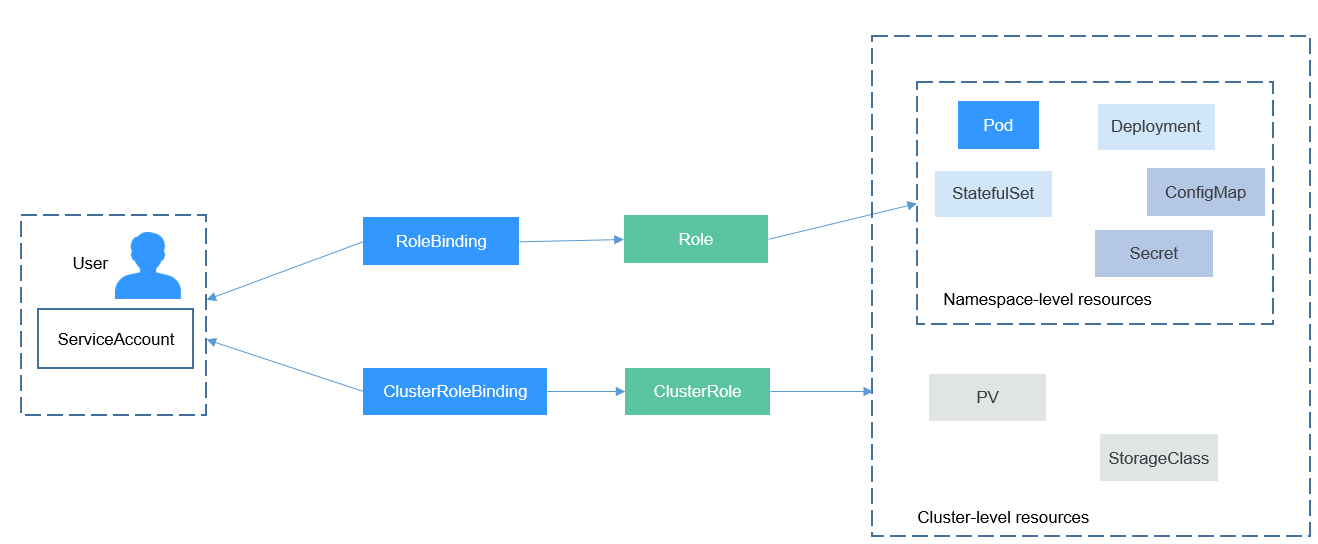
On the CCE console, you can assign permissions to a user or user group to access resources in one or multiple namespaces. By default, the CCE console provides the following ClusterRoles:
In addition to the preceding typical ClusterRoles, you can define Role and RoleBinding to grant permissions to add, delete, modify, and obtain resources (such as nodes, PVs, and CustomResourceDefinitions) and different resources (such as pods, Deployments, and Services) within specific namespaces. This allows for more precise permission control.