Introduction
Envoy Gateway is an open-source Kubernetes API gateway built on Envoy. It fully complies with Gateway API standards and provides standardized, high-performance, and scalable north-south traffic ingress and routing management. It can replace Ingress as the unified traffic ingress for Kubernetes clusters, supporting core scenarios such as service release, traffic governance, and security protection.
Open-source community: https://github.com/envoyproxy/gateway
How It Works
Envoy Gateway uses a control plane–data plane architecture:
- Control plane: parses Gateway API resources, generates and delivers Envoy configurations, but does not directly forward service traffic.
- Data plane: The high-performance Envoy proxy handles actual service traffic, including traffic ingress, TLS termination, route forwarding, and load balancing.
Constraints
- Before using Envoy Gateway, ensure CoreDNS is running properly.
- After Envoy Gateway is installed, a GatewayClass named envoy-gateway is automatically created. After the add-on is uninstalled, the GatewayClass is retained. Do not manually delete it. To delete a GatewayClass after the add-on is uninstalled, manually remove its finalizers if no Gateway is associated with it. Otherwise, resources may disappear or functionality may be abnormal after the add-on is reinstalled.
- Before deleting a custom GatewayClass, ensure the Gateway associated with it is deleted.
- Uninstalling the add-on does not delete the created Gateway and its related resources (including Deployments, Services, ConfigMaps, and ServiceAccounts). Manually delete the Gateway resources managed by the add-on before uninstalling it. After the add-on is uninstalled, whether deleting a Gateway also deletes its associated resources depends on the deployment mode of the Envoy Gateway data plane. With the add-on's default configuration, deleting a Gateway will also delete its associated resources.
- In CCE standard clusters, when Envoy Gateway is bound to a dedicated load balancer, the node hosting the add-on controller pod (with the same Gateway name in the same namespace), and any other containers on that same node, cannot use the load balancer's private IP to access ingresses.
- After the add-on is configured, the associated load balancer configuration is persisted in the add-on's ConfigMap. The add-on pods use a built-in watch mechanism to monitor ConfigMap changes in real time and automatically synchronize the latest configuration. Therefore, it usually takes tens of seconds for the updated load balancing configuration to take effect.
- In an IPv4/IPv6 dual-stack cluster, if you change the add-on configuration from IPv4 with a shared load balancer to IPv4/IPv6 dual stack with a dedicated load balancer during an add-on update, existing gateways will fail to update. Before performing this operation, ensure that no gateway is currently running.
Precautions
Envoy Gateway is a community-driven add-on integrated by CCE. It is not covered by the cloud service SLA. Evaluate service risks before use. For support, contact the community or submit a service ticket.
Installing the Add-on
- Log in to the CCE console and click the cluster name to access the cluster console.
- In the navigation pane, choose Add-ons. On the displayed page, locate Envoy Gateway and click Install.
- On the add-on installation page, select Specifications as needed and adjust the number of add-on pods and resource quotas.
High availability is not possible with a single pod. If an error occurs on the node where the add-on pod runs, the add-on will fail.
- Configure the add-on parameters.
- Add-on Namespace: Select the namespace where Envoy Gateway will run.
- Protocol Version: Select a protocol version. This parameter is only available for IPv4/IPv6 dual-stack clusters.
- Set ELB: This add-on does not automatically create load balancers by default. When a Gateway is created, any provisioned load balancer uses the following settings. Automatically provisioned load balancers are billed on a pay-per-use basis.
The following table lists load balancer settings.
Table 1 Load balancer settingsLoad balancer Type
Configuration
Dedicated
Options: Network (TCP/UDP/TLS) and Network (TCP/UDP/TLS) & Application (HTTP/HTTPS)
- Elastic: applies to fluctuating traffic. You are billed based on actual Load Balancer Capacity Unit (LCU) usage. Clusters v1.21.10-r10, v1.23.8-r10, v1.25.3-r10, and later versions support elastic specifications.
- AZ: You can create load balancers in multiple AZs to improve service availability. If disaster recovery is required, select multiple AZs.
- Instance Name: Enter a load balancer name.
- Enterprise Project: This parameter is available only to enterprise users with an enterprise project enabled. Enterprise projects facilitate project-level management and grouping of cloud resources and users.
- Resource Tag: You can add resource tags to classify resources. You can create predefined tags on the TMS console. These tags are available to all resources that support tags. You can use these tags to improve the tag creation and resource migration efficiency.
Network Settings
- Frontend Subnet: This parameter is used to allocate IP addresses to load balancers for external service access.
- Backend Subnet: This parameter is used to allocate IP addresses to load balancers for backend access.
- EIP: If you select Auto assign, you can configure the bandwidth for the public network.
Shared
- Instance Name: Enter a load balancer name.
- Enterprise Project: This parameter is available only to enterprise users with an enterprise project enabled. Enterprise projects facilitate project-level management and grouping of cloud resources and users.
- Resource Tag: You can add resource tags to classify resources. You can create predefined tags on the TMS console. These tags are available to all resources that support tags. You can use these tags to improve the tag creation and resource migration efficiency.
Network Settings
EIP: If you select Auto assign, you can configure the bandwidth for the public network.
- AI Inference Gateway: If this function is enabled, Envoy AI Gateway will be deployed to support intelligent routing, protocol conversion, and unified access to multiple large language model (LLM) backends.
- Global Rate Limiting: This function requires a Redis service as the global counter store. The Redis service must be highly available, and network connectivity between the add-on and Redis must be stable. You can use a self-managed Redis service or a cloud-managed Redis database.
If this function is enabled, cluster-level rate limiting and shared caching provide precise traffic control and reduce backend load. Note that this introduces network latency, and Redis unavailability may cause gateway errors or rate limiting failures.
- Configure deployment policies for the add-on pods.Note
When configuring multi-AZ deployment or node affinity, ensure that there are nodes meeting the scheduling policy and that resources are sufficient in the cluster. Otherwise, the add-on pods cannot run.
Table 2 Configurations for add-on schedulingParameter
Description
Multi-AZ Deployment
- Preferred: Deployment pods of the add-on will be preferentially scheduled to nodes in different AZs. If all the nodes in the cluster are deployed in the same AZ, the pods will be scheduled to different nodes in that AZ.
- Equivalent mode: Deployment pods of the add-on are evenly scheduled to the nodes in the cluster in each AZ. If a new AZ is added, you are advised to increase add-on pods for cross-AZ HA deployment. With the Equivalent multi-AZ deployment, the difference between the number of add-on pods in different AZs will be less than or equal to 1. If resources in one of the AZs are insufficient, pods cannot be scheduled to that AZ.
- Forcible: Deployment pods of the add-on are forcibly scheduled to nodes in different AZs. There can be at most one pod in each AZ. If nodes in a cluster are not in different AZs, some add-on pods cannot run properly. If a node is faulty, the add-on pods on it may fail to be migrated.
Node Affinity
- Not configured: Node affinity is disabled for the add-on pods.
- Specify node: Specify the nodes where the add-on pods are deployed. If you do not specify the nodes, the add-on pods will be randomly scheduled based on the default cluster scheduling policy.
- Specify node pool: Specify the node pool where the add-on pods are deployed. If you do not specify the node pools, the add-on pods will be randomly scheduled based on the default cluster scheduling policy.
- Customize affinity: Enter the labels of the nodes where the add-on pods are to be deployed for more flexible scheduling policies. If you do not specify node labels, the add-on pods will be randomly scheduled based on the default cluster scheduling policy.
If multiple custom affinity policies are configured, ensure that there are nodes that meet all the affinity policies in the cluster. Otherwise, the add-on pods cannot run.
Toleration
Using both taints and tolerations enables (but does not require) the add-on's Deployment pods to be scheduled on nodes with matching taints, and allows control over pod eviction policies when host nodes are tainted.
The add-on applies default tolerations for the node.kubernetes.io/not-ready and node.kubernetes.io/unreachable taints. The toleration time window is 60 seconds.
For details, see Configuring Tolerance Policies.
- Click Install.
Components
Component | Description | Resource Type |
|---|---|---|
envoy | The high-performance proxy that forwards traffic. It is not deployed during add-on installation. Instead, it is generated automatically after a Gateway is created. | Deployment |
envoy-gateway | Parses Gateway API resources and generates/delivers Envoy configurations. | Deployment |
ai-gateway-controller | Created when AI inference gateway is enabled. It is a central controller that injects AI traffic distribution logic into gateways. | Deployment |
cceaddon-envoy-gateway-service-mutating-webhook | A Kubernetes MutatingAdmissionWebhook that automatically transforms Service annotations based on predefined rules when Services are created or updated. | Deployment |
envoy-ratelimit | Automatically created after envoy-gateway is deployed when global rate limiting is enabled. A Redis-backed, high-performance distributed rate limiting service. It enables flexible global traffic control and overload protection for gateway-layer API requests. | Deployment |
envoy and envoy-ratelimit are not deployed during add-on installation. They do not inherit the affinity policies configured during add-on installation. Do not manually modify their affinity policies, as this may cause functionality issues.
Customizing the Data Plane Deployment of Envoy Gateway
You can customize the data plane deployment of Envoy Gateway and select the namespace for deploying Envoy Proxy resources (Deployments, Services, and ServiceAccounts).
To do so, perform the following steps:
- Log in to the CCE console and click the cluster name to access the cluster console.
- In the navigation pane, choose Add-ons. Locate Envoy Gateway on the right and click Edit.
- Click Edit YAML above the add-on name and modify custom.config.envoyGateway.provider.kubernetes.deploy.type.
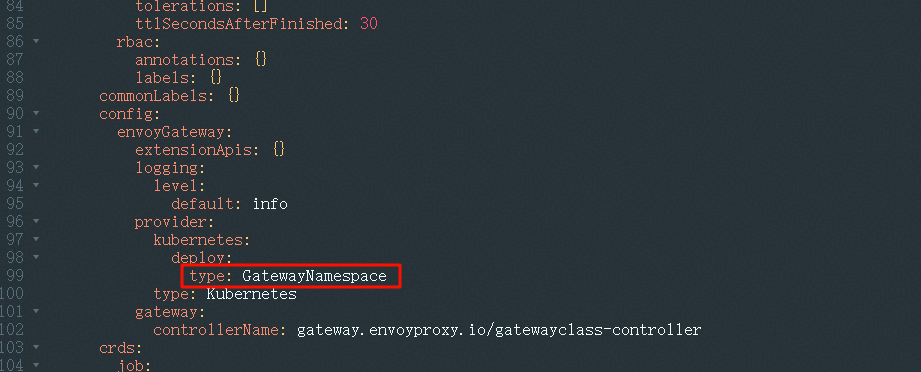
- GatewayNamespace (default): After a Gateway is created, the add-on creates a LoadBalancer Service and an Envoy Deployment in the namespace where the Gateway resides. When the add-on is uninstalled, deleting the Gateway also deletes the associated Service and Deployment.
- ControllerNamespace: After a Gateway is created, the add-on creates a LoadBalancer Service and an Envoy Deployment (named in the format envoy-<Gateway-namespace>-<Gateway-name>-<hash>) in the add-on's installation namespace. If the add-on is uninstalled or its pods become unhealthy, deleting the Gateway does not delete the associated Service and Deployment. You must delete them manually.
- Click Submit.
Do not modify this parameter when a Gateway already exists. After modification, existing resources will not be cleaned up. Instead, new resources will be created in the new namespace.
Enabling Client IP Address Transfer for Envoy Gateway
If you enable or disable client IP address retrieval for a load balancer, traffic to the listener will be interrupted. Exercise caution when performing this operation.
For VPC and Tunnel Network Models (CCE Standard Clusters)
- Enable client IP address transfer for ELB.
- Dedicated load balancer: This option is enabled by default.
- Shared load balancer: Manually add an annotation to enable client IP address retrieval.
- Log in to the CCE console and click the cluster name to access the cluster console.
- In the navigation pane, choose Add-ons. Locate Envoy Gateway on the right and click Edit.
- Click Edit YAML above the add-on name, modify the add-on parameter custom.envoyService.annotations, and add the annotation kubernetes.io/elb.transparent-client-ip: 'true'.

NoteTo disable client IP address retrieval for a shared load balancer, perform the following steps:
- Change the annotation in the custom.envoyService.annotations parameter to kubernetes.io/elb.transparent-client-ip: 'false'.
- After the add-on is edited, the change does not apply to existing gateways. Manually modify the annotation in the Service associated with the gateway to kubernetes.io/elb.transparent-client-ip: 'false'.
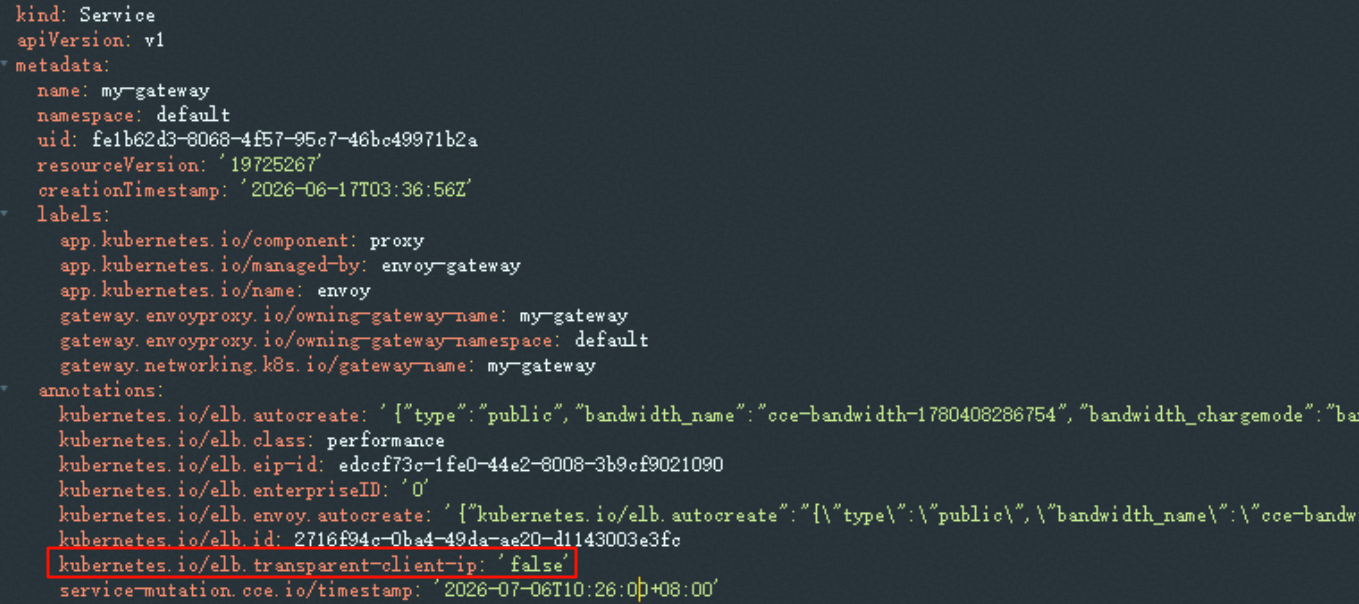
By default, the Service associated with the Gateway has the same name as the Gateway. If you have changed the data plane deployment mode of Envoy Gateway, the naming convention is envoy-<gateway-namespace>-<gateway-name>-<hash>.
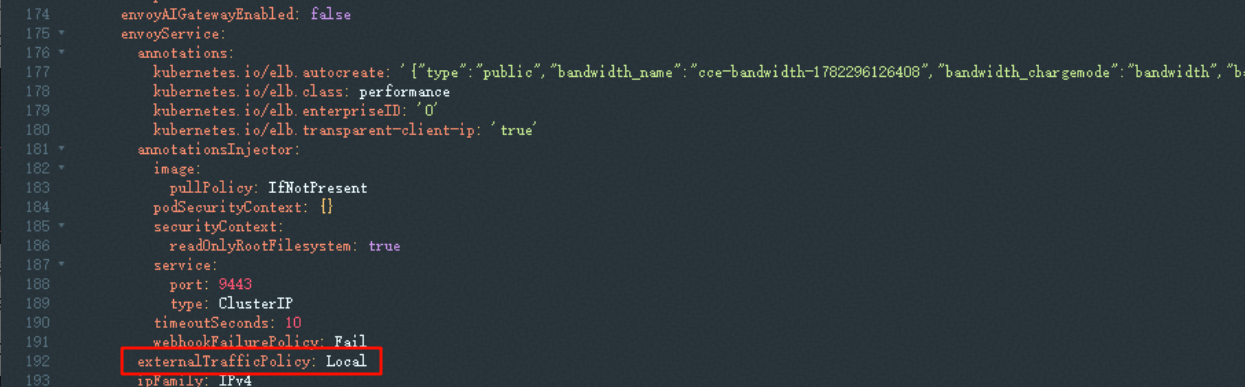
- Set the service affinity mode to node-level.
- Log in to the CCE console and click the cluster name to access the cluster console.
- In the navigation pane, choose Add-ons. Locate Envoy Gateway on the right and click Edit.
- Click Edit YAML above the add-on name and change the custom.envoyService.externalTrafficPolicy value to Local.
For Cloud Native Network 2.0 Models (CCE Turbo Clusters)
In CCE Turbo clusters, shared load balancers do not support client IP address retrieval. Use dedicated load balancers so that external requests can be sent directly to containers.
Transparent source IP address transmission is enabled by default for dedicated load balancers. You only need to select a dedicated load balancer when installing the Envoy Gateway add-on to obtain the client IP address.
Helpful Links
- After the add-on is installed, you can create Gateway API resources for external application access. For more advanced settings, see Using Envoy Gateway for Service Access.
- If you were using NGINX Ingress, you can migrate resources to Envoy Gateway. For details, see Migrating NGINX Ingress to Envoy Gateway.