In Kubernetes, a Service makes an application running on a set of pods network-accessible. It provides a consistent DNS name for these pods and distributes traffic across them for load balancing. This section describes the basic concepts of Kubernetes Services and provides a comparison of various Service types.
Service
After a pod is created, accessing it directly can result in certain problems:
- The pod can be deleted and recreated at any time by a controller such as a Deployment. If the pod is recreated, access to it may fail.
- An IP address cannot be assigned to a pod until the pod is started. Before the pod is started, its IP address is unknown.
- Applications usually run on multiple pods that use the same image. Accessing pods one by one is not efficient.
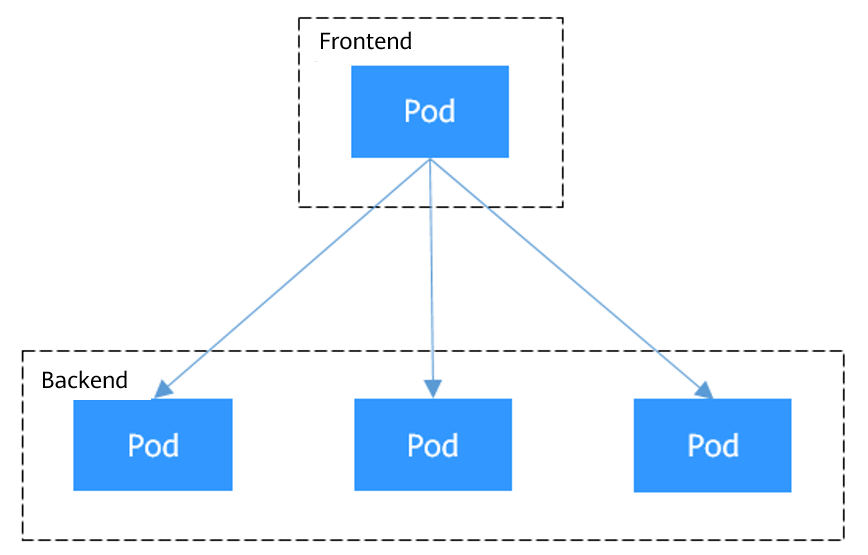
For example, a Deployment is used to deploy the frontend and backend of an application. The frontend calls the backend for computing, as shown in Figure 1. Three pods are running in the backend, and they are independent and replaceable. When a backend pod is recreated, the new pod is assigned with a new IP address, but the frontend pod is unaware of this change.
Figure 1 Inter-pod access
To solve these problems, Kubernetes introduces Services, which provide stable network interfaces and persistent IP addresses for pods. You can set these IP addresses using Service CIDR blocks during cluster creation. The Service CIDR blocks are used to assign IP addresses to Services. A Service uses a label selector to identify its target pods and uses load balancing to evenly distribute traffic among them. This abstraction eliminates the complexity of directly accessing individual pods and enhances both the availability and efficiency of workloads.
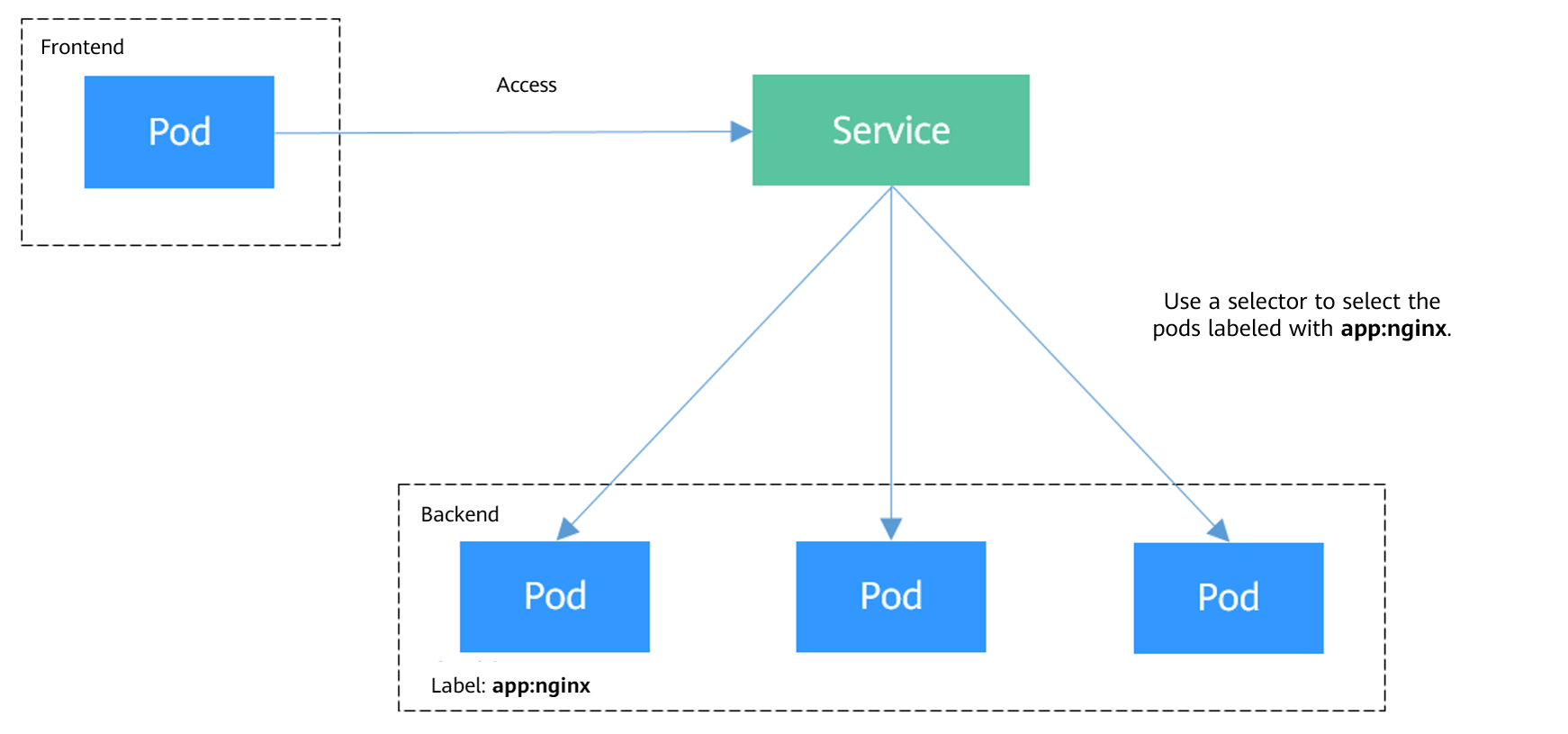
For the example above, a Service is created for the backend pods and used for the frontend pod to access these backend pods. In this way, the frontend pod remains unaffected by any changes to the backend pods, as shown in Figure 2.
Figure 2 Accessing pods through a Service
Service Types
You can create a specified type of Service in a cluster. The description and application scenarios of different types of Services are listed in the table below.
Service Type | Description | Application |
|---|---|---|
ClusterIP Services are the default type of Kubernetes Services. They assign a virtual IP address, accessible only within the cluster, from the cluster's Service CIDR block. | Services that only need to communicate with each other within a cluster and do not need to be exposed outside the cluster. For example, if a frontend application pod in a cluster needs to access a backend database in the same cluster, you can create a ClusterIP Service for the backend database to ensure that the backend database can be accessed only within the cluster. | |
A NodePort Service opens a port on each node in a cluster to allow external traffic to access the Service through <node-IP-address>:<node-port>. | Scenarios where temporary or low-volume access is required. For example, in a testing environment, you can use a NodePort Service when deploying and debugging a web application. | |
A LoadBalancer Service adds an external load balancer on the top of a NodePort Service and distributes external traffic to multiple pods within a cluster. It automatically assigns an external IP address to allow access from the clients. LoadBalancer Services process TCP and UDP traffic at Layer 4 (transport layer) of the OSI model. They can be extended to support Layer 7 (application layer) capabilities to manage HTTP and HTTPS traffic. | Cloud applications that require a stable, easy-to-manage entry for external access. For example, in a production environment, you can use LoadBalancer Services to expose public-facing services such as web applications and API services to the Internet. These services often need to handle heavy traffic while maintaining high availability. | |
A DNAT Service provides Network Address Translation (NAT) for all nodes in a cluster so that multiple nodes can share an EIP. | Services that require temporary or low-volume access from the Internet. DNAT Services provide higher reliability than NodePort Services. With a DNAT Service, there is no need to bind an EIP to a single node, and requests can still be distributed to the workload even if any node fails. | |
For headless Services, no cluster IP address is allocated. When a client attempts to access a backend pod and performs a DNS query for the Service, it receives a list of the IP addresses of the backend pods. This allows the client to communicate directly with individual pods. | Applications that require direct communication with specific backend pods instead of using proxies or load balancers. For example, when you deploy a stateful application (such as a ClickHouse database), you can use a headless Service. It allows application pods to directly access each ClickHouse pod and enables targeted read and write operations. This enhances overall data processing efficiency. |
Why a Service Fails to Be Accessed from Within the Cluster
If the service affinity of a Service is set to the node level, that is, the value of externalTrafficPolicy is Local, the Service may fail to be accessed from within the cluster (specifically, nodes or containers). Information similar to the following is displayed:
It is common that a load balancer in a cluster cannot be accessed. The reason is as follows: When Kubernetes creates a Service, kube-proxy adds the access address of the load balancer as an external IP address (External-IP, as shown in the following command output) to iptables or IPVS. If a client inside the cluster initiates a request to access the load balancer, the address is considered as the external IP address of the Service, and the request is directly forwarded by kube-proxy without passing through the load balancer outside the cluster.
# kubectl get svc nginxNAME TYPE CLUSTER-IP EXTERNAL-IP PORT(S) AGEnginx LoadBalancer 10.247.76.156 123.**.**.**,192.168.0.133 80:32146/TCP 37s
When the value of externalTrafficPolicy is Local, the access failures in different container network models and service forwarding modes are as follows: Server Service Type Access Type Client Request Source Tunnel Network Cluster VPC Network Cluster (DataPlane V2 disabled. If enabled, see Clusters with DataPlane V2 Enabled.) CCE Turbo Cluster (DataPlane V2 disabled. If enabled, see Clusters with DataPlane V2 Enabled.) NodePort Service Public/Private network Same node as service pod Access via node IP + NodePort on the server node: Success Access via node IP + NodePort on a non-server node: Failure Access via node IP + NodePort on the server node: Success Access via node IP + NodePort on a non-server node: Failure Accessible Different node from service pod Access via node IP + NodePort on the server node: Success Access via node IP + NodePort on another node: Failure Access via node IP + NodePort on the server node: Success Access via node private IP + NodePort on the client node: Success Access via node EIP + NodePort on the client node: Failure Access via node IP + NodePort on another node: Failure Accessible Other containers on the same node as the service pod Access via node IP + NodePort on the server node: Success Access via node IP + NodePort on a non-server node: Failure Access via node EIP + NodePort on the server node: Success Access via node private EIP + NodePort on the server node: Failure Access via node IP + NodePort on a non-server node: Failure Accessible Other containers on a different node from the service pod Access via node IP + NodePort on the server node: Success Access via node private IP + NodePort on the client node: Success Access via node IP + NodePort on another node: Failure Access via node IP + NodePort on the server node: Success Access via node private IP + NodePort on the client node: Success Access via node IP + NodePort on another node: Failure Accessible LoadBalancer Service using a dedicated load balancer Private network Same node as service pod Inaccessible Inaccessible Accessible Other containers on the same node as the service pod Inaccessible Inaccessible Accessible Server Service Type Access Type Client Request Source Tunnel Network Cluster VPC Network Cluster (DataPlane V2 disabled. If enabled, see Clusters with DataPlane V2 Enabled.) CCE Turbo Cluster (DataPlane V2 disabled. If enabled, see Clusters with DataPlane V2 Enabled.) NodePort Service Public/Private network Same node as service pod Access via node IP + NodePort on the server node: Success Access via node IP + NodePort on a non-server node: Failure Access via node IP + NodePort on the server node: Success Access via node IP + NodePort on a non-server node: Failure Accessible Different node from service pod Access via node IP + NodePort on the server node: Success Access via node private IP + NodePort on the client node: Success Access via node EIP + NodePort on the client node: Failure Access via node IP + NodePort on another node: Failure Access via node IP + NodePort on the server node: Success Access via node private IP + NodePort on the client node: Success Access via node EIP + NodePort on the client node: Failure Access via node IP + NodePort on another node: Failure Accessible Other containers on the same node as the service pod Access via node IP + NodePort on the server node: Success Access via node IP + NodePort on a non-server node: Failure Access via node EIP + NodePort on the server node: Success Access via node private EIP + NodePort on the server node: Failure Access via node IP + NodePort on a non-server node: Failure Accessible Other containers on a different node from the service pod Access via node IP + NodePort on the server node: Success Access via node IP + NodePort on a non-server node: Failure Access via node IP + NodePort on the server node: Success Access via node IP + NodePort on a non-server node: Failure Accessible LoadBalancer Service using a dedicated load balancer Private network Same node as service pod Inaccessible Inaccessible Accessible Other containers on the same node as the service pod Inaccessible Inaccessible Accessible DataPlane V2 is supported only in CCE VPC-network clusters and Turbo clusters. Once enabled, it replaces kube-proxy entirely, eliminating the need to configure a service forwarding mode. Server Service Type Access Type Client Request Source VPC Network Cluster (DataPlane V2 Enabled to Replace kube-proxy) CCE Turbo Cluster (DataPlane V2 Enabled to Replace kube-proxy) NodePort Service Public/Private network Same node as service pod Access via node IP + NodePort on the server node: Success Access via node private IP + NodePort on a non-server node: Success Access via node EIP + NodePort on a non-server node: Failure Access via node IP + NodePort on the server node: Success Access via node private IP + NodePort on a non-server node: Success Access via node EIP + NodePort on a non-server node: Failure Different node from service pod Access via node IP + NodePort on the server node: Success Access via node private IP + NodePort on a non-server node: Success Access via node EIP + NodePort on a non-server node: Failure Access via node IP + NodePort on the server node: Success Access via node private IP + NodePort on a non-server node: Success Access via node EIP + NodePort on a non-server node: Failure Other containers on the same node as the service pod Access via node IP + NodePort on the server node: Success Access via node IP + NodePort on another node: Failure Access via node IP + NodePort on the server node: Success Access via node IP + NodePort on another node: Failure Other containers on a different node from the service pod Access via node IP + NodePort on the server node: Success Access via node private IP + NodePort on the client node: Success Access via node IP + NodePort on another node: Failure Access via node IP + NodePort on the server node: Success Access via node private IP + NodePort on the client node: Success Access via node IP + NodePort on another node: Failure LoadBalancer Service using a dedicated load balancer Private network Same node as service pod Inaccessible Inaccessible Other containers on the same node as the service pod Inaccessible Accessible
The following methods can be used to solve this problem:
- (Recommended) In the cluster, use the ClusterIP Service or service domain name for access.
- Set externalTrafficPolicy of the Service to Cluster, which means cluster-level service affinity. Note that this affects source address persistence.
Assume that the Service name is my-service and it is in the default namespace. The kubectl command example is as follows:
kubectl patch service my-service -n default --type='merge' -p '{"spec":{"externalTrafficPolicy":"Cluster"}}' - Leveraging the pass-through feature of the Service, kube-proxy is bypassed when the ELB address is used for access. The ELB load balancer is accessed first, and then the workload. For details, see Configuring Passthrough Networking for a LoadBalancer Service.Note
- In a CCE standard cluster, after passthrough networking is configured using a dedicated load balancer, the private IP address of the load balancer cannot be accessed from the node where a workload pod resides or other pods on the same node as the workload.
- This function is only available in clusters v1.19 and later.
- In IPVS, the passthrough settings of Services connected to the same load balancer must be the same.
- If node-level (local) service affinity is used, kubernetes.io/elb.pass-through is automatically set to onlyLocal to enable passthrough networking.