Vault resources can be migrated when service requirements change and the existing vault no longer meets the new scale or specifications.
Migrating a resource means that you dissociate the resource from a vault and then associate it with another vault. All backups of the resource will be migrated to the destination vault.
Constraints
- Resources can be migrated only when the source and destination vaults are in the Available or Locked state.
- Resources can be migrated only when no task is being executed in the source and destination vaults.
- The remaining capacity of the destination vault must be greater than the size of the resource backups to be migrated.
- Cross-account resource migration is currently not supported.
- Backups cannot be migrated between single-AZ and multi-AZ backup vaults.
- The source and destination vaults must be in the same region.
- The source and destination vaults must be of the same type. For example, resources in a server backup vault can be migrated to another server backup vault, but cannot be migrated to another disk backup vault.
Procedure
- Log in to the CBR console.
- In the upper left corner, click
 and select a region.
 - Click
 and choose Storage > Cloud Backup and Recovery.
- In the upper left corner, click
- On a required backup page, locate the vault where the target resource is associated and click its name.
- Click the Associated Servers tab. Find the target server and click Migrate in the Operation column.
Figure 1 Migrating a resource
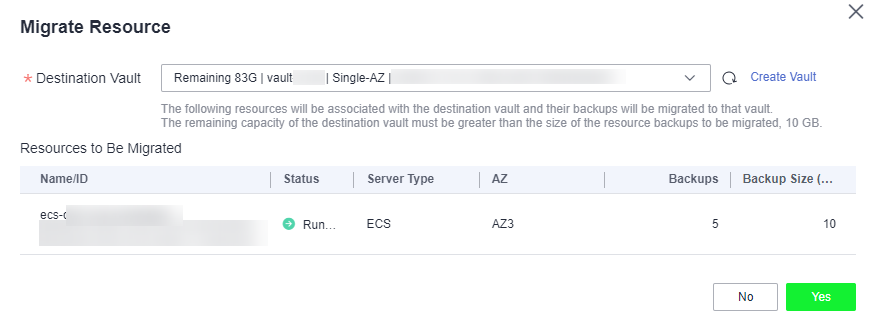
- Select the destination vault and click Yes.
- View the migration progress on the Tasks page. If Status changes to Successful, the resource has been migrated.
- Go to the destination vault to confirm that the resource has been associated and all its backups have been migrated.
Parent topic: Vault Management