A backup policy allows CBR to automatically back up vaults at specified times or intervals. Periodically generated backups ensure quick data restoration in the event of corruption or loss.
You can use the default backup policy or create a custom one to enable periodic data backups for resources.
The backup service experiences peak usage from 22:00 to 08:00, during which delays may occur. To ensure optimal performance, it is recommended that you evaluate your service types and stagger backups across discrete time periods.
Constraints
- You can apply backup policies to server backup vaults, SFS Turbo backup vaults, and disk backup vaults.
- A backup policy must be enabled before it can be used for periodic backups.
- A user can create a maximum of 32 backup policies.
- When expired backups are deleted, automatic backups will be deleted, but manual backups will not.
- Only servers in the Running or Stopped state and disks in the Available or In-use state can be backed up.
- CBR by default performs a full backup for a resource in the initial backup and incremental backups in subsequent backups.
- The minimum interval between two full backups is one day.
- In CloudPond scenarios, backups in vaults are retained only by quantity. A maximum of seven backups can be retained.
Procedure
- Log in to the CBR console.
- In the upper left corner, click
 and select a region.
 - Click
 and choose Storage > Cloud Backup and Recovery.
- In the upper left corner, click
- Choose Policies in the navigation pane and click the Backup Policies tab. In the upper right corner, click Create Policy.
Figure 1 Creating a backup policy
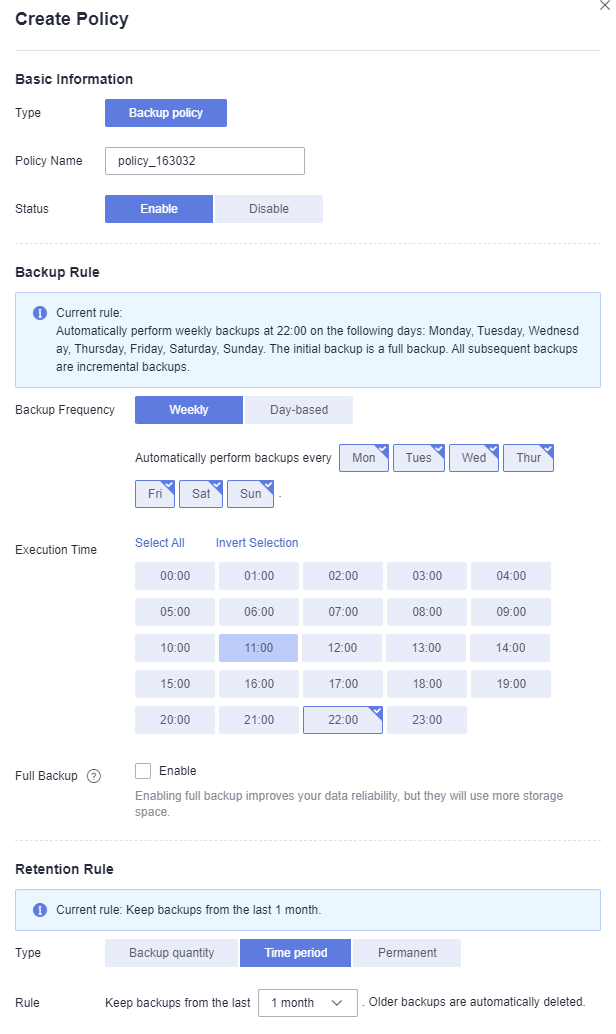
- Set the backup policy parameters. Table 1 describes the parameters.Table 1 Backup policy parameters
Parameter
Description
Example Value
Type
Select a policy type. In this example, select the backup policy.
Backup policy
Policy Name
Backup policy name. You can enter a custom name or use the default name policy_xxxx.
The name can contain 1 to 64 characters. Only letters, digits, underscores (_), and hyphens (-) are allowed.
backup_policy
Status
Whether to enable the backup policy. By default, this function is enabled.
CBR backs up resources to vaults and deletes expired backups only after a backup policy is enabled and applied to the vaults.
Enabled
Execution Time
Time when the backup is executed. The default backup time is 22:00.
Backups can be scheduled at the beginning of each hour, and you can select multiple hours.
It is recommended that backups be performed during off-peak hours or when no services are running.
The backup service experiences peak usage from 22:00 to 08:00, during which delays may occur. To ensure optimal performance, it is recommended that you evaluate your service types and stagger backups across discrete time periods.
NOTE:- There may be a time difference between the scheduled backup time and the actual backup time.
- If a large amount of data needs to be backed up, you are advised to make backup less frequent to prevent the system from skipping any execution time.
For example, a disk is scheduled to be backed up at 00:00, 01:00, and 02:00. A backup task starts at 00:00. Because a large amount of incremental data needs to be backed up or a heap of backup tasks are executed at the same time, this backup task takes 90 minutes to complete at 01:30. CBR performs the next backup at 02:00. In this case, only two backups are generated in total, one at 00:00, and the other at 02:00.
- The backup time refers to the client's local time, not the time zone of the region.
00:00, 02:00
Full Backup
Whether to perform periodic full backups. This function is disabled by default.
- Enable
Enabling full backup improves your data reliability, but full backups will take more storage space.
Configure a full backup frequency. The value ranges from 0 to 100. A value of 0 means that a full backup will be performed in every backup task.
- Do not enable
CBR will perform incremental backups after the first backup.
NOTE:- A full backup usually takes a long period of time. If a full backup of a resource is in progress, other policy or manual backups of this resource will not be performed. You can back up data during off-peak hours.
- When backups are kept by quantity, full backups can be performed only when the configured full backup frequency is less than the number of retained backups.
7
Backup Cycle
Select a backup cycle.
- Weekly
Specifies on which days of each week the backup task will be executed. You can select multiple days.
- Day-based
Specifies the interval (every 1 to 30 days) for executing the backup task.
Every day
If you select day-based backup, the first backup is supposed to be executed on the day when the backup policy is created. If the execution time on the day you create the backup policy has passed, the first backup will be executed in the next backup cycle.
It is recommended that backups be performed during off-peak hours or when no services are running.
Retention Rule
The rule that specifies how backups will be retained. By default, backups are retained for one month.
A maximum of 10 backups are retained for failed periodic backup tasks. They are retained for one month and can be deleted manually.
- Backup quantity
You can set the maximum number of backups to retain for each resource. The value ranges from 2 to 99,999.
Advanced settings
You can also set long-term retention rules with advanced options. Long-term retention rules and quantity-based retention rules will be both applied.
- Day-based: 0–100.
- Weekly: 0–100.
- Monthly: 0–100.
- Yearly: 0–100.
A resource may be backed up multiple times in a day. If day-based backup is configured, only the most recent backup of that day is retained. If you set Day-based to 5, the most recent backup of each of the last five days will be retained. A total of five backups are retained. If there are more than five backup replicas, the system automatically deletes the earliest backup replicas. When multiple backup schedules (daily, weekly, monthly, yearly) are enabled, the system retains the combined union of all backups. For example, if Day-based is set to 5 and Weekly to 1, five backups will be retained. The long-term retention rule and the quantity-based retention rule both apply.
- Time period
Backups can be retained for one month, three months, six months, one year, or a user-defined period between 2 and 99,999 days.
- Permanent
You can retain backups permanently.
NOTE:- The system automatically deletes the earliest and expired backups every other day. This prevents exceeding the maximum number of backups to retain or retaining any backup longer than the maximum retention period.
- Expired backups are not deleted immediately upon expiration. Instead, they are deleted in batches between 08:00 and 20:00. For example, if a backup expired at 20:00 on November 23, 2024, it was deleted between 08:00 and 20:00 on November 24, 2024. In this way, backup data can be deleted during off-peak hours.
- The retention rules apply only to auto-generated backups; manual ones must be deleted manually.
- If a backup has been created and the next backup task is in progress, CBR will not allow you to delete the most recent backup. You can delete the backup only after the ongoing backup task is complete.
6 months
NoteMore frequent backups create more backups or extend their retention, offering better data protection at the cost of increased storage usage. Set an appropriate backup frequency as needed.
- Click Create Now. After the backup policy is created, you can view it in the backup policy list.
- Locate the desired vault and choose More > Apply Backup Policy in the Operation column to apply the policy to the vault. You can then view the applied policy on the vault details page, and data will be periodically backed up to the vault based on the policy.
Example
At 10:00 a.m. on Monday, a user sets a backup policy for their vault to instruct CBR to execute a backup task at 02:00 a.m. every day and retain a maximum of three backups. As of 11:00 a.m. on Saturday, three backups will be retained, which are generated on Thursday, Friday, and Saturday. The backups generated at 02:00 a.m. on Tuesday and Wednesday have been automatically deleted.