This topic describes how to use Identity and Access Management (IAM) to implement fine-grained permissions control for your APIG resources. With IAM, you can:
- Create IAM users for employees based on your enterprise's organizational structure. Each IAM user will have their own security credentials for accessing APIG resources.
- Grant only the permissions required for users to perform a specific task.
- Entrust another account or cloud service to perform O&M on your APIG resources.
If your account does not require individual IAM users, skip this chapter.
This section describes the procedure for granting permissions (see Figure 1).
Prerequisites
Learn about the permissions (see Table 1) supported by APIG and choose policies or roles according to your requirements.
Role/Policy Name | Description | Type | Dependency |
|---|---|---|---|
APIG Administrator | Administrator permissions for APIG. Users granted these permissions can use all functions of API gateways. | System-defined role | If a user needs to create, delete, or change resources of other services, the user must also be granted administrator permissions of the corresponding services in the same project. |
APIG FullAccess | Full permissions for APIG. Users granted these permissions can use all functions of gateways. | System-defined policy | None |
APIG ReadOnlyAccess | Read-only permissions for APIG. Users granted these permissions can only view gateways. | System-defined policy | None |
Process Flow
Figure 1 Process for granting APIG permissions
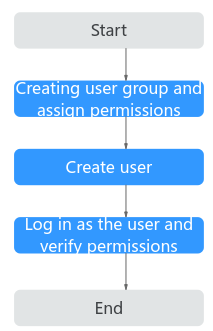
- Create a user group and assign permissions.
Create a user group on the IAM console, and attach the APIG Administrator role or the APIG FullAccess policy to the group. For details, see "Creating a User Group and Assigning Permissions" in the IAM User Guide.
- Create an IAM user.
Create a user on the IAM console and add the user to the group created in 1. For details, see "Creating an IAM User" in the IAM User Guide.
- Log in and verify permissions.
Log in to the APIG console as the created user, and verify that the user has administrator permissions for APIG. For details, see "Logging In as an IAM User" in the IAM User Guide.
Custom APIG Policies
Custom policies can be created to supplement the system-defined policies of APIG. For the actions that can be added to custom policies, see section "Permissions Policies and Supported Actions" in the API Gateway API Reference.
You can create custom policies using one of the following methods:
- Visual editor: Select cloud services, actions, resources, and request conditions. This does not require knowledge of policy syntax.
- JSON: Create a JSON policy or edit an existing one.
For operation details, see "Creating a Custom Policy" in the Identity and Access Management User Guide. The following section contains examples of common APIG custom policies.
Example Custom Policies
- Example 1: Allow users to create and debug APIs{"Version": "1.1","Statement": [{"Effect": "Allow","Action": ["apig:apis:createapig:apis:debug"]}]}
- Example 2: Deny API group creation
A policy with only "Deny" permissions must be used together with other policies. If the permissions assigned to a user contain both "Allow" and "Deny", the "Deny" permissions take precedence over the "Allow" permissions.
The following method can be used if you need to assign permissions of the APIG FullAccess policy to a user but you want to prevent the user from creating API groups. Create a custom policy for denying API group creation, and attach both policies to the group to which the user belongs. Then, the user can perform all operations on API gateways except creating API groups. The following is an example of a deny policy:
{"Version": "1.1","Statement": [{"Effect": "Allow","Action": ["apig:apis:createapig:apis:debug"]}]}