For security reasons, browsers restrict cross-origin requests initiated from within scripts. This means that a web application can only request resources from its origin. The CORS mechanism allows browsers to send XMLHttpRequest to servers in other domains and request access to the resources there.
Figure 1 Process flow of the CORS mechanism
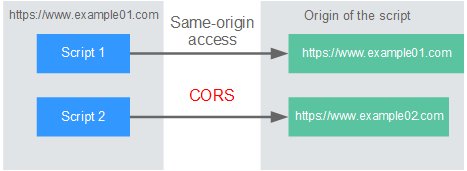
There are two types of CORS requests:
- Simple requests
Simple requests must meet the following conditions:
- The request method is HEAD, GET, or POST.
- The request header contains only the following fields:
- Accept
- Accept-Language
- Content-Language
- Last-Event-ID
- Content-Type (application/x-www-form-urlencoded, multipart/form-data, or text/plain)
In the header of a simple request, browsers automatically add the Origin field to specify the origin (including the protocol, domain, and port) of the request. After receiving such a request, the target server determines whether the request is safe and can be accepted based on the origin. If the server sends a response containing the Access-Control-Allow-Origin field, the server accepts the request.
- Not-so-simple requests
Requests that do not meet the conditions for simple requests are not-so-simple requests.
Before sending a not-so-simple request, browsers send an HTTP preflight request to the target server to confirm whether the origin the web page is loaded from is in the allowed origin list, and to confirm which HTTP request methods and header fields can be used. If the preflight request is successful, browsers send simple requests to the server.
Configuring CORS
CORS is disabled by default. To enable CORS for an API, perform the operations described in this section. To customize request headers, request methods, and origins allowed for cross-origin access, create a CORS plug-in policy by referring to CORS.
- Simple CORS requests
When creating an API, enable CORS in the Security Configuration area of the Create API page. For more information, see Simple Request.
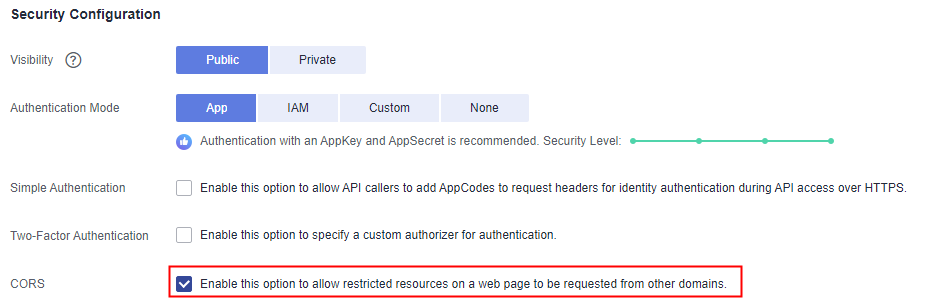
- Not-so-simple CORS requests
Not-so-simple CORS requests can be implemented in either of the following ways:
- Method 1: Create an API that uses the OPTIONS method for preflight. Follow this procedure to define the preflight request API. For details, see Not-So-Simple Request.
- Method 2: Configure a CORS policy and bind it to the API. For details, see CORS.
- In the Frontend Definition area, set the following parameters:
- Method: Select OPTIONS.
- Protocol: The same protocol used by the API with CORS enabled.
- Path: Enter a slash (/).
Figure 2 Defining the API request

- In the Security Configuration area, select None and enable CORS.
- Select the Mock backend type.
Simple Request
When creating an API that will receive simple requests, enable CORS for the API.
Scenario 1: If CORS is enabled and the response from the backend does not contain a CORS header, APIG handles requests from any domain, and returns the Access-Control-Allow-Origin header. For example:
Request sent by a browser and containing the Origin header field:
GET /simple HTTP/1.1Host: www.test.comOrigin: http://www.cors.comContent-Type: application/x-www-form-urlencoded; charset=utf-8Accept: application/jsonDate: Tue, 15 Jan 2019 01:25:52 GMT
Origin: This field is required to specify the origin (http://www.cors.com in this example) of the request. APIG and the backend service determine based on the origin whether the request is safe and can be accepted.
Response sent by the backend service:
HTTP/1.1 200 OKDate: Tue, 15 Jan 2019 01:25:52 GMTContent-Type: application/jsonContent-Length: 16Server: api-gateway{"status":"200"}
Response sent by APIG:
HTTP/1.1 200 OKDate: Tue, 15 Jan 2019 01:25:52 GMTContent-Type: application/jsonContent-Length: 16Server: api-gatewayX-Request-Id: 454d689fa69847610b3ca486458fb08bAccess-Control-Allow-Origin: *{"status":"200"}
Access-Control-Allow-Origin: This field is required. The asterisk (*) means that APIG handles requests sent from any domain.
Scenario 2: If CORS is enabled and the response from the backend contains a CORS header, the header will overwrite that added by APIG. The following messages are used as examples:
Request sent by a browser and containing the Origin header field:
GET /simple HTTP/1.1Host: www.test.comOrigin: http://www.cors.comContent-Type: application/x-www-form-urlencoded; charset=utf-8Accept: application/jsonDate: Tue, 15 Jan 2019 01:25:52 GMT
Origin: This field is required to specify the origin (http://www.cors.com in this example) of the request. APIG and the backend service determine based on the origin whether the request is safe and can be accepted.
Response sent by the backend service:
HTTP/1.1 200 OKDate: Tue, 15 Jan 2019 01:25:52 GMTContent-Type: application/jsonContent-Length: 16Server: api-gatewayAccess-Control-Allow-Origin: http://www.cors.com{"status":"200"}
Access-Control-Allow-Origin: Indicates that the backend service accepts requests sent from http://www.cors.com.
Response sent by APIG:
HTTP/1.1 200 OKDate: Tue, 15 Jan 2019 01:25:52 GMTContent-Type: application/jsonContent-Length: 16Server: api-gatewayX-Request-Id: 454d689fa69847610b3ca486458fb08bAccess-Control-Allow-Origin: http://www.cors.com{"status":"200"}
The CORS header in the backend response overwrites that in APIG's response.
Not-So-Simple Request
When creating an API that will receive not-so-simple requests, enable CORS for the API by following the instructions in Configuring CORS, and create another API that will be accessed using the OPTIONS method.
The request parameters of an API accessed using the OPTIONS method must be set as follows:
- Group: The same group to which the API with CORS enabled belongs.
- Method: Select OPTIONS.
- Protocol: The same protocol used by the API with CORS enabled.
- Path: Enter a slash (/) or select the path that has been set for or matches the API with CORS enabled.
- Security Authentication: Select None. No authentication is required for requests received by the new API no matter which security authentication mode has been selected.
- CORS: Enable this option.
The following are example requests and responses sent to or from a mock backend.
Request sent from a browser to an API that is accessed using the OPTIONS method:
OPTIONS /HTTP/1.1User-Agent: curl/7.29.0Host: localhostAccept: */*Origin: http://www.cors.comAccess-Control-Request-Method: PUTAccess-Control-Request-Headers: X-Sdk-Date
- Origin: This field is required to specify the origin from which the request has been sent.
- Access-Control-Request-Method: This field is required to specify the HTTP methods to be used by the subsequent simple requests.
- Access-Control-Request-Headers: This field is optional and used to specify the additional header fields in the subsequent simple requests.
Response sent by the backend: none
Response sent by APIG:
HTTP/1.1 200 OKDate: Tue, 15 Jan 2019 02:38:48 GMTContent-Type: application/jsonContent-Length: 1036Server: api-gatewayX-Request-Id: c9b8926888c356d6a9581c5c10bb4d11Access-Control-Allow-Origin: *Access-Control-Allow-Headers: X-Stage,X-Sdk-Date,X-Sdk-Nonce,X-Proxy-Signed-Headers,X-Sdk-Content-Sha256,X-Forwarded-For,Authorization,Content-Type,Accept,Accept-Ranges,Cache-Control,RangeAccess-Control-Expose-Headers: X-Request-Id,X-Apig-Latency,X-Apig-Upstream-Latency,X-Apig-RateLimit-Api,X-Apig-RateLimit-User,X-Apig-RateLimit-App,X-Apig-RateLimit-Ip,X-Apig-RateLimit-Api-AllenvAccess-Control-Allow-Methods: GET,POST,PUT,DELETE,HEAD,OPTIONS,PATCHAccess-Control-Max-Age: 172800
- Access-Control-Allow-Origin: This field is required. The asterisk (*) means that APIG handles requests sent from any domain.
- Access-Control-Allow-Headers: This field is required if it is contained in the request. It indicates all header fields that can be used during cross-origin access.
- Access-Control-Expose-Headers: This is the response header fields that can be viewed during cross-region access.
- Access-Control-Allow-Methods: This field is required to specify which HTTP request methods the APIG supports.
- Access-Control-Max-Age: This field is optional and used to specify the length of time (in seconds) during which the preflight result remains valid. No more preflight requests will be sent within the specified period.
Request sent by a browser and containing the Origin header field:
PUT /simple HTTP/1.1Host: www.test.comOrigin: http://www.cors.comContent-Type: application/x-www-form-urlencoded; charset=utf-8Accept: application/jsonDate: Tue, 15 Jan 2019 01:25:52 GMT
Response sent by the backend:
HTTP/1.1 200 OKDate: Tue, 15 Jan 2019 01:25:52 GMTContent-Type: application/jsonContent-Length: 16Server: api-gateway{"status":"200"}
Response sent by APIG:
HTTP/1.1 200 OKDate: Tue, 15 Jan 2019 01:25:52 GMTContent-Type: application/jsonContent-Length: 16Server: api-gatewayX-Request-Id: 454d689fa69847610b3ca486458fb08bAccess-Control-Allow-Origin: *{"status":"200"}