You can manage your security credentials on the My Credentials page.
To access the cloud platform using APIs, obtain security credentials (such as the account name and project ID) on the API Credentials page. On the Access Keys page, you can manage access keys (AK/SK) used for API access.
Procedure
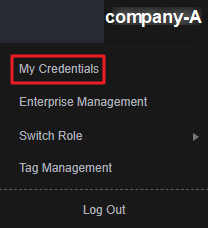
- On the management console, hover over the username in the upper right corner and choose My Credentials from the drop-down list.
Figure 1 Choosing My Credentials
- On the My Credentials console, view your API credentials and access keys.Table 1 Credential information
Parameter
Description
API Credentials
IAM User Name
Username used by an IAM user to log in to the cloud platform.
IAM User ID
ID of the IAM user, which is automatically generated by the cloud platform. The IAM user ID cannot be modified.
Account Name
Automatically created upon successful registration. Resources of different accounts are isolated.
Account ID
ID of the account, which is automatically generated by the cloud platform. The account ID cannot be modified.
Project ID
ID of a project, which is automatically generated by the cloud platform. The project ID cannot be modified.
Projects
Group and isolate resources (including compute, storage, and network resources) across physical regions. A project can be a department or a project group. All your resources are managed by project.
Access Keys
Access key ID/Secret access key (AK/SK) pairs used for API access. You can create a maximum of two access keys.