You can create a parallel file system on OBS Console.
Procedure
- On the console homepage, click Service List in the upper left corner and choose Storage > Object Storage Service.
- In the navigation pane, select Parallel File System.
- In the upper right corner of the page, click Create Parallel File System.
Figure 1 Creating a parallel file system
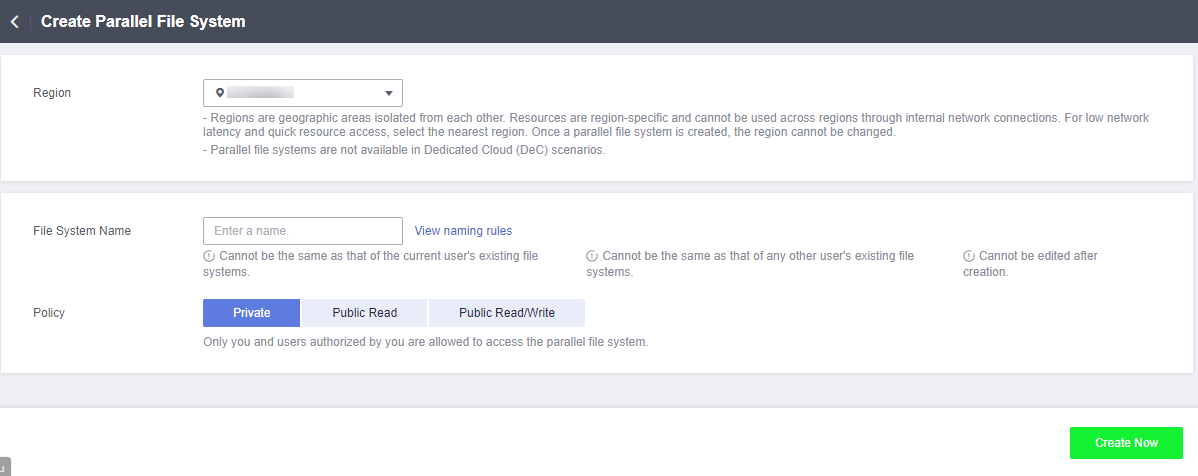
- Select a region and enter a name for the parallel file system.Note
- Once a parallel file system is created, its name cannot be changed.
- URLs do not support uppercase letters and cannot distinguish between names containing uppercase or lowercase letters. For example, if you attempt to access the parallel file system MyFileSystem using a URL, the file system name will be resolved to myfilesystem, causing an access error. For this reason, a parallel file system name can contain only lowercase letters, digits, periods (.), and hyphens (-).
- Configure a data redundancy policy. If you select multi-AZ storage, data will be stored in multiple AZs for a higher reliability.Note
Once a parallel file system is created, you cannot change the data redundancy policy, so take care when selecting at data redundancy policy.
- Configure a policy. You can select Private, Public Read, or Public Read and Write for the parallel file system.
- (Optional) Add tags. Tags are used to identify parallel file systems in OBS, for the purpose of classification. Each tag is represented by one key-value pair. For details about how to add a tag, see the "Tags" section in the Object Storage Service User Guide.
- Confirm the settings at the bottom of the page and click Create Now.
- View the file system you created just now in the parallel file system list.
Then, you can use the parallel file system the same way you use a bucket. For details about how to use PFS, see Using PFS.
Parent topic: Managing Parallel File Systems on OBS Console