Scenarios
To call APIs using a token, add the token to the X-Auth-Token header in API requests.
Note
You can use either of the following authentication methods to call APIs:
- Token authentication: Requests are authenticated using a token.
- AK/SK authentication: Requests are encrypted using an access key ID (AK) and a secret access key (SK).
API Calling Example
- Obtain a token and set it as an environment variable for authenticating the calling of other APIs.
- Obtain a token. An example request is as follows:curl -X POST https:// {iam_endpoint} /v3/auth/tokens -H 'content-type: application/json' -d '{"auth": {"identity": {"methods": ["password"],"password": {"user": {"name": " { user_name} ","domain": {"name": " { user_name} "},"password": " { password} "}}},"scope": {"project": {"id": " {project_id} "}}}}' -vk
Modify the parameters in the preceding command according to the following description. For details, see the API forObtaining a User Token in the Identity and Access Management API Reference.
- Obtain the {iam_endpoint} from Regions and Endpoints.
- Replace {user_name} and {password} respectively with the username and password of the IAM server.
- {project_id}: The project ID. On the management console, hover the mouse pointer over the username in the upper right corner, choose My Credentials from the drop-down list, and then view the project ID on the displayed page.
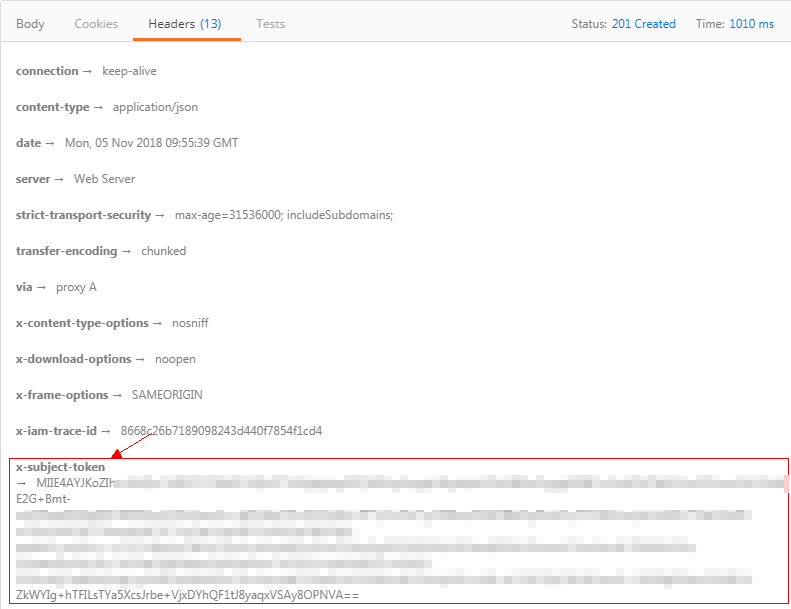
The token value is the X-Subject-Token value in the response header as shown below:
Figure 1 Obtaining the X-Subject-Token response header
- Run the following command to set an environment variable for passing the token:
export Token={X-Subject-Token}
X-Subject-Token is the token obtained in 1.a. Example:
export Token= MIIDkg******BZQMEAgEwg
- Obtain a token. An example request is as follows:
- To call an API, obtain the domain name, request method, and URL by referring to Preparation, add X-Auth-Token to the request header, and set the value of X-Auth-Token to the token obtained in 1. Set the parameters based on the site requirements.curl -X Request_method Domain name+URL -H "x-auth-token: $Token " -vk
Parent topic: Calling APIs Through IAM Authentication