Scenarios
To use Go to call an API through app authentication, obtain the Go SDK, create a new project, and then call the API by referring to the API calling example.
This section uses IntelliJ IDEA 2022.2.1 as an example.
Prerequisites
- You have obtained API calling information. For details, see Preparation.
- You have installed Go 1.14 or a later version. If not, download the Go installation package from the official Go website and install it.
- You have installed IntelliJ IDEA 2022.2.1 or a later version. If not, download the installation package from the official IntelliJ IDEA website and install it.
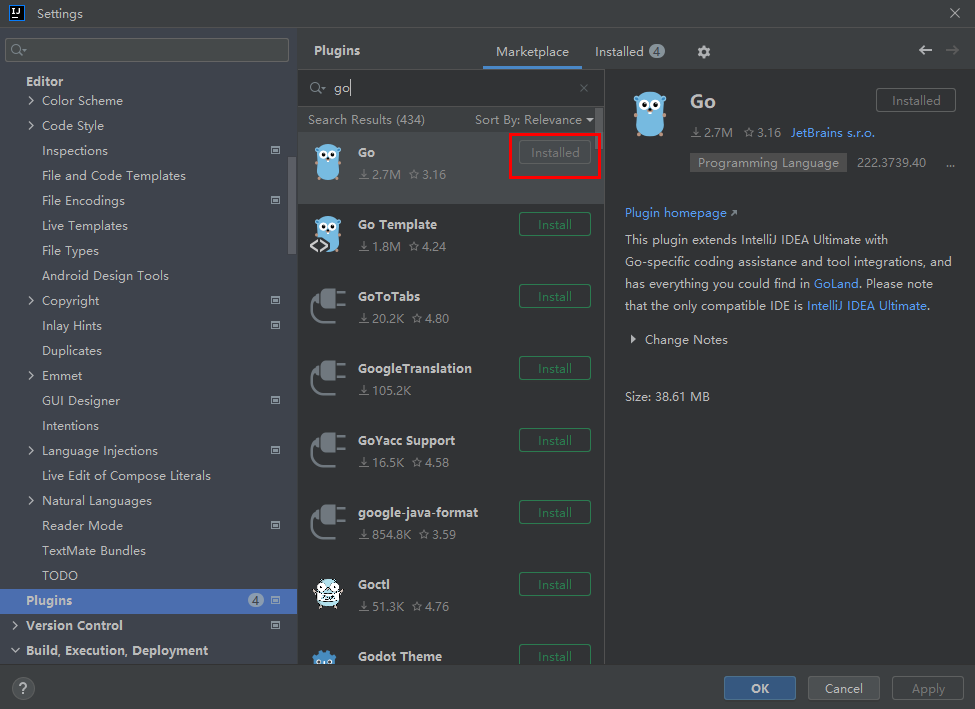
- You have installed the Go plug-in on IntelliJ IDEA. If not, install the Go plug-in according to Figure 1.
Figure 1 Installing the Go plug-in
Obtaining the SDK
Download the SDK and demo. Then obtain the ApiGateway-go-sdk.zip package. The following table shows the files decompressed from the package.
Name | Description |
|---|---|
core\escape.go | SDK code |
core\signer.go | |
demo.go | Sample code |
Creating a Project
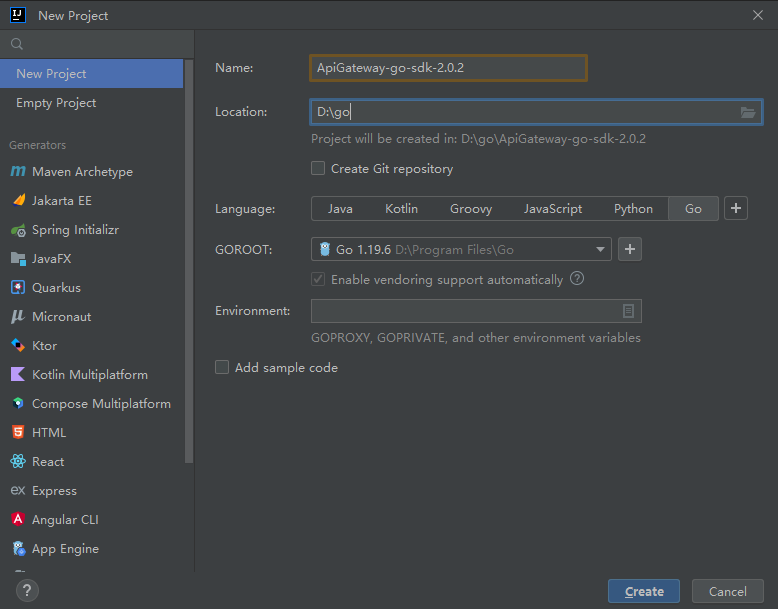
- Start IntelliJ IDEA and choose File > New > Project.
In the displayed New Project dialog box, set Name to the name of the folder in the SDK package, Location to the decompression path of the folder, Language to Go, and click Create.
Figure 2 Go
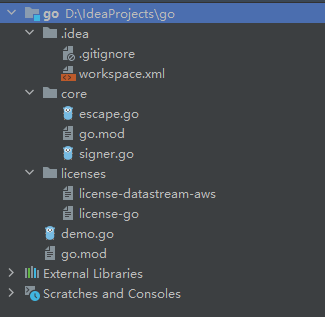
- View the directory structure shown in the following figure.
Figure 3 Directory structure of the new project go
Modify the parameters in sample code demo.go as required. For details about the sample code, see API Calling Example.
API Calling Example
- Import the Go SDK (signer.go) to the project.import "apig-sdk/go/core"
- Generate a new signer and enter the AppKey and AppSecret.
- In this example, the AK and SK stored in the environment variables are used. Specify the environment variables CLOUD_SDK_AK and CLOUD_SDK_SK in the local environment first. The following uses Linux as an example to describe how to set the obtained AK/SK as environment variables.
- Open the terminal and run the following command to open the environment variable configuration file:
vi ~/.bashrc
- Set environment variables, save the file, and exit the editor.export CLOUD_SDK_AK="Obtained AK"export CLOUD_SDK_SK="Obtained SK"
- Run the following command to apply the modification:
source ~/.bashrc
- Open the terminal and run the following command to open the environment variable configuration file:
- Generate a new signer and enter the configured environment variables.s := core.Signer{Key: os.Getenv("CLOUD_SDK_AK"),Secret: os.Getenv("CLOUD_SDK_SK"),}
- In this example, the AK and SK stored in the environment variables are used. Specify the environment variables CLOUD_SDK_AK and CLOUD_SDK_SK in the local environment first. The following uses Linux as an example to describe how to set the obtained AK/SK as environment variables.
- Generate a new request, and specify the domain name, method, request URL, query parameters, and body.r, _ := http.NewRequest("POST", "http://c967a237-cd6c-470e-906f-a8655461897e.apigw.exampleRegion.com/api?a=1&b=2",ioutil.NopCloser(bytes.NewBuffer([]byte("foo=bar"))))
- Add the x-stage header to the request to specify an environment name. Add other headers to be signed as necessary.r.Header.Add("x-stage", "RELEASE")
- Execute the following function to add the X-Sdk-Date and Authorization headers for signing:s.Sign(r)
- Access the API and view the access result.resp, err := http.DefaultClient.Do(r)body, err := ioutil.ReadAll(resp.Body)