Overview
Welcome to MapReduce Service API Reference. MapReduce Service (MRS) provides enterprise-level big data clusters on the cloud. Tenants can fully control the clusters and easily run big data components such as Hadoop, Spark, HBase, Kafka, and Storm in the clusters.
This document describes how to use application programming interfaces (APIs) to perform operations on MRS, such as creating or deleting clusters, adjusting nodes, as well as creating and executing jobs. For details about all supported operations, see API Overview.
If you plan to access MRS through an API, ensure that you are familiar with MRS concepts. For details, see Service Overview in the MapReduce Service User Guide.
MRS 3.x does not support V1.1 APIs. You need to use V2 APIs. If you still need to use V1.1 APIs, obtain them from Out-of-Date APIs.
API Calling
MRS support Representational State Transfer (REST) APIs, allowing you to call APIs using HTTPS. For details about API calling, see Calling APIs.
Endpoints
An endpoint is the request address for calling an API. Endpoints vary depending on services and regions. For the endpoints of all services, see Regions and Endpoints.
Constraints
- For more constraints, see API description.
Concepts
- Account
An account is created upon successful registration. The account has full access permissions for all of its cloud services and resources. It can be used to reset user passwords and grant user permissions. For security purposes, do not directly use the account to perform routine management but create IAM users and grant them permissions for routine management.
- User
An IAM user is created using an account to use cloud services. Each IAM user has its own identity credentials (password and access keys).
API authentication requires information such as the account name, username, and password.
- Region
Regions are geographic areas isolated from each other. Resources are region-specific and cannot be used across regions through internal network connections. For low network latency and quick resource access, select the nearest region.
- AZ
An AZ contains one or more physical data centers. Each AZ has independent cooling, fire extinguishing, moisture-proof, and electricity facilities. Within an AZ, computing, network, storage, and other resources are logically divided into multiple clusters. AZs within a region are interconnected using high-speed optical fibers to support cross-AZ high-availability systems.
- Project
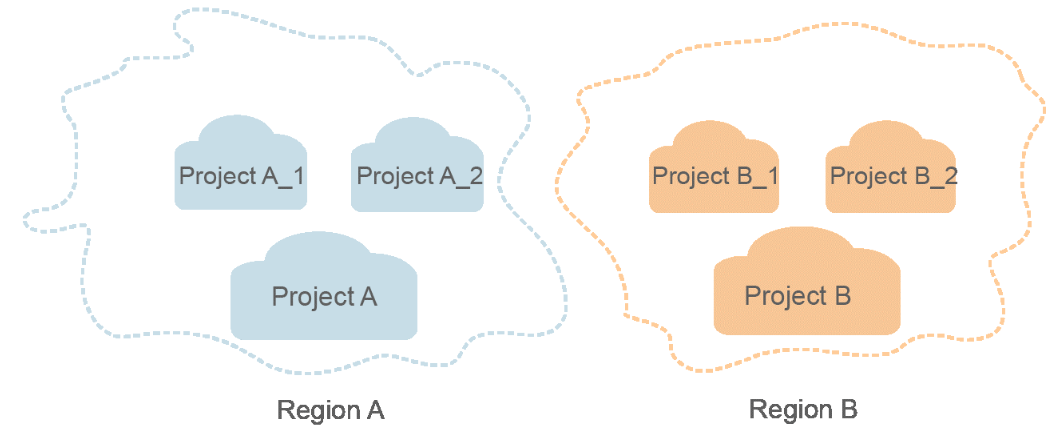
A project corresponds to a region. Projects group and isolate resources (including compute, storage, and network resources) across physical regions. Users can be granted permissions in a default project to access all resources in the region associated with the project. For more refined access control, create sub-projects under a project and create resources in the sub-projects. Users can then be assigned permissions to access only specific resources in the sub-projects.
Figure 1 Project isolation model
- Checkpoint
When an application consumes data, the latest SN of the consumed data is recorded as a checkpoint. When the data is reconsumed, the consumption can be continued based on this checkpoint.
- App
Multiple applications can consume data in the same stream, and their checkpoints are distinguished by App.
Selecting an API Type
Currently, MRS provides two types (V1.1 and V2) of APIs for cloud services with customized specifications. Only part of V2 APIs is available and mainly used for submitting jobs and SQL statements. If the API functions are the same, you are advised to use the V2 APIs first.
Based on the V1.1 APIs, the V2 APIs have the following enhancements:
- Jobs can be submitted in a security cluster.
- The HiveSQL, Spark Python, and Flink jobs are supported.
- The SparkSQL and SparkScript results can be queried.
For details about the APIs and their functions, see API Overview.