Welcome to Enterprise Router API Reference. An enterprise router connects VPCs and on-premises networks to build a central hub network that features high-specification, high-bandwidth, and high-performance. Enterprise routers use Border Gateway Protocol (BGP) to learn, dynamically select, or switch between routes, thereby ensuring the service continuity and significantly improving network scalability and O&M efficiency.
A number of APIs are provided for you to perform operations on enterprise routers, such as creating an enterprise router, attaching an instance to an enterprise router, creating a route table, and adding routes. For details about all supported operations, see API Overview.
API Calling
Enterprise Router supports Representational State Transfer (REST) APIs, and allows you to make API calls over HTTPS.
For details about API calling, see Calling APIs.
Endpoints
An endpoint is the request address for calling an API. Endpoints vary depending on services and regions. For the endpoints of all services, see Regions and Endpoints.
Constraints
The number of enterprise routers that you can create is determined by your quota.
To view or increase the quota, see "Increasing Quotas" in the Enterprise Router User Guide.
For more constraints, see specific API description.
Concepts
- Account
An account is created upon successful signing up. The account has full access permissions for all of its cloud services and resources. It can be used to reset user passwords and grant user permissions. The account is a payment entity, which should not be used directly to perform routine management. To ensure account security, create Identity and Access Management (IAM) users and grant them permissions for routine management.
- User
An IAM user is created by an account in IAM to use cloud services. Each IAM user has its own identity credentials (password and access keys).
API authentication requires information such as the account name, username, and password.
- Region
A region is a geographic area in which cloud resources are deployed. Availability zones (AZs) in the same region can communicate with each other over an intranet, while AZs in different regions are isolated from each other. Deploying cloud resources in different regions can better suit certain user requirements or comply with local laws or regulations.
- AZ
An AZ comprises of one or more physical data centers equipped with independent ventilation, fire, water, and electricity facilities. Computing, network, storage, and other resources in an AZ are logically divided into multiple clusters. AZs within a region are interconnected using high-speed optical fibers to allow you to build cross-AZ high-availability systems.
- Project
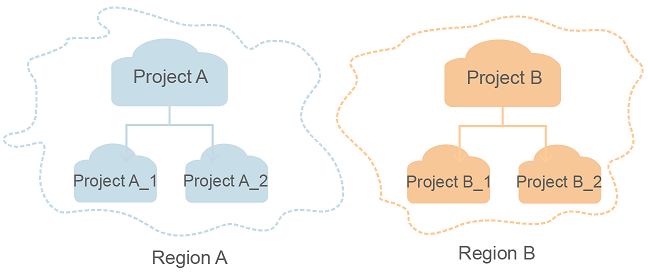
A project corresponds to a region. Default projects are defined to group and physically isolate resources (including computing, storage, and network resources) across regions. Users can be granted permissions in a default project to access all resources under their accounts in the region associated with the project. If you need more refined access control, create subprojects under a default project and create resources in subprojects. Then you can assign users the permissions required to access only the resources in the specific subprojects.
Figure 1 Project isolation model