Сценарий
APIG поддерживает пользовательскую аутентификацию как запросов фронтенда, так и бэкенда.
- Пользовательская аутентификация фронтенда: Если у вас уже есть система аутентификации, вы можете настроить её в функции, а затем создать пользовательского авторизатора, используя функцию для аутентификации запросов API.
- Пользовательская аутентификация бэкенда: Вы можете создать пользовательского авторизатора для аутентификации запросов к различным сервисам бэкенда, устраняя необходимость кастомизации API для разных систем аутентификации и упрощая разработку API. Достаточно создать основанный на функции пользовательский авторизатор в APIG для подключения к системе аутентификации бэкенда.
Пользовательская аутентификация реализуется с помощью FunctionGraph и не поддерживается, если FunctionGraph недоступен в выбранном регионе.
Подробную информацию о пользовательской аутентификации см. в API Gateway Developer Guide.
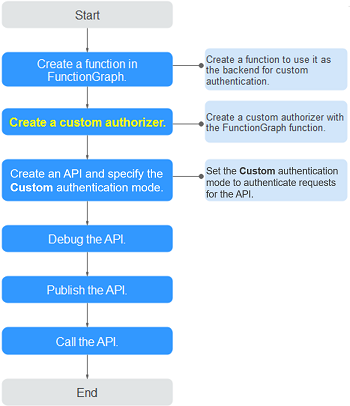
На следующем рисунке показан процесс вызова API через пользовательскую аутентификацию.
Рисунок 1 Вызов API через пользовательскую аутентификацию
Предварительные требования
- Вы создали функцию в FunctionGraph.
- У вас есть разрешение FunctionGraph Administrator.
Процедура
- Войдите в консоль управления.
- Нажмите
 в левом верхнем углу и выберите API Gateway.
 - Выберите API Publishing > Custom Authorizers, и нажмите Create Custom Authorizer.
- Установите параметры, перечисленные в Table 1.Table 1 Параметры для создания пользовательского авторизатора
Параметр
Описание
Имя
Имя авторизатора.
Тип
- Frontend: Аутентифицирует доступ к API.
- Backend: Аутентифицирует доступ к бэкэнд‑сервисам.
Function URN
Выберите функцию FunctionGraph.
Источники идентификации
Параметры запроса для аутентификации. Вы можете добавить заголовки и строки запроса. Имена заголовков не чувствительны к регистру.
Этот параметр обязателен только в том случае, если вы задаёте Type значение Frontend и Max. Cache Age (s) больше 0. При использовании кэша этот параметр используется в качестве критерия поиска для запроса результатов аутентификации.
Max. Cache Age (s)
Время кэширования результатов аутентификации.
Значение 0 означает, что результаты аутентификации не будут кэшироваться. Максимальное значение — 3600.
Send Request Body
Определите, следует ли отправлять тело каждого запроса API в функцию аутентификации. Если включить эту опцию, тело запроса будет отправлено в функцию аутентификации так же, как заголовки и строки запроса.
ПРИМЕЧАНИЕ:Эта опция доступна только для выделенных API gateways.
User Data
Настраиваемые параметры запроса, используемые совместно с Identity Sources при вызове функции APIG.
- Нажмите OK.